Ecler HUB1408 Manual


Læs gratis den danske manual til Ecler HUB1408 (6 sider) i kategorien Ikke kategoriseret. Denne vejledning er vurderet som hjælpsom af 12 personer og har en gennemsnitlig bedømmelse på 4.7 stjerner ud af 6.5 anmeldelser. Har du et spørgsmål om Ecler HUB1408, eller vil du spørge andre brugere om produktet?

Side 1/6
ECLER TECHNICAL DATA SHEET
1/6
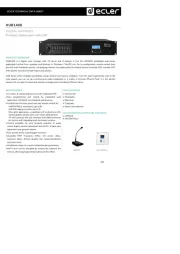
HUB1408
DIGITAL MATRIXES
8 outputs digital zoner with DSP
PRODUCT OVERVIEW
HUB1 is a digital zone manager with inputs and 8 outputs. It has the HANGAR embedded web-server 408 14
application (control from standard web browser in Windows / MacOS, etc.) for its configuration; remote control from
physical wall installation panels, call (paging) stations and applications for mobile devices (Android, iOS). Includes DSP
with specific functions for both inputs and outputs.
HUB Series offers multiple possibilities, being intuitive and easy to configure. From the least experienced user to the
most expert, you can set up a professional audio installation in a matter of minutes (Plug & Play). It is the perfect
solution for any type of sound that requires managing and controlling different zones.
KEY FEATURES
14 inputs, 8 outputs digital zoner with integrated DSP
Easy programming and control by embedded web
application, HANGAR, and standard web browser
Control from the front panel and user remote control by:
- eMCONTROL1 wall panels (up to 8)
- eMPAGE paging consoles (up to 2)
- Ecler pilot application, compatible with Android and iOS:
control graphic panels set to user needs (pilot panels)
- -NET protocol (RS-232 interface with DB9 connector) TP
for control and integrating with third party systems
Control available, by zone (output): selection of audio
source (input), volume adjustment and MUTE, 3 band tone
adjustment and general volume
Four priority levels, ducker/pager functions
Available DSP: frequency shifter, link stereo, delay,
crossover filters, 8-band graphic EQ, compressor/limiter
and much more
Predefined setups for a quick installation (plug and play)
MUTE port can be activated by closing the external dry
contact, affecting programmed outputs to this effect.
APPLICATIONS
• Commercial
• Hospitality
• Education
• Corporate
• Sports and wellness
ACCESSORIES & COMPATIBLE DEVICES
• eMPAGE
eMCONTROL1
eMPAGE
eMCONTROL1


Produkt Specifikationer

Mærke: Ecler
Kategori: Ikke kategoriseret
Model: HUB1408

Har du brug for hjælp?

Hvis du har brug for hjælp til Ecler HUB1408 stil et spørgsmål nedenfor, og andre brugere vil svare dig


Ikke kategoriseret Ecler Manualer
Ecler

Ecler WPaH-AT100 Manual

21 August 2025
Ecler

Ecler MIMO1212SG Manual

21 August 2025
Ecler

Ecler WPaVOL-SR-J Manual

20 August 2025
Ecler

Ecler VEO-XRT44 Manual

18 August 2025
Ecler

Ecler VEO-XRI2L Manual

17 August 2025
Ecler

Ecler VEO-SPS44 Manual

12 August 2025
Ecler

Ecler HUB1408 Manual

16 Juni 2025
Ecler

Ecler PULSO-10 Manual

15 Juni 2025

Ikke kategoriseret Manualer

Nyeste Ikke kategoriseret Manualer

Waterstone

Waterstone 7800 Manual

11 December 2025
Kwikset

Kwikset 258 Manual

11 December 2025
Schlage

Schlage F170 Manual

11 December 2025
Moen

Moen Align 7565EV Manual

11 December 2025
ALNO

ALNO MC10244 Manual

11 December 2025
JET

JET TAK-ZX Manual

11 December 2025
Waterstone

Waterstone 1455 Manual

11 December 2025
Laica

Laica NE2015 Manual

11 December 2025