Furuno FELCOM20 Manual


Læs gratis den danske manual til Furuno FELCOM20 (2 sider) i kategorien Ikke kategoriseret. Denne vejledning er vurderet som hjælpsom af 10 personer og har en gennemsnitlig bedømmelse på 3.5 stjerner ud af 5.5 anmeldelser. Har du et spørgsmål om Furuno FELCOM20, eller vil du spørge andre brugere om produktet?

Side 1/2
INMARSAT-C MES
Model FELCOM20
Operator's Guide
English
This guide provides the basic
operating procedures for this
equipment. For detailed information,
see the Operator’s Manual.
The brand, product names,
trademarks, registered trademarks,
or service marks mentioned in this
document belong to their respective
holders.
Login/Logout
Login
The terminal unit must be “idle” to login. ([IDLE] appears in
[Current Status] on the [Dashboard] screen.
1. Confirm that [SYNC (NCS)] appears in [Frame Sync] on
the [Dashboard] screen.
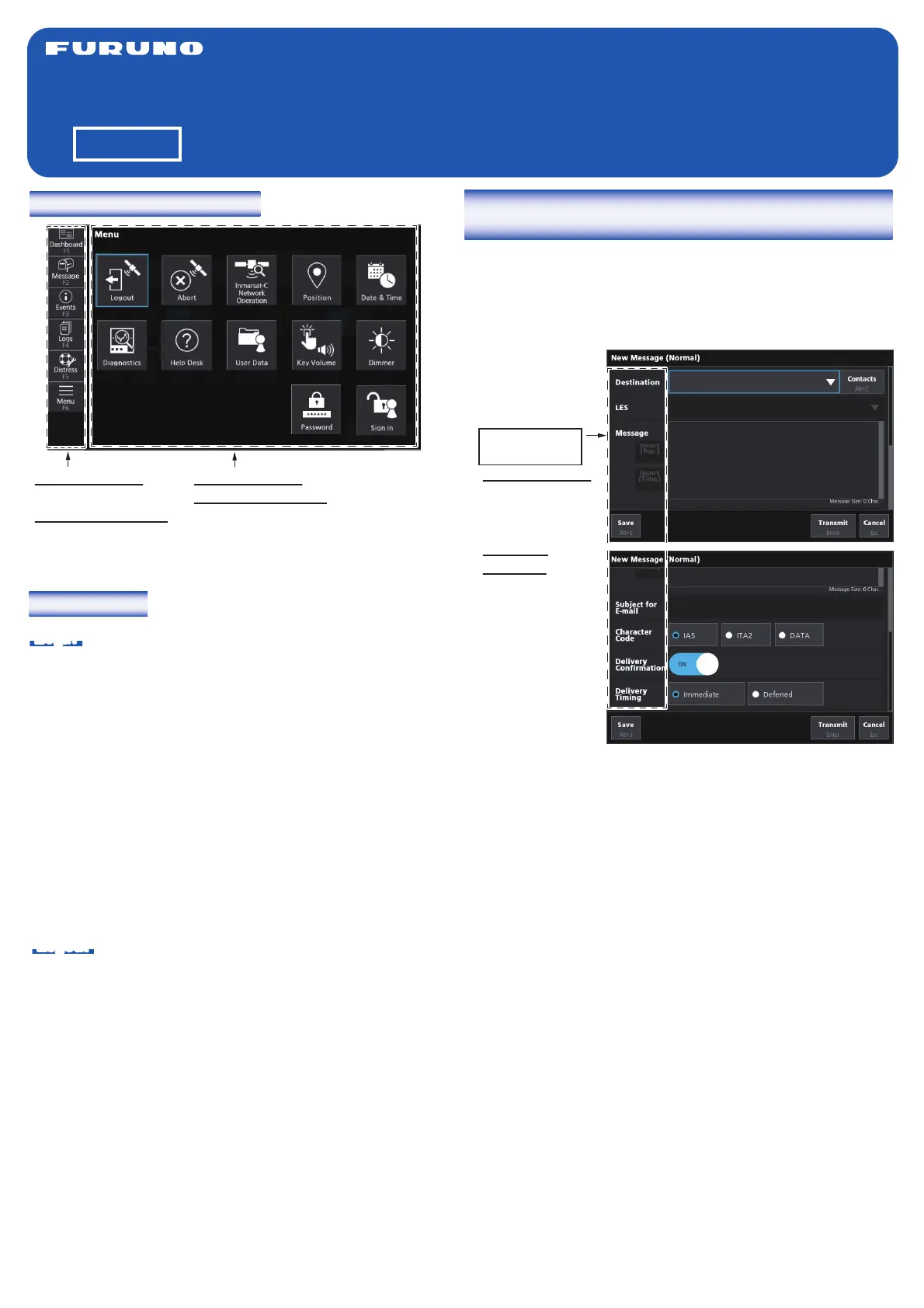
2. Tap [Menu] on the left side of the screen (keyboard: F6
key) to open the [Menu] screen.
3. Tap [Login] (keyboard: select [Login] using the arrow keys
Enter key).
4. The confirmation mesage “Login process starting. Are you
sure?” appears. Tap [OK] (keyboard: Enter key).
When login is completed, the [Current Status] indication on
the [Dashboard] screen changes from [LOGIN] to [IDLE],
and [Successful Login] appears below the [Current Status].
Also, [Login] appears in [Login Status].
Logout
1. Tap [Menu] on the left side of the screen (keyboard: F6
key) to open the [Menu] screen.
2. Tap [Logout] (keyboard: select [Logout] using the arrow
keys Enter key).
3. The confirmation mesage “Logout process starting. Are
you sure?” appears. Tap [OK] (keyboard: Enter key).
When logout is completed, the [Current Status] indication on
the [Dashboard] screen changes from [LOGOUT] to [IDLE].
[Successful Logout] appears below [Current Status], and
[Logout] appears in [Login Status]. Turn off the FELCOM20.
How to send a message to a destination registered
on the Contacts list
1. Tap [Message] on the left side of the screen (keyboard: F2
key) to open the message screen.
2. Tap [New MSG (Normal)] at the bottom of the screen
(keyboard: Alt + N key) to open the [New Message
(Normal)] window.
3. Enter your message in the [Message] area.
4. Tap [Contacts] at the top right corner of the window
(keyboard: Alt + C key) to open the [Contacts List]
window.
5. Tap of [Type] (keyboard: space bar) to open the
[Destination Type] window.
6. Tap the destination type (keyboard: select the destination
type using the arrow keys), then tap [OK] (keyboard:
Enter key).
7. Tap the address(es) to put check mark(s) in the box(es)
(keyboard: select the address(es) using the Tab key
press the space bar to put check mark(s)), then tap
[Select] (keyboard: Enter key).
8. Tap of [LES] (keyboard: space bar) to open the [Select
E-mail/SMS Service LES] or [Select LES] window.
9. Tap the LES (keyboard: select the LES using the arrow
keys), then tap [OK] (keyboard: Enter key).
10. To insert the current position, place the cursor where to
insert the information in [Message], then tap [Insert (Pos.)]
(keyboard: Alt + P key).
11. To insert the current time, place the cursor where to insert
the information in [Message], then tap [Insert (Time)]
(keyboard: Alt + T key).
12. For e-mail, enter the subject in [Subject for E-mail]. For
other communication formats, go to step 13.
13. Tap [IA5] (for e-mail, fax, SMS), [ITA2] (for telex), or
[DATA] as appropriate in [Character Code] (keyboard:
select [IA5], [ITA2], or [DATA] using the arrow keys).
Screen operation overview
Touch operation:
Tap an icon.
Keyboard operation:
Press any key from
F1 to F6.
How to focus/
select an item
Touch operation:
Tap an input field
for the appropri-
ate item.
Keyboard
operation: Press
the Tab key to
focus to the next
item (to below or
right). Press the
Shift + Tab key
to focus to the
previous item (to
above or left).
Touch operation: Tap an icon.
Keyboard operation: Select an
icon using the arrow keys, then
press the Enter key to confirm
the selection.


Produkt Specifikationer

Mærke: Furuno
Kategori: Ikke kategoriseret
Model: FELCOM20

Har du brug for hjælp?

Hvis du har brug for hjælp til Furuno FELCOM20 stil et spørgsmål nedenfor, og andre brugere vil svare dig


Ikke kategoriseret Furuno Manualer
Furuno

Furuno TZTF19F Manual

10 Oktober 2025
Furuno

Furuno FELCOM20 Manual

16 September 2025
Furuno

Furuno GP340 Manual

16 September 2025
Furuno

Furuno FS-1575 Manual

23 Juli 2025
Furuno

Furuno TZTX13X Manual

23 Juli 2025
Furuno

Furuno NX-900 Manual

23 Juli 2025
Furuno

Furuno FM-4800 Manual

23 Juli 2025
Furuno

Furuno MU-152 Manual

23 Juli 2025
Furuno

Furuno GP-39 Manual

23 Juli 2025
Furuno

Furuno FM-8900S Manual

23 Juli 2025

Ikke kategoriseret Manualer

Nyeste Ikke kategoriseret Manualer

Melchioni

Melchioni SIBERIA 85 Manual

8 December 2025
Artrom

Artrom CF-18M Manual

8 December 2025
Klarfit

Klarfit Ease Delux Manual

8 December 2025
Kora

Kora DVB-T2 Manual

8 December 2025
Bosch

Bosch WGB244ASFG Manual

8 December 2025
Atoll

Atoll P50 Manual

8 December 2025
JET

JET SLT-330F Manual

8 December 2025
SkyRC

SkyRC Progbox Manual

8 December 2025
Fostex

Fostex FE206En Manual

8 December 2025