HP 235 Slim Manual


Læs gratis den danske manual til HP 235 Slim (2 sider) i kategorien Ikke kategoriseret. Denne vejledning er vurderet som hjælpsom af 100 personer og har en gennemsnitlig bedømmelse på 4.8 stjerner ud af 50.5 anmeldelser. Har du et spørgsmål om HP 235 Slim, eller vil du spørge andre brugere om produktet?

Side 1/2
ENGLISH
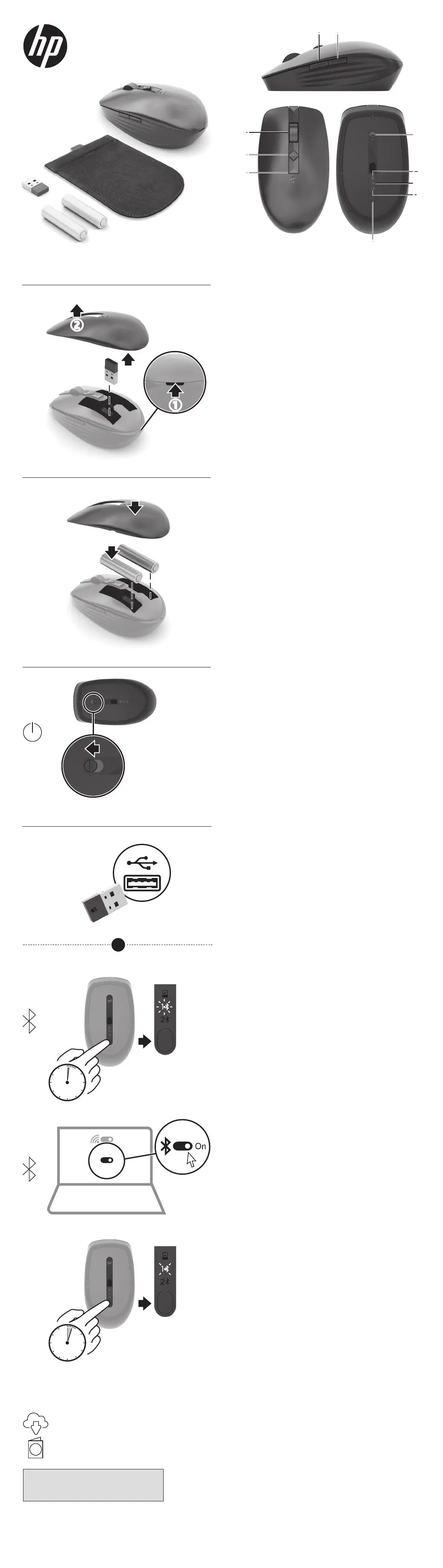
Connect the mouse to one computer using the receiver and
up to two computers via Bluetooth®.
To program the mouse buttons or change the DPI setting
(1200 DPI by default), use the software. If the software
does not download automatically, on your computer, open
Microsoft Store or Apple Store. Search for HP Accessory
Center, and then download the app.
Components description
1
Programmable forward button
By default, press to display the next page in your application
history.
2
Programmable back button
By default, press to display the previous page in your
application history.
3
Programmable scroll wheel
Scrolls the screen up or down. Click to use application-specic
functions, and click and hold to scroll when you move the
mouse up or down. Tilt right or tilt left to use functions
programmed in the app. By default, tilt right to scroll the
screen right and tilt left to scroll the screen left.
4
Hyperscroll button
Press to turn hyperscroll on or o.
5
Battery light
Amber: The mouse batteries need to be replaced.
6
Power switch
Turns the mouse on or off.
7
Receiver light
Quickly blinking white (5 s): The receiver channel is currently
selected and the receiver is not connected to a computer.
Solid white (5 s): The mouse is connected to the computer to
which the receiver is connected.
8
Bluetooth pairing lights
Quickly blinking white (5 s): The illuminated Bluetooth channel
is currently selected. If you attempted to pair the mouse to a
computer, the pairing was not successful.
Solid white (5 s): The mouse is connected to the computer that
is paired to the illuminated Bluetooth channel.
Slowly blinking white (180 s): The illuminated Bluetooth
channel is in pairing mode.
9
Pairing button
Press to switch between channels. Press and hold for 3 s to
enter pairing mode for the selected channel.
ESPAÑOL
Para descargar la Guía del usuario para el emparejamiento de
Bluetooth, vaya a http://www.hp.com/support.
Conecte el mouse a un equipo utilizando el receptor y hasta
dos equipos mediante Bluetooth.
Para programar los botones del mouse o cambiar la
conguración de ppp (1200 ppp de forma predeterminada),
utilice el software. Si el software no se descarga de forma
automática en su equipo, abra la Tienda Microsoft o la
Apple Store. Busque HP Accessory Center y luego descargue
la aplicación.
Descripción de los componentes
1
Botón de avance programable
De modo predeterminado, al presionarlo muestra la página
siguiente en el historial de su aplicación.
2
Botón de retroceso programable
De modo predeterminado, al presionarlo muestra la página
anterior en el historial de su aplicación.
3
Rueda de desplazamiento programable
Se desplaza en la pantalla hacia arriba o hacia abajo. Haga
clic para usar funciones especícas de la aplicación y haga clic
y mantenga presionado para desplazarse cuando mueva el
mouse hacia arriba o hacia abajo. Incline hacia la derecha o
hacia la izquierda para usar las funciones programadas en la
aplicación. De forma predeterminada, incline hacia la derecha
para desplazarse hacia la derecha en la pantalla e incline hacia
la izquierda para desplazarse hacia la izquierda.
4
Botón de hiperdesplazamiento
Presione para activar o desactivar el hiperdesplazamiento.
5
Indicador luminoso de la batería
Ámbar: es necesario sustituir las baterías del mouse.
6
Interruptor de encendido/apagado
Activa o desactiva el mouse.
7
Indicador luminoso del receptor
Parpadeo rápido en blanco (5 s): el canal receptor está
seleccionado actualmente y el receptor no está conectado a
un equipo.
Blanco jo (5 s): el mouse está conectado al equipo al que está
conectado el receptor.
8
Indicadores luminosos de emparejamiento de Bluetooth
Parpadeo rápido en blanco (5 s): el canal Bluetooth iluminado
está seleccionado actualmente. Si intentó emparejar el mouse
con un equipo, el emparejamiento no se realizó correctamente.
Blanco jo (5 s): el mouse está conectado al equipo que está
emparejado con el canal Bluetooth iluminado.
Blanco intermitente lento (180 s): el canal Bluetooth
iluminado está en modo de emparejamiento.
9
Botón de emparejamiento
Presione para alternar entre los canales. Presione y sostenga
durante 3 s para entrar en el modo de emparejamiento con el
canal seleccionado.
1 2
5
8
4
3
6
8
7
9
*M17588-001*
M17588-001
PRINTER: Replace this box with Printed- In (PI) Statement(s)
as per spec.
NOTE: This box is simply a placeholder. PI Statement(s) do not
have to t inside the box but should be placed in this area.
4
2
3
1
On
On
B
A
C
To download the Bluetooth Pairing User Guide,
go to http://www.hp.com/support.
D
www.hp.com/support
i
1s
3s
1
3
2
1
2
OR


Produkt Specifikationer

Mærke: HP
Kategori: Ikke kategoriseret
Model: 235 Slim

Har du brug for hjælp?

Hvis du har brug for hjælp til HP 235 Slim stil et spørgsmål nedenfor, og andre brugere vil svare dig


Ikke kategoriseret HP Manualer

HP

HP Z6 G5 Manual

13 November 2025
HP

HP Smart Tank 5108 Manual

6 Oktober 2025
HP

HP Jetdirect 2700w Manual

16 September 2025
HP

HP Pro 3410 Manual

10 September 2025
HP

HP Pro 1005 Manual

10 September 2025
HP

HP Pro Tower 480 G9 Manual

10 September 2025
HP

HP Pro 3400 Manual

10 September 2025

Ikke kategoriseret Manualer

Nyeste Ikke kategoriseret Manualer