Insignia NS-HZ340 Manual

Læs gratis den danske manual til Insignia NS-HZ340 (2 sider) i kategorien Kabler til computere og periferiudstyr. Denne vejledning er vurderet som hjælpsom af 24 personer og har en gennemsnitlig bedømmelse på 4.9 stjerner ud af 12.5 anmeldelser. Har du et spørgsmål om Insignia NS-HZ340, eller vil du spørge andre brugere om produktet?

Side 1/2
Before using your new product, please read these instructions to prevent any damage.
PACKAGE CONTENTS
HDMI Audio Extractor
RCA-to-3.5 mm adapter
6 ft. (1.8 m) Micro USB power supply
Quick Setup Guide
FEATURES
3.5 mm stereo and optical outputs pass audio to your audio device
HDMI input/output passes video without degradation and supports up to 4K@60Hz,
HDR signals
Audio mode selector switch allows for 2-channel analog or up to 5.1 channel digital
output for maximum compatibility
RCA-to-3.5 mm adapter provides additional audio connection options
Note: HDMI ARC is not supported.
HDMI AUDIO EXTRACTOR BASICS
Your audio extractor sends sound to a separate audio device (such as speakers or a
soundbar) without impacting your HDMI video quality. This lets you play audio through
a dierent playback device than your video and is useful when your video playback
device cannot play audio.
Mode Switch:
2CH (2.0 Stereo): A 2-channel stereo audio signal is extracted from your source
device and played through both the AUDIO OUT and OPTICAL OUT jacks. This mode
maximizes compatibility for headphones, stereo systems, or other stereo playback
devices.
5.1CH (5.1 Surround Sound): Up to a 5.1 channel surround sound signal is extracted
from your source device and played through the OPTICAL OUT jack. This mode is
best for connecting to a soundbar, receiver, or other playback device that is
compatible with surround sound signals.
Note: An audio signal that matches the audio mode (2CH or 5.1CH) is also sent through the
HDMI OUT port. Advanced 7.1 surround sound and uncompressed audio cannot be sent
through the HDMI OUT port. For best sound quality, do not use your audio extractor to send
HDMI audio to a surround sound receiver or similar playback device.
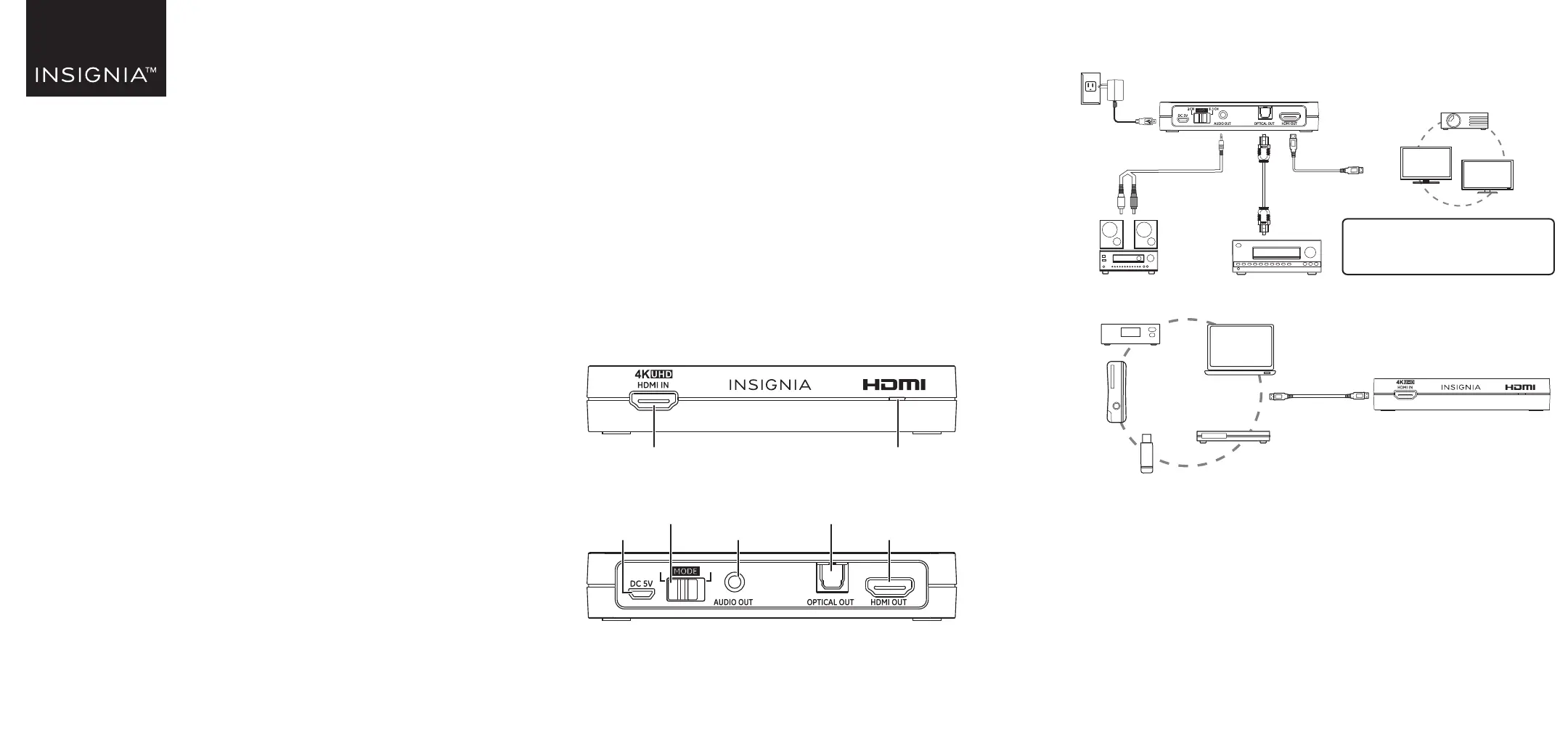
Front
Back
QUICK SETUP GUIDE
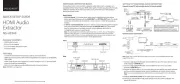
HDMI Audio
Extractor
NS-HZ340
HDMI IN
5.1CH2CH
HDMI OUT
OPTICAL OUT
AUDIO OUTDC 5V
Audio mode
switch
Front view
DVD/Blu-ray
player
Power LED
Note: For best performance, connect your audio extractor
directly to your TV. If the extractor is used before
connecting to a soundbar or home theater receiver, the
audio will be limited to 2.0 stereo or 5.1 surround sound.
4K
HDTV
Back view
3.5 mm-RCA
adapter cable
Home
theater
system
Stereo
AC
adapter
Optical
cable
OR
Monitor
Projector
PC
HD STB
Game
console
Streaming
device
SETTING UP YOUR HDMI AUDIO EXTRACTOR
Connect to your TV and an audio device (3.5 mm or optical)
Connect to your source device
Note: If you want to watch 4K content, make sure that your source and display devices both
support 4K content.
1 Connect a high-speed HDMI cable (not included) from your HD source device to your
audio extractors HDMI IN port.
2 Connect a high-speed HDMI cable (not included) from your TV to your audio
extractor’s HDMI OUT port.
3 Connect an optical cable or 3.5 mm audio cable (not included) to your audio extractor
and to your audio playback device, such as headphones or a home theater system.
Note: To connect to playback devices with RCA jacks, use the included 3.5 mm-to-RCA adapter
cable.
4 Slide the audio mode switch to the audio output format you want.
5 Connect the included Micro USB power adapter to the DC 5V Micro USB jack. The
power LED turns on.
HDMI
cable
HDMI
cable
NS-HZ340_23-0086_QSG_V3_EN_Final.ai 1 3/16/2023 8:32:18 AM


Produkt Specifikationer

Mærke: Insignia
Kategori: Kabler til computere og periferiudstyr
Model: NS-HZ340

Har du brug for hjælp?

Hvis du har brug for hjælp til Insignia NS-HZ340 stil et spørgsmål nedenfor, og andre brugere vil svare dig


Kabler til computere og periferiudstyr Insignia Manualer
Insignia

Insignia NS-HZ330 Manual

1 Oktober 2025
Insignia

Insignia NS-HZ340 Manual

30 September 2025
Insignia

Insignia NS-HZ331 Manual

29 September 2025

Kabler til computere og periferiudstyr Manualer

Nyeste Kabler til computere og periferiudstyr Manualer

Legrand

Legrand C100 Manual

15 December 2025
Legrand

Legrand C210 Manual

10 December 2025
Legrand

Legrand C910 Manual

10 December 2025
Elbe

Elbe CA-1105-MICRO Manual

29 November 2025
Qoltec

Qoltec 50438 Manual

13 November 2025
Qoltec

Qoltec 53906 Manual

11 November 2025
gofanco

gofanco HDBaseT-HD20 Manual

6 November 2025
Vantec

Vantec CB-ISA225-U3 Manual

3 November 2025
Hosa

Hosa Edge CMK-010AU Manual

3 November 2025
gofanco

gofanco HDbitT8Pv2 Manual

3 November 2025