Insignia NS-PH3A4AP Manual

Insignia USB HUB NS-PH3A4AP

Læs gratis den danske manual til Insignia NS-PH3A4AP (2 sider) i kategorien USB HUB. Denne vejledning er vurderet som hjælpsom af 11 personer og har en gennemsnitlig bedømmelse på 4.9 stjerner ud af 6 anmeldelser. Har du et spørgsmål om Insignia NS-PH3A4AP, eller vil du spørge andre brugere om produktet?
Side 1/2
PACKAGE CONTENTS
USB 3.0 4-Port Hub
• AC adapter 5V/4A
• USB cable
Quick Setup Guide
FEATURES
Backwards compatible with previous-generation USB
revisions
Adds expansion ports with supplemental power to
your computer
Four USB 3.0 extended ports
LED power indicator light
SYSTEM REQUIREMENTS
Computer with a USB 2.0 or 3.0 port
Note: USB 3.0 is compatible with USB 2.0, however data
transfer speed will be limited to the 2.0 level.
Windows 10, macOS, and Chrome OS
Blue LED power indicator
Supports hot-swappable and Plug & Play capability
Supports over-current protection at USB host port
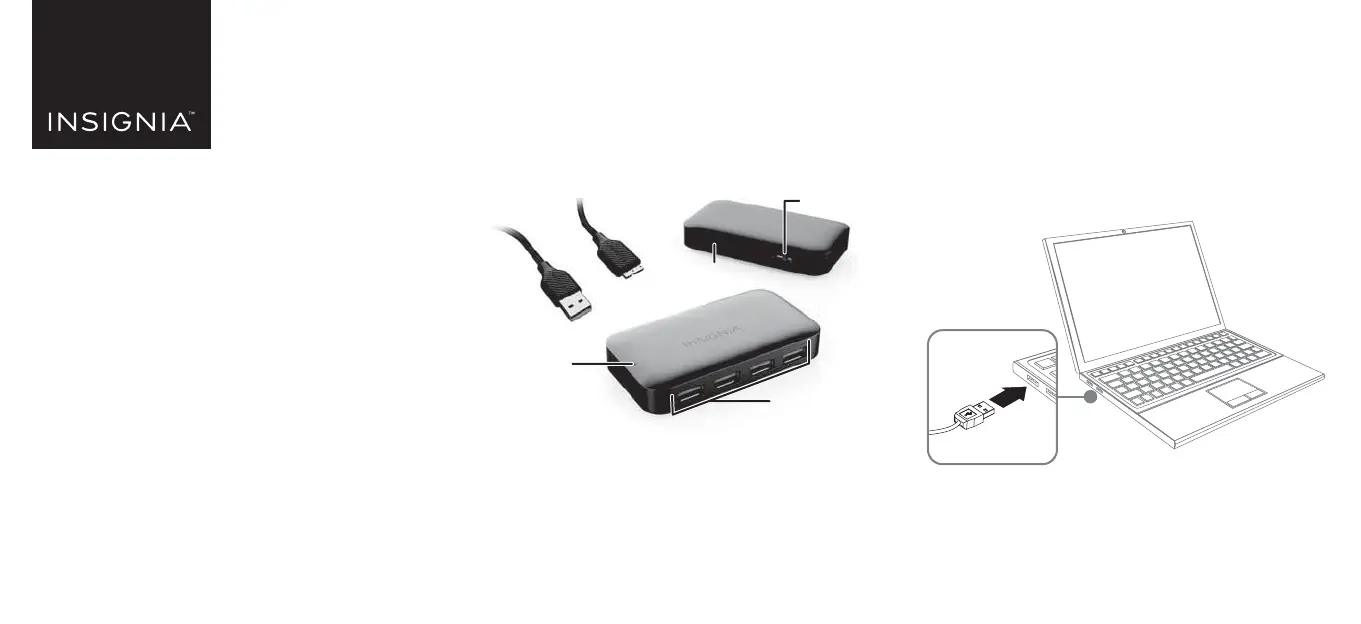
Upstream port
(to computer)
DC jack
LED
Downstream ports
(to devices)
Before using your new product, please read these instructions to prevent any damage.
INSTALLING YOUR HUB
Note: When you connect your hub to a computer, the
computer detects your hub and automatically installs the
driver.
1 Connect the smaller end of the USB cable to the
upstream port on the rear of the hub, then connect
the larger end of the USB cable to an open USB port
on your computer.
QUICK SETUP GUIDE
USB 3.0 4 Port
Powered Hub
NS-PH3A4AP / NS-PH3A4AP-C
NS-PH3A4AP_-C_21-0153_QSG_V1_EN_Final.ai 1 5/26/2021 2:19:07 PM


Produkt Specifikationer

Mærke: Insignia
Kategori: USB HUB
Model: NS-PH3A4AP

Har du brug for hjælp?

Hvis du har brug for hjælp til Insignia NS-PH3A4AP stil et spørgsmål nedenfor, og andre brugere vil svare dig