J5 Create JUE303 Manual


Læs gratis den danske manual til J5 Create JUE303 (2 sider) i kategorien Netværkskort/adapter. Denne vejledning er vurderet som hjælpsom af 31 personer og har en gennemsnitlig bedømmelse på 3.6 stjerner ud af 16 anmeldelser. Har du et spørgsmål om J5 Create JUE303, eller vil du spørge andre brugere om produktet?
Side 1/2
Windows
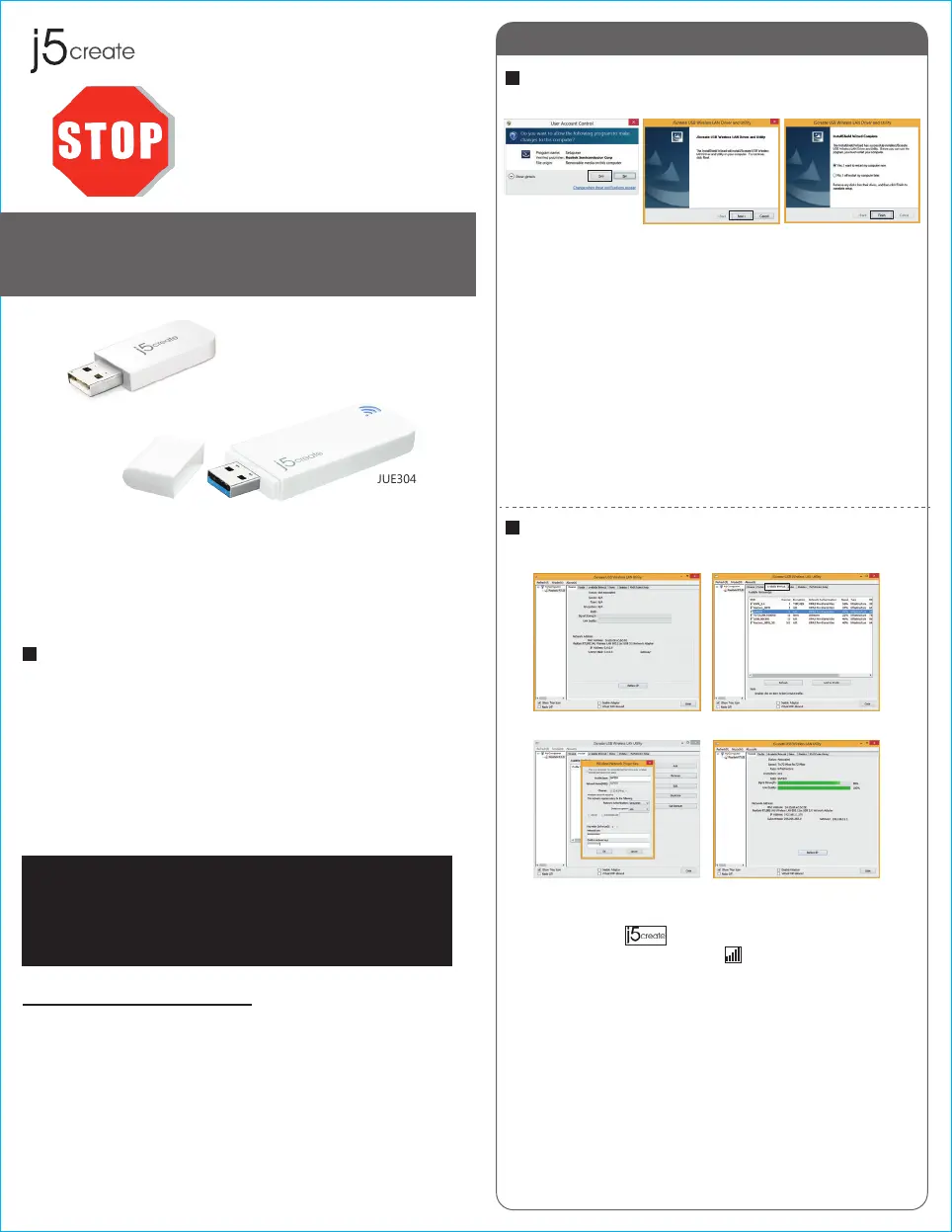
Driver Installation
Connecting to a Wireless Network
Step 1 Step 2.3 Step 4
Thank you for purchasing the j5create Wireless AC USB
Adapter. The j5create Wireless AC USB Adapter can easily
upgrade your desktop/laptop to receive a wireless Internet
connection. Once connected, access your high-speed Internet
connection while sharing photos, files, music, videos, printers
and storage. Get a better Internet experience with a faster
wireless connection so you can enjoy smoother digital phone
calls, gaming, downloading and video streaming.
● Microsoft Windows 8.1 / 8 / 7 / Vista / XP
(32-bit or 64-bit)
● Mac OSX v10.6~v10.10
● Linux OS
● Available USB port
Do Not plug in the j5create
Wireless AC USB Adapter
until the driver is completely
installed on your computer.
JUE303 / JUE304
JUE303
JUE304
Wireless AC USB Adapter
Step 1 Step 2
Step 3 Step 4
STOP!
If you have any problems with this product please contact
our technical support team before returning it to the store.
TECHNICAL SUPPORT
Customer Service:
888-988-0488
Technical Support:
888-689-4088
Email:
service@j5create.com
Live Chat:
www.j5create.com/livechat
Support Ticket:
tickets.j5create.com
Introduction
System Requirements
1
2015Feb-V1
Step 1
Insert the installation CD into your CDROM. The Windows
7/8 User Account Control dialog is shown. Click Yes to
continue.
Step 2
The Preparing Setup dialog is shown.
Step 3
The wizard is ready to install the driver and the utility. Click
Next to begin the installation.
Step 4
Click Finish, then restart your computer to complete the
installation process
Step 1
Plug the Wireless AC USB Adapter into a USB port.
Double-click the icon on your desktop to start the
Wireless AC Network Utility or in the task bar.
Step 2
Click the Available Network button to scan for available
access points.
Step 3
Double-click on the service set identifier (SSID) of the
network that you are going to connect to. Enter the
Network Key (password) and press OK.
Step 4
Your wireless network is ready for use.


Produkt Specifikationer

Mærke: J5 Create
Kategori: Netværkskort/adapter
Model: JUE303

Har du brug for hjælp?

Hvis du har brug for hjælp til J5 Create JUE303 stil et spørgsmål nedenfor, og andre brugere vil svare dig


Netværkskort/adapter J5 Create Manualer

J5 Create

J5 Create JUA350 Manual

30 August 2024
J5 Create

J5 Create JCA153 Manual

30 August 2024
J5 Create

J5 Create JUA254 Manual

30 August 2024
J5 Create

J5 Create JUA214 Manual

30 August 2024
J5 Create

J5 Create JUE301 Manual

30 August 2024
J5 Create

J5 Create JCA111 Manual

30 August 2024
J5 Create

J5 Create JUE303 Manual

30 August 2024
J5 Create

J5 Create JCH471 Manual

30 August 2024

Netværkskort/adapter Manualer

Nyeste Netværkskort/adapter Manualer

Approx

Approx APPUSB900 Manual

29 November 2025
D-Link

D-Link DWA-548 Manual

29 November 2025
EXSYS

EXSYS EX-62026POE Manual

28 November 2025
Digitus

Digitus DA-70852 Manual

28 November 2025
EXSYS

EXSYS EX-62010POE-SFP Manual

28 November 2025
D-Link

D-Link DWA-140 Manual

27 November 2025
D-Link

D-Link DUB-E135 Manual

27 November 2025
D-Link

D-Link DUB-E255 Manual

26 November 2025
Digitus

Digitus DA-70856 Manual

26 November 2025