COVER
File name: 210378300C_Rugged_SSD4_70mmX100mm_WW_QIG
Make from: 210378300B_Rugged_SSD4_70mmX100mm_WW_QIG
Folded size: 70 mm W X 100 mm H Trim size: 420 mm W X 100 mm H
Code name: OVO+
Colors: 1C/1C PANTONE 2758 C
Artwork change:
Adobe CC Pro/ China + Taiwan RoHS tables update Round: Final hires print 07-17-25
EN
WWW.SEAGATE.COM/LACIE
Note:
To protect your data, always follow the
safe removal procedures for your operating
system when disconnecting your product.
Review details of your Rugged
®
SSD4’s
warranty by opening the Seagate Limited
Warranty Statement on your drive or go to
www.seagate.com/warranty. To request warranty
service, contact an authorized Seagate service
center or refer to www.seagate.com/support/
rugged-ssd4 for more information regarding
customer support within your jurisdiction.
FCC DECLARATION OF CONFORMANCE
This device complies with Part 15 of the FCC
Rules. Operation is subject to the following
two conditions: (1) this device may not cause
harmful interference, and (2) this device must
accept any interference received, including
interference that may cause undesired operation.
CLASS B
This equipment has been tested and found to
comply with the limits for a Class B digital device,
pursuant to Part 15 of the FCC Rules. These limits
are designed to provide reasonable protection
against harmful interference in residential
installation. This equipment generates, uses,
and can radiate radio frequency energy and, if
not installed and used in accordance with the
instructions, may cause harmful interference to
radio communications.
However, there is no guarantee that interference
will not occur in a particular installation. If this
equipment does cause harmful interference
to radio or television reception, which can be
determined by turning the equipment off and
on, the user is encouraged to try to correct the
interference by one or more of the following
measures:
• Reorient or relocate the receiving antenna.
• Increase the separation between the
equipment and receiver.
• Connect the equipment into an outlet on
a circuit different from that to which the
receiver is connected.
• Consult the dealer or an experienced radio/
TV technician for help.
CAUTION: Any changes or modifications made
to this equipment may void the user’s authority
to operate this equipment.
For GPSR (EU) 2023/988 safety concerns,
contact us at: www.seagate.com/legal/
eu-gpsr-contact-us
For Australian Customers Only.
Our goods come with guarantees that cannot
be excluded under the Australian Consumer
Law. You are entitled to a replacement or refund
for a major failure and for compensation
for any other reasonably foreseeable loss or
damage. You are also entitled to have the
goods repaired or replaced if the goods fail to
be of acceptable quality and the failure does
not amount to a major failure.
Revision - July 1, 2020
Disposal of waste equipment
by users in private households
in the European Union
This symbol on the product or in
its packaging indicates that this product must
not be disposed of with your other household
waste. Instead, it is your responsibility to dispose
of your waste equipment by handing it over
to a designated collection point for recycling
of waste electrical and electronic equipment.
The separate collection and recycling of your
waste equipment at the time of disposal will
help to conserve natural resources and ensure
that it is recycled in a manner that protects
human health and the environment. For more
information about where you can drop off your
waste equipment for recycling, contact your
local city office, your household waste disposal
service, or the shop where you purchased
the product.
FR
WWW.SEAGATE.COM/LACIE
REMARQUE : Pour protéger vos données,
suivez toujours les procédures de retrait
sécurisé correspondant à votre système
d’exploitation lors de la déconnexion
du produit.
Pour connaître les conditions de garantie de
votre Rugged
®
SSD4, ouvrez la déclaration
de garantie limitée Seagate sur votre disque
ou consultez la page www.seagate.com/
warranty. Pour toute demande d’intervention
sous garantie, contactez un centre de réparation
agréé Seagate clientèle ou consultez le site
www.seagate.com/support/rugged-ssd4 pour
obtenir de plus amples informations sur
le support clientèle dont vous dépendez.
Pour toute question relative à la sécurité
entrant dans le cadre du Règlement général
de sécurité des produits (EU) 2023/988,
contactez-nous à l’adresse suivante:
www.seagate.com/legal/eu-gpsr-
contact-us
IT
WWW.SEAGATE.COM/LACIE
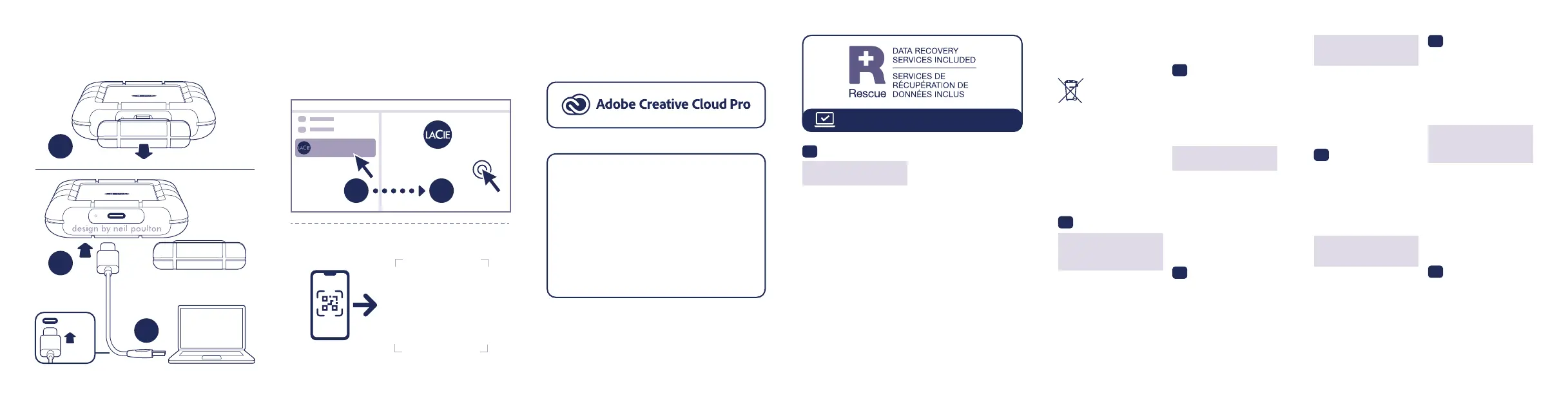
1 Collegamento
2 Avvio
3 Riscatto
Mac: questa unità è pre-formattata exFAT
per l’utilizzo sia su PC che Mac. Per Time
Machine è necessario riformattarla per Mac. La
riformattazione comporterà la cancellazione di
tutti i dati precedentemente salvati sull’unità.
www.seagate.com/time-machine
NOTA: per proteggere i dati, disconnettere
sempre il dispositivo applicando la procedura
di rimozione sicura dell’hardware.
Controllare i dettagli della garanzia del vostro
Rugged
®
SSD4 aprendo la Garanzia Limitata di
Seagate Informativa presente sulla vostra unità
o su www.seagate.com/warranty. Per richiedere
un servizio coperto da garanzia contattare un
centro di assistenza autorizzato Seagate o fare
riferimento a www.seagate.com/support/rugged-
ssd4 per maggiori informazioni in merito
all’assistenza clienti presente nel vostro territorio.
Per problemi di sicurezza in base alla
normativa GPSR (EU) 2023/988, contattare
Seagate all’indirizzo www.seagate.com/
legal/eu-gpsr-contact-us
DE
WWW.SEAGATE.COM/LACIE
1 Verbinden
2 Starten
3 Einlösen
Mac: Dieses Laufwerk ist mit exFAT vorformatiert
und kann mit PC und Mac verwendet werden.
Zur Verwendung von Time Machine muss es
für den Mac neu formatiert werden. Bei der
Neuformatierung gehen alle gespeicherten
Daten verloren.
www.seagate.com/time-machine
HINWEIS: Befolgen Sie immer die
Anweisungen Ihres Betriebssystems zum
sicheren Entfernen der Festplatte, um die
Integrität Ihrer Daten zu gewährleisten.
Einzelheiten zur Garantie für Ihre Rugged
®
SSD4
finden Sie in der Seagate Garantieerklärung
zu Ihrer Festplatte oder auf www.seagate.com/
warranty. Im Garantiefall wenden Sie sich
bitte an ein autorisiertes Seagate Servicecenter
oder besuchen Sie www.seagate.com/support/
rugged-ssd4, wo Sie weitere Informationen über
den Kundensupport in Ihrer Region erhalten.
Bei Sicherheitsfragen zur GPSR (EU) 2023/988
wenden Sie sich bitte an www.seagate.com/
legal/eu-gpsr-contact-us
ES
WWW.SEAGATE.COM/LACIE
1 Conectar
2 Lanzar
3 Canjear
Mac: Esta unidad está preformateada en
formato exFAT para usarse tanto con PC como
con Mac. Para poder utilizar Time Machine, la
unidad debe volver a formatearse para Mac. Al
volver a formatear se eliminarán todos los datos
almacenados previamente en la unidad.
www.seagate.com/time-machine
NOTA: Para proteger sus datos, asegúrese
de seguir los procedimientos de extracción
segura de su sistema operativo siempre que
desconecte el producto.
Revise los detalles de la garantía de su Rugged
®
SSD4 abriendo la declaración de garantía
limitada de Seagate que se encuentra en su
unidad o visite www.seagate.com/warranty.
Para solicitar servicio técnico bajo la garantía,
póngase en contacto con un centro de servicio
autorizado de Seagate o visite www.seagate.
com/support/rugged-ssd4 si desea obtener más
información sobre el servicio técnico en su territorio.
Para cuestiones de seguridad relacionadas con
el RGPD (UE) 2023/988, póngase en contacto
con nosotros en: www.seagate.com/legal/
eu-gpsr-contact-us
NL
WWW.SEAGATE.COM/LACIE
1 Aansluiten
2 Starten
3 Verzilveren
Mac: Deze schijf is gepreformatteerd in exFAT
om te gebruiken met zowel pc als Mac. Voor
Time Machine moet de schijf geformatteerd
zijn voor Mac. Opnieuw formatteren zal alle
gegevens verwijderen die eerder op de schijf
waren opgeslagen.
www.seagate.com/time-machine
OPMERKING: Volg ter bescherming van
uw gegevens altijd de procedures van uw
besturingssysteem voor het veilig verwijderen
van hardware als u het product wilt
loskoppelen.
Meer informatie over de garantie op uw
Rugged
®
SSD4 vindt u door de Seagate Limited
Garantieverklaring te openen op uw schijf of
door naar www.seagate.com/warranty te gaan.
Om de garantieservice aan te vragen, kunt u
contact opnemen met een erkend Seagate-
servicecentrum of ga naar www.seagate.com/
support/rugged-ssd4 voor meer informatie
over klantenservice in uw regio.
Neem voor vragen over veiligheidsoverwegingen
met betrekking tot de Verordening algemene
productveiligheid (EU) 2023/988 contact met
ons op via: www.seagate.com/legal/
eu-gpsr-contact-us
PL
WWW.SEAGATE.COM/LACIE
1 Połącz
2 Uruchom
3 Zrealizuj
Mac: Dysk jest wstępnie sformatowany w
systemie plików exFAT do użytku z komputerami
PC i Mac. W razie pracy z Time Machine
dysk musi być sformatowany w systemie
kompatybilnym z Mac. Sformatowanie
spowoduje usunięcie wszystkich danych
zapisanych wcześniej na dysku.
www.seagate.com/time-machine
3 Redeem
3 Bénéficiez de l’offre
www.seagate.com/time-machine
Mac: This drive is preformatted exFAT for use with
both PC and Mac. For Time Machine, it must be
reformatted for Mac. Reformatting will delete all
data previously stored on the drive.
Mac : Ce disque est préformaté en exFAT de
manière à fonctionner sur PC et Mac. Pour Time
Machine, le disque doit être reformaté pour Mac.
Lors du reformatage, toutes les données stockées
au préalable sur le disque seront effacées.
1 Connect
1 Connectez
2 Launch
2 Lancez
www.seagate.com/rescue
USB-C
A
B
C
LaCie
Start_Here
Windows
®
/ Mac
®
A
B
Android
TM
/ iOS
FINAL BACKUP