Netgear GS316v3 Manual


Læs gratis den danske manual til Netgear GS316v3 (2 sider) i kategorien Ikke kategoriseret. Denne vejledning er vurderet som hjælpsom af 22 personer og har en gennemsnitlig bedømmelse på 4.9 stjerner ud af 11.5 anmeldelser. Har du et spørgsmål om Netgear GS316v3, eller vil du spørge andre brugere om produktet?

Side 1/2
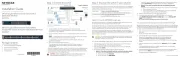
16-port Gigabit Ethernet Unmanaged Switch
Model GS316v3
• NETGEAR 16-port Gigabit Ethernet Unmanaged Switch Model GS316v3
• Power adapter
• Wall-mount installation kit
• Rubber feet
• Installation Guide
Package contents
November 2022
3. Connect to power
This switch is designed for indoor use only. If you want to connect it to a device located
outdoors, the outdoor device must be properly grounded and surge protected, and you
must install an Ethernet surge protector inline between the switch and the outdoor device.
Failure to do so can damage the switch.
WARNING: Before connecting this switch to outdoor cables or devices, see
https://kb.netgear.com/000057103 for safety and warranty information.
1. Register the switch
1. From a computer or mobile device that is connected to the Internet, visit
my.netgear.com.
2. Log in to your NETGEAR account.
NOTE: If you don’t have a free NETGEAR account, you can create one.
The Your Registered Products page displays.
3. Click the REGISTER NEW PRODUCT button.
4. In the SERIAL NUMBER eld,typetheserialnumberofyourswitch.
The serial number is 13 digits long. It is printed on the switch label.
5. From the PURCHASE DATE menus, select the date that you purchased the switch.
6. Click the button.REGISTER
Your switch is registered to your NETGEAR account.
AconrmationemailissenttoyourNETGEARaccountemailaddress.
Sample connections
Desktop
IP camera
Smart TV
Laptop Server
Printer
WAX214v2 AP
Desktop
GS316v3 switch
Router
Internet
4. Check the LEDs
When you connect the power adapter to the switch and plug the cable into an electrical
outlet, the LEDs indicate the status:
LED Description
Power LED
Solid green: The switch is powered on and operating normally.
Off: Power is not supplied to the switch.
Both Port LEDs
Solid green: 1 Gbps link on this port.
Blinking green: 1 Gbps activity on this port.
Off: No link is detected on this port.
Left Port LED only
Solid green: 100 Mbps link on this port.
Blinking green: 100 Mbps activity on this port.
Off: No link is detected on this port.
Right Port LED only
Solid green: 10 Mbps link on this port.
Blinking green: 10 Mbps activity on this port.
Off: No link is detected on this port.
Installation Guide


Produkt Specifikationer

Mærke: Netgear
Kategori: Ikke kategoriseret
Model: GS316v3

Har du brug for hjælp?

Hvis du har brug for hjælp til Netgear GS316v3 stil et spørgsmål nedenfor, og andre brugere vil svare dig


Ikke kategoriseret Netgear Manualer

Netgear

Netgear Orbi RBE373 Manual

23 September 2025
Netgear

Netgear Orbi RBE374 Manual

23 September 2025
Netgear

Netgear Orbi RBE370 Manual

23 September 2025
Netgear

Netgear Orbi RBE372 Manual

23 September 2025
Netgear

Netgear GS748Tv6 Manual

24 August 2025
Netgear

Netgear GS752TSB Manual

23 August 2025
Netgear

Netgear GS728TPSB Manual

22 August 2025

Ikke kategoriseret Manualer

Nyeste Ikke kategoriseret Manualer

Waterstone

Waterstone 7800 Manual

11 December 2025
Kwikset

Kwikset 258 Manual

11 December 2025
Schlage

Schlage F170 Manual

11 December 2025
Moen

Moen Align 7565EV Manual

11 December 2025
ALNO

ALNO MC10244 Manual

11 December 2025
JET

JET TAK-ZX Manual

11 December 2025
Waterstone

Waterstone 1455 Manual

11 December 2025
Laica

Laica NE2015 Manual

11 December 2025