Siemens gigaset as280 Manual

Siemens Fast telefoni gigaset as280

Læs gratis den danske manual til Siemens gigaset as280 (16 sider) i kategorien Fast telefoni. Denne vejledning er vurderet som hjælpsom af 12 personer og har en gennemsnitlig bedømmelse på 4.5 stjerner ud af 6.5 anmeldelser. Har du et spørgsmål om Siemens gigaset as280, eller vil du spørge andre brugere om produktet?
Side 1/16
1
AS280-AS285 / AUS / A31008-M2042-C401-1-7619 / Overview.fm / 20.08.2010
Gigaset AS280/AS285
±V
11.12. 11:56
INT MENU
d
h
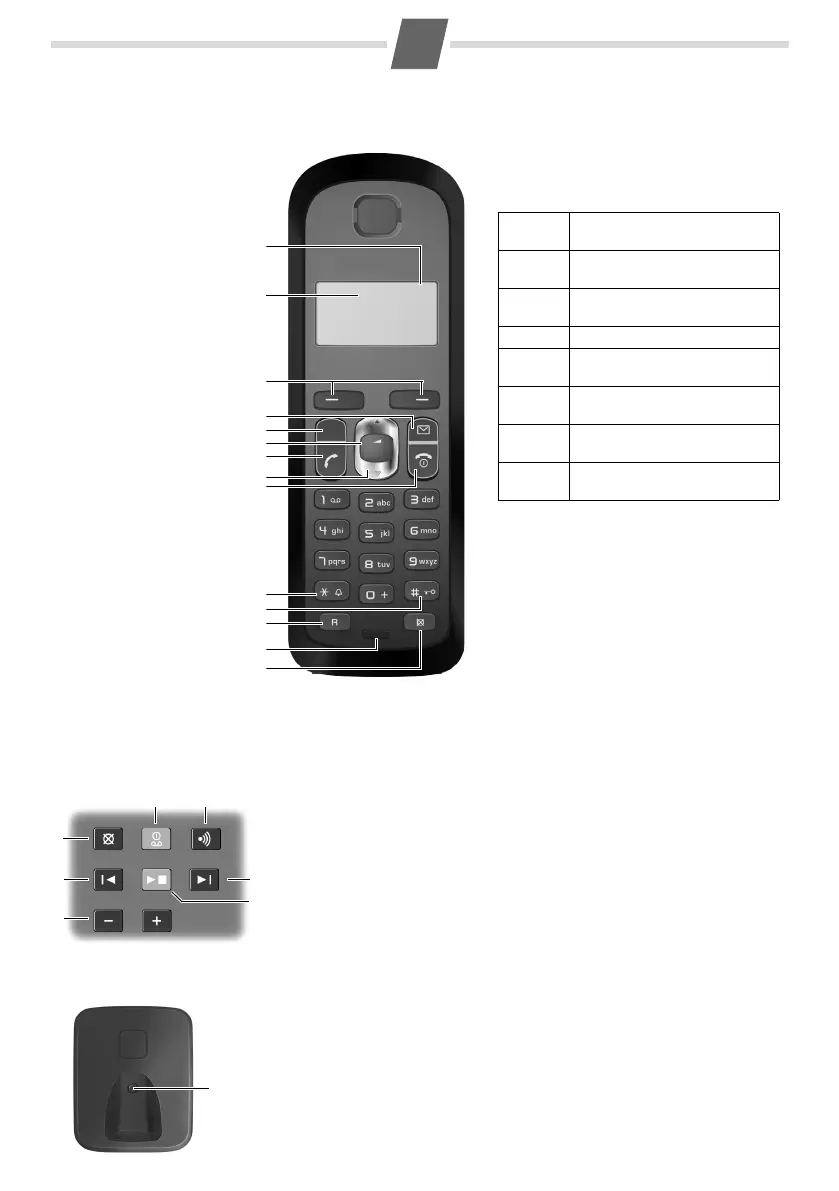
1Charge status of
the batteries
2Answer machine icon
(AS285 only)
3Display keys
4Message key
Flashes: new messages
received
5 Handsfree key
6 Control key (u)
7 Talk key
8Directory key
(press down)
9End call and
On/Off key
10 Ringer on/off
(press and hold
in idle status)
11 Keypad lock on/off
(press and hold)
12 Recall key
- Consultation call
(flash)
- Dialling pause
(press and hold)
13 Microphone
14 "Microphone off" key
The base station at a glance
AS285 base station
AS280 base station
76
5
12
3
4
1
11
2
3
5
7
4
6
9
13
1
The handset at a glance
12
14
8
10
1 Registration/paging key:
Search for handsets (press briefly, "Paging"
¢ page 10)
Register handsets (press and hold
¢ page 10).
2 On/Off key: activate and deactivate answer machine.
Lights up: answer machine is activated.
Flashes: there is at least one new message or message is in the process
of being recorded.
Flashes very quickly for about four seconds: memory is full.
3 Volume keys: ( = quieter; + = louder)
During message playback: adjust the speaking volume.
While phone is ringing: adjust ringer volume.
4 Play/Stop key:
Play back messages from the answer machine, or cancel playback.
During message playback:
5 Delete current message.
6 Skip to the start of the current message (press once) or go to the pre-
vious message (press twice).
7Skip to next message.
Display keys on handset:
Pressing a key launches the function that
appears above that key in the display.
Display
icon
Function when pressed
INT
Call other registered handsets
¢ page 10.
MENU
Open main/submenu (see
Menu tree
¢ page 14).
Go back one menu level.
U
Scroll up/down or adjust vol-
ume with u.
T
Move cursor to left/right with
u.
˜
Backspace deletes one charac-
ter at a time from right to left.
OK
Confirm menu function or save
entry.


Produkt Specifikationer

Mærke: Siemens
Kategori: Fast telefoni
Model: gigaset as280

Har du brug for hjælp?

Hvis du har brug for hjælp til Siemens gigaset as280 stil et spørgsmål nedenfor, og andre brugere vil svare dig