www.silverstonetek.com
User manual
5U rackmount server chassis
with enhanced liquid cooling compatibility
RM52
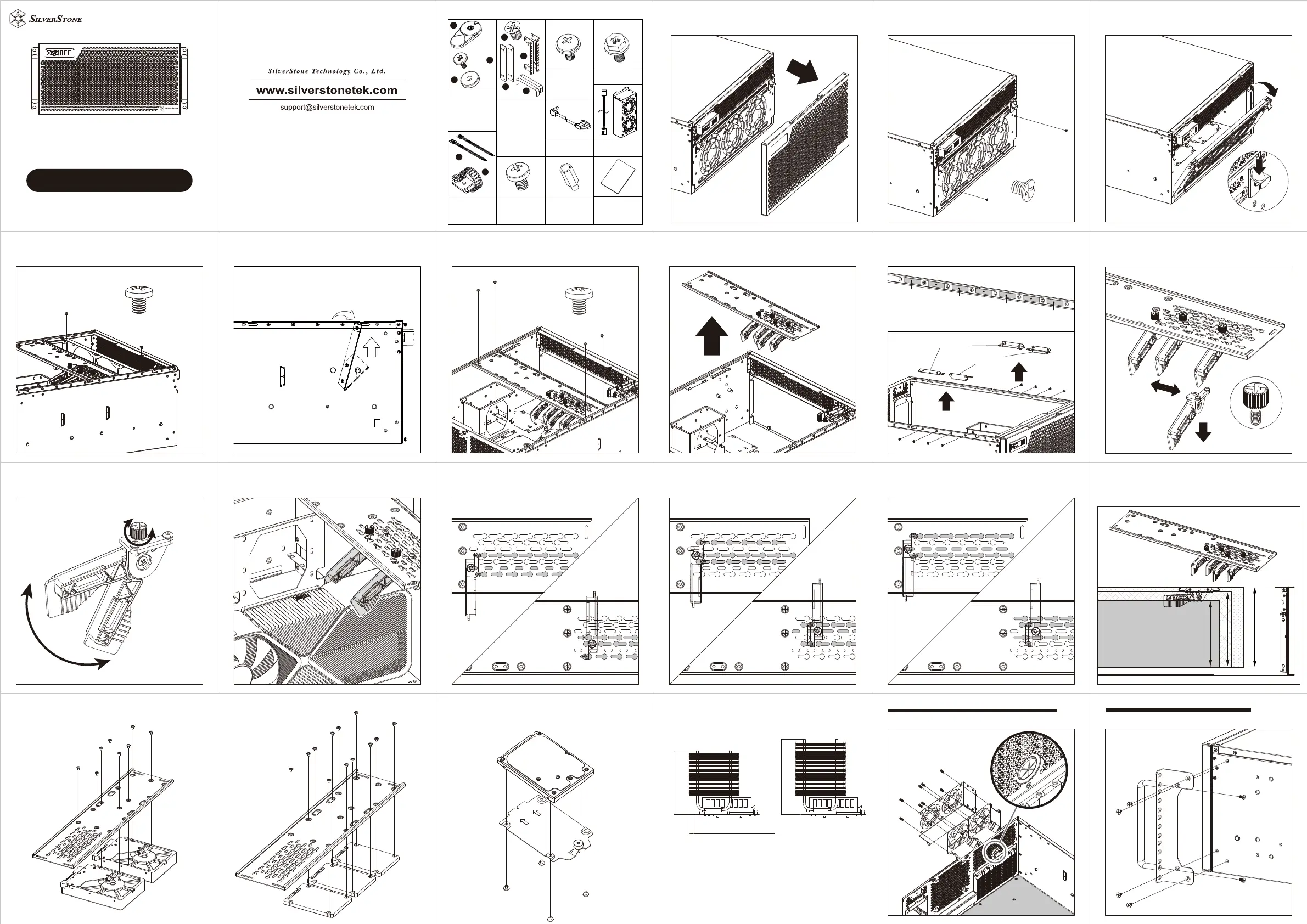
1.Remove front panel 2-1.Remove front radiator bracket screws
X2
G11248350
2-2.Press down on the clips from both sides to remove
front radiator bracket
X2
3-1.Remove top panel then remove internal radiator
bracket screws
X2
3-1.Remove top panel then remove internal radiator
bracket screws
X2
3-2.Remove the internal radiator bracket by tilting it at
a 15° angle, then lifting it upwards out the chassis
1
2
4-1.Remove graphics card retainer screws
X4
4-2.Remove graphics card retainer
4-2-A.Graphics card retainer and internal radiator bracket
position adjustments
Position 1
Position 2
Position 3
Position 4
Position 5
Position 6
Position 7
Internal radiator bracket can be installed in
position 6 or 7, when removed, L-shaped bracket
(GPU) can be installed on positions 1 to 7
L-shaped bracket (GPU)
L-shaped bracket (radiator)
1
2
4-3-1.Remove thumbscrews and clamps
4-3-2.Loosen the thumbscrew to adjust the clamps to
the desired angle
tighten
loosen
4-3-3.Utilize two clamps to stabilize the graphics card
firmly
4-4-1.Mounting positions - 1
Clamps facing forward
Clamps facing backward
4-4-2.Mounting positions - 2
Clamps facing forward
Clamps facing backward
4-4-3.Mounting positions - 3
Clamps facing forward
Clamps facing backward
Graphics card width limitation:
1.Graphics card retainer clamps installed: 165mm
2.Graphics card retainer clamps removed: 186mm
3.Graphics card retainer removed: 198mm
165
186
198
4-5.Hard drives installed on the graphics card retainer
or
3.5"HDD
2.5"SSD
4-5-A.2.5” SSD installation 5.CPU cooler height limitation
CPU cooler height limitation
Graphics card retainer installed: 181mm
Graphics card retainer removed: 192mm
Maximum 181mm
Maximum 15mm
Maximum 192mm
6.The thickness of the rear fan cage fans are limited to 38mm
Run the cable through
the pass-through hole
80mm external fan cage installation
7.Assemble the handle bars with the L-shaped bracket,
then secure the assembly on both sides of the chassis
X2
Horizontal orientation installation
Parts package component list
x4
A
D
E
F
G
H
I
B
C
x4
x4
Horizontal to vertical
position accessories
A:Case feet
B:Case feet screws
C:Case feet washers
Manual
D.Handle bar
bracket screws
E.Handle brackets
F.Handle bars
G.L-shaped brackets
Handle bar
accessories
H.Cable ties
I.Cable
management
buckle
PSU Mounting
screws
Secondary PSU
extension adapter
Mounting for
3.5” HDD,
external 80mm
fan cage
80mm fan cage
Fan extension cable
Motherboard
standoff
4. Motherboard,
2.5” SSD, Power
extension cord
extension