INSTRUCTION MANUAL
SK-500016
1/4 2/4
Thank you for purchasing SkyRC Infrared Thermometer. This is a non-contact infrared thermometer
specifically designed for use with R/C engines, electronic speed controllers, motors, battery packs,
battery chargers and etc.
Simply aim the infrared thermometer at the target and press the measurement button to quickly and
easily display the surface temperature!
FEATURES
High accuracy and high speed infrared sensor
Four modes for temperature records: Quick Mode / Scan Mode / Max. Value / Min. Value
Celsius and Fahrenheit scale selectable
Testing a wide range of temperature from -40℃(-40℉) to 380℃(716℉)
The infrared emissivity coefficient can be adjusted
A large LCD can display temperature, emissivity coefficient and battery’s capacity, etc.,
and applied with back light, which make it easy to operate and read
Low power consumption and powered by 2 x AAA batteries (Battery Excluded)
1 minute auto-off timer to save battery’s life
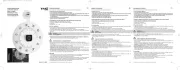
Infrared Thermometer
On / Measure Button
Mode Button
Unit Button
Battery Indicator
Unit of Measurement
Temperature
Emissivity Coefficient
Aluminum Cup
MEASURING TEMPERATURES
There are four methods to begin measuring temperatures. Point the aluminum cup located on the top
end of the gauge directly at the object to be measured, and do one of the following:
1. Quick Mode
This thermometer can temporarily store maximum or minimum temperatures. Turn the unit on by
pressing the “MEASURE” button. Then, press the “MODE” button once for the maximum function or
twice for minimum. The appropriate MAX or MIN icon will display in the screen.
Point the aluminum cup to the object being measured, and press and
hold the “MEASURE” button and the thermometer will display and locked
the hottest or MAX temperature that is observed while the button is being
held.
Point the aluminum cup to the object being measured, and press and
hold the “MEASURE” button and the thermometer will display and locked
the coolest or MIN temperature that is observed while the button is being
held.
Press the “MEASURE” button once for an instantaneous temperature reading to be shown on-
screen.
Moving the aluminum cup as close as possible to the target.
Press and hold the “MEASURE” button to read temperatures continually. The temperature
onscreen will be updated continually. Release “MEASURE” button will cause the last reading to
remain locked on-screen.
3. Maximum Temperature Mode
4. Minimum Temperature Mode
Infrared Sensor
Battery Compartment
2 X AAA Battery
(Battery excluded)
2. Scan Mode
C
MIN
C
MAX
INTRODUCTION