StarTech.com DVI92030202L Manual


Læs gratis den danske manual til StarTech.com DVI92030202L (2 sider) i kategorien Kabler til pc'er og periferiudstyr. Denne vejledning er vurderet som hjælpsom af 12 personer og har en gennemsnitlig bedømmelse på 4.6 stjerner ud af 6.5 anmeldelser. Har du et spørgsmål om StarTech.com DVI92030202L, eller vil du spørge andre brugere om produktet?
Side 1/2
Instruction Manual
DE: Bedienungsanleitung - de.startech.com
FR: Guide de l'utilisateur - fr.startech.com
ES: Guía del usuario - es.startech.com
IT: Guida per l'uso - it.startech.com
NL: Gebruiksaanwijzing - nl.startech.com
PT: Guia do usuário - pt.startech.com
Manual Revision: 07/06/2016
For the most up-to-date information, please visit: www.startech.com
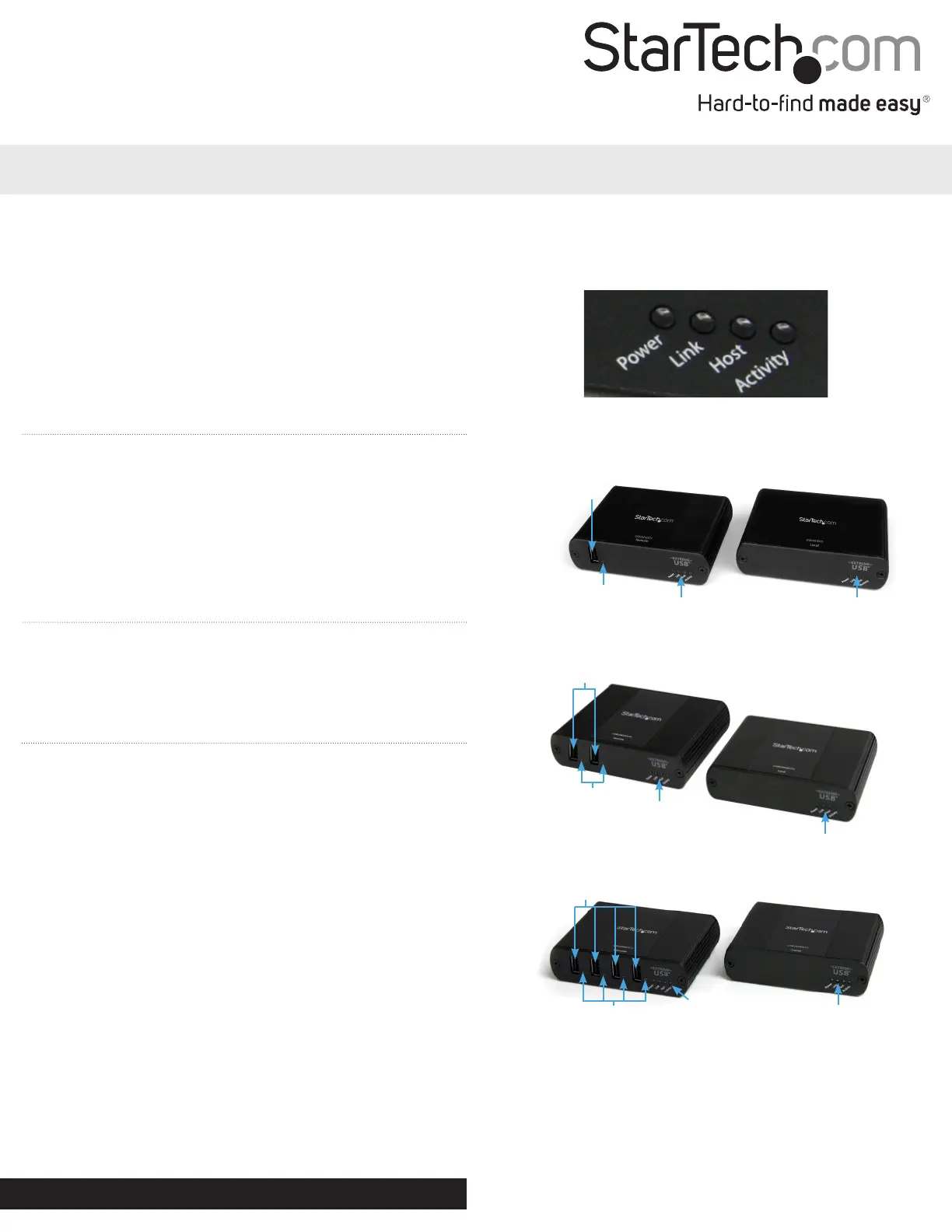
USB2001EXT2/USB2002EXT2/USB2004EXT2
1/2/4 Port USB 2.0 Extender over Cat5 or Cat6 - Up to 330 ft (100m)
Packaging Contents
1 x USB extender Transmitter/Local unit
1 x USB extender Receiver/Remote unit
1 x Power Adapter
3 x Power Cord (NA/UK/EU)
1 x Mounting Kit
1 x USB cable
1 x Installation Guide
System Requirements
USB enabled computer system with available USB port
Available AC power outlet
Solid core Category 5e unshielded twisted pair (UTP) or greater cabling.
Installation
1. Place the Local and Remote units at the desired locations and
connect together using RJ45 terminated Cat5 or Cat6 cabling.
a) If you are using surface cabling, ensure you have enough Cat5e
cabling to connect the Local Unit to the Remote Unit’s location,
and that each end is terminated with a RJ45 connector. The cabling
cannot go through any networking equipment (i.e. router, switch).
OR
b) If you are using premise cabling, ensure that the Cat5e
cabling between the Local Unit to the Remote Unit has been
properly terminated in a wall outlet in each location and there is
a patch cable long enough to connect the Remote Unit to their
respective outlets. The cabling cannot go through any networking
equipment (i.e. router, switch).
2. Connect the included power adapter to the Local unit for the
USB2002EXT2. Connect the power adapter to the Remote unit for
the USB2004EXT2 or USB2001EXT2. The Power LED should light
up solid.
3. Connect the Local unit to the host computer system with a USB
cable. The computer can be either powered On or O. The operating
system should detect the extender and install it automatically.
4. USB devices can now be connected to the Remote unit.
USB2001EXT2 Front
USB Type A
Connector
USB Device
Status LED
Indicators
Extender Status
LED Indicators
Remote Unit Local Unit
USB2004EXT2 Front
USB Type A
Connector
Remote Unit Local Unit
USB2002EXT2 Front
USB Type A
Connector
Remote Unit
Local Unit
LED Status Indicators
Extender Status
LED Indicators
Extender Status
LED Indicators
Extender Status
LED Indicators
Extender Status
LED Indicators
Extender Status
LED Indicators
USB Device
Status LED
Indicators
USB Device
Status LED
Indicators


Produkt Specifikationer

Mærke: StarTech.com
Kategori: Kabler til pc'er og periferiudstyr
Model: DVI92030202L
Vægt: 107 g
Antal pr. pakke: 1 stk
Produktfarve: Sort
Pakkevægt: 114 g
Pakkedybde: 290 mm
Pakkebredde: 145 mm
Pakkehøjde: 17 mm
Certificering: CE, REACH
Kabellængde: 0.203 m
Harmoniseret systemkode (HS): 84733080
Bæredygtighedscertifikater: RoHS
Plug and play: Ja
Stik 1: DVI-I
Stik 2: DVI-D + VGA (D-Sub)
Stik 1 køn: Hanstik
Stik 2 køn: Hunstik
Stikforbindelse kontakter plettering: Guld
Stik 1 formfaktor: Lige
Stik 2 formfaktor: Lige
Materiale for kapper: Polyvinylchlorid (PVC)
AWG-ledningsstørrelse: 28
Kabelafskærmning: Aluminium mylar foil

Har du brug for hjælp?

Hvis du har brug for hjælp til StarTech.com DVI92030202L stil et spørgsmål nedenfor, og andre brugere vil svare dig