TriStar VE-5798 Manual


Læs gratis den danske manual til TriStar VE-5798 (1 sider) i kategorien Ventilator. Denne vejledning er vurderet som hjælpsom af 4 personer og har en gennemsnitlig bedømmelse på 4.8 stjerner ud af 2.5 anmeldelser. Har du et spørgsmål om TriStar VE-5798, eller vil du spørge andre brugere om produktet?

Side 1/1
EN | Instruction manual
VE-5798BS
PARTS DESCRIPTION
Swaardvenstraat 65 | 5048 AV | Tilburg
The Netherlands | www.tristar.eu
West Point, Second Floor | Mucklow Office Park
Mucklow Hill Halesowen | West Midlands | B62 8DY |
United Kingdom | www.tristar.eu
Europe B.V.
SAFETY
Read all instructions.
Disconnect the power plug before dismantling,
assembling or before cleaning..
Avoid touching mobile parts of the fan.
Make sure the fan is on a dry and even
surface.
Never insert fingers, pencils or any other
objects though the guards whenever the
power plug is connected, especially while
running.
Do not use the appliance for any other
purpose than its intended use.
This appliance is only to be used for
household purposes and only for the purpose
it is made for.
The fan must not be used if the guards are not
fastened according to instructions.
When the power cord is damaged, it must be
replaced by the manufacturer or its service
agent or a similarly qualified person in order to
avoid a hazard.
Do not use your appliance with an extension
cord unless it has been checked and tested by
a qualified electrician or electrical supplier.
This appliance can be used by children aged
from 8 years and above and persons with
reduced physical, sensory or mental
capabilities or lack of experience and
knowledge if they have been given
supervision or instruction concerning use of
the appliance in a safe way and understand
the hazards involved. Children shall not play
with the appliance. Cleaning and user
maintenance shall not be made by children
without supervision.
Ensure that the fan is switched off from the
supply mains before removing the guard.
Safety Coin cell
BATTERY WARNING: KEEP OUT OF REACH OF CHILDREN
Store spare batteries securely. Dispose of used batteries
immediately and safely. If you think batteries might have been
swallowed or placed inside any part of the body, seek immediate
medical attention.
If the battery compartment does not close
securely, stop using the product and keep it
away from children.
Be alert, there are no obvious symptoms if a
child has swallowed a button or coin battery. If
your child appears unwell and there are no
obvious symptoms, then check to make sure
there are no batteries missing from any items
they have been around. If you suspect they
have swallowed a coin/button cell, then seek
medical attention. Similarly, if they vomit bright
red fresh blood seek immediate medical help.
Always remain vigilant with discharged or
spare button or coin batteries in the home and
in products that contain them.
PRODUCT CONTAINS A COIN/BUTTON CELL
PARTS DESCRIPTION
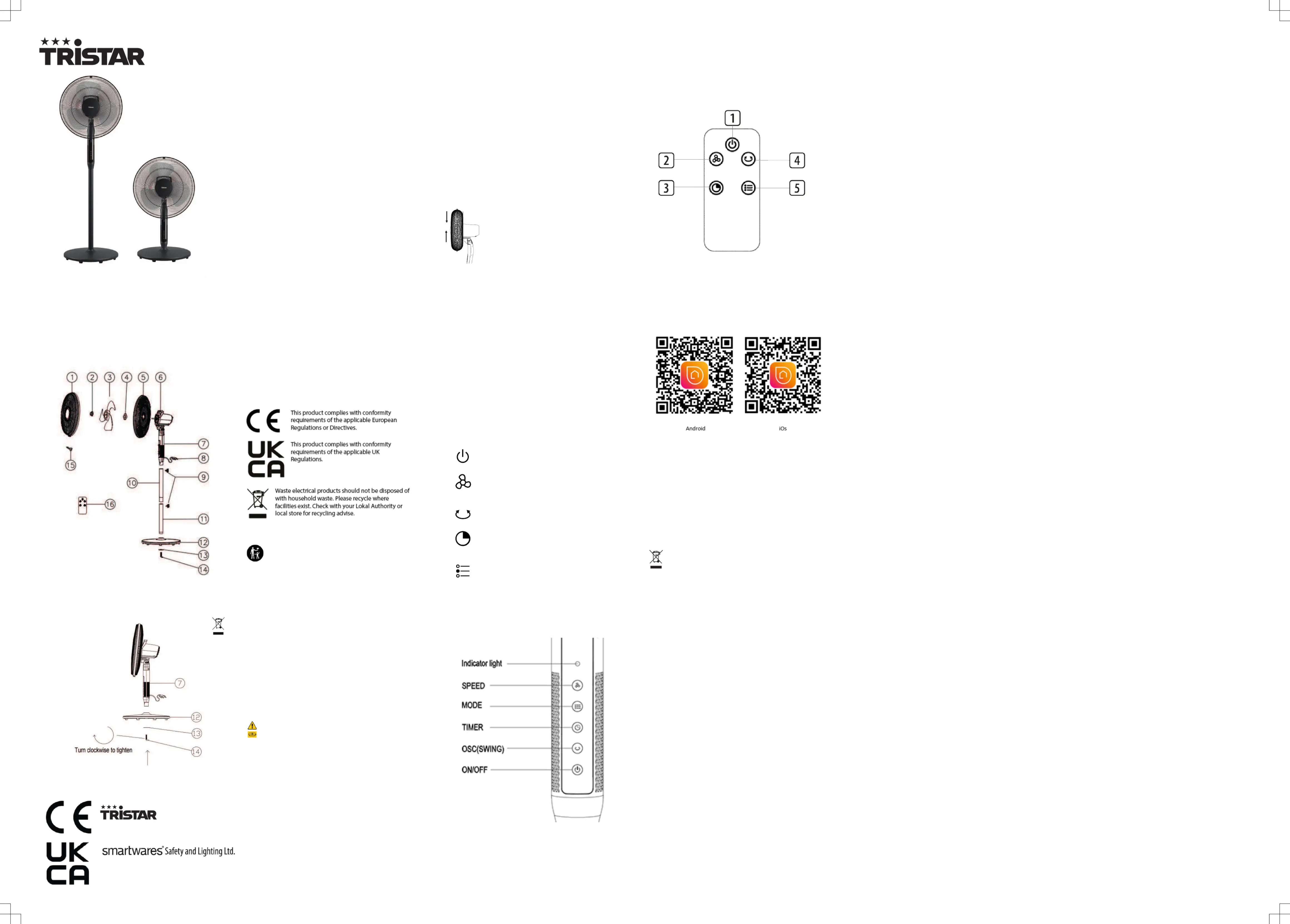
1. Front guard
2. Fan blade lock cap
3. Fan blades
4. Rear locking ring
5. Rear guard
6. Motor spindle
7. Control panel tube
8. Power cord
9. Circle shape bolt
10. Top tube
11. Bottom tube
12. Base cover
13. Nut
14. 7-shape bolt
15. Locking screw
16. Remote control
ASSEMBLY
Assembly of the base and fan body
Put the bottom tube (11) in the base cover (12), then use the bottom
tube (11) and nut to lock the base cover (12).
Use the circle shaped bolt (9) to lock top tube (10) and bottom tube
(11).
Use another circle shaped bolt (9) to connect the base to the control
panel tube (7). Then connect it to the top tube (10) to lock.
Before assembling the fan body (6), remove the black protective sleeve
of the motor shaft.
Unscrew the rear locking ring by turning it anticlockwise. Position the
rear guard (5) into the motor spindle (6). Insert the rear locking ring back
onto the motor spindle (6) to lock the rear guard (5) in place. Turn
clockwise to lock.
Slide the fan blade (3) onto the motor spindle (6), making sure the motor
housing is fully seated into the blade groove. Screw the fan blade lock
cap (2) anticlockwise to tighten the blade to the motor spindle.
Cover the front guard (1) on the rear guard (5) with the clips.
Finally, twist the clip into the specified position with the safety screw.
Assembly of the desk fan
Pass the base cover (12) through the control panel box tube (7), then
use the nut and 7-shape bolt to lock the base cover (12) and control box
tube to each other (7).
To change into a table fan, just remove the two tubes of the floor fan and
directly lock the base cover (12) with the 7-Shape Bolt (14).
ANGLE ADJUSTMENT
Switch off the fan before adjusting the angle.
Press or push the fan head to adjust the angle.
BEFORE THE FIRST USE
Take the appliance andaccessoriesoutthebox.Removethe
stickers,protective foilorplasticfrom thedevice.
Before using your appliance for the first time, wipe off all removable parts
with a damp cloth. Never use abrasive products.
Place the device on a flat stable surface and ensure a minimum of 10
cm. free space around the device. This device is not suitable for
installation in a cabinet or for outside use.
Putthepower cable intothe socket.(Note: Make surethe voltagewhich
is indicated on the devicematchesthe localvoltage beforeconnecting
the device.Voltage220V-240V 50/60Hz)
USE
For your convenience, the fan can be operated from the control panel at
the front of the unit or with the remote control. The buttons on the control
panel operate the same functions as the remote control, except for setting
the timer from the control panel, which is slightly different and explained in
the instructions below.
When using the remote control, point it towards the LED display at the
front of the fan and ensure that nothing is obstructing the path of the
signal. Handle the remote control carefully; do not drop or throw it.
1. Place the fully assembled pedestal fan on a dry, level and stable
surface. Take into consideration all relevant safety advice from the
previous pages. Remove all the cable tie and plastic bags before plug
to the mains
2. Insert the plug into an appropriate electrical socket and switch on
power at the outlet. The fan will emit one short beep sound and the
number 0 will be shown in the LED display.
3. Press the ON/OFF button to start the fan. After 3 seconds, the
fan will return to the default setting (fan speed / wind mode).
4. Press the SPEED button to select one of the available fan
speeds. The display will show 1 to 9, increasing the fan speed with
every increasing number.
5. Press the SWING button to start oscillation for widespread air
distribution. Press the button once more to stop oscillation.
6. Use the TIMER button to set the off-time in 1 hour increments
up to a maximum of 9 hours. The display shows the number of hours
set (and after 10 seconds switches to displaying the gear).
7. Use the MODE button to set the desired operation mode:
natural,sleep or normal. On the display, the indicator light changes to
white in natural mode, blue in sleep mode and turns off in normal
mode.
8. In the off state, hold down the mode button for 5 seconds. After the
display displays 8, you can connect to WIFI.
9. Hold down the swing button for 4 seconds to enable or disable the
beeping sound.
10. Switch off and unplug the fan after use.
Setting the tilt angle:
Press down or raise up the motor spindle (6), move the fan to the desired
angle.
Using the remote control
Remote control operations are identical to the functions on the fan control
panel.
The buttons:
1. ON/OFF
2. SPEED
3. TIMER
4. SWING
5. MODE
Ensure battery is inserted in the correct direction.
1xC2025 size battery is required
The battery should not be thrown away.
USING THE APPLIANCE WITH THE CONNECTED AT HOME APP
Connected at Home
The appliance can be used manually with its built-in controls, remote
control or you can use a smart phone or voice to control it. Before you
begin, ensure the Connected at Home app is downloaded. The app is
available on Android and iOS. Download the Connected At Home App and
get started!
Pair your appliance to the “Connected at Home” app
Make sure the appliance is powered.
In the off state, hold down the mode button for 5 seconds. After the
display shows 8, you can connect the device to the app.
Open Connected at Home app.
Create an account or if you already have an account, please log in with
your details.
Follow the instructions in the app to connect your appliance with Wi-Fi.
CLEANING AND MAINTENANCE
Clean the appliance with a damp cloth. Never use harsh and abrasive
cleaners, scouring pad or steel wool, which damages the device.
Never immerse the electrical device in water or any other liquid. The
device is not dishwasher proof.
Dry throughout before storage.
ENVIRONMENT
This appliance should not be put into the domestic garbage at the
end of its durability, but must be offered at a central point for the recycling
of electric and electronic domestic appliances. This symbol on the
appliance, instruction manual and packaging puts your attention to this
important issue. The materials used in this appliance can be recycled. By
recycling of used domestic appliances you contribute an important push to
the protection of our environment. Ask your local authorities for information
regarding the point of recollection.
Support
You can find all available information and spare parts at www.tristar.eu!


Produkt Specifikationer

Mærke: TriStar
Kategori: Ventilator
Model: VE-5798

Har du brug for hjælp?

Hvis du har brug for hjælp til TriStar VE-5798 stil et spørgsmål nedenfor, og andre brugere vil svare dig


Ventilator TriStar Manualer

TriStar

TriStar VE-5798 Manual

1 Januar 2026
TriStar

TriStar VE-5722 Manual

30 December 2026
TriStar

TriStar VE-5878BS Manual

29 December 2026
TriStar

TriStar VE-5863 Manual

25 December 2025
TriStar

TriStar VE-5727 Manual

27 Juli 2025
TriStar

TriStar VE-5936 Manual

10 Oktober 2024
TriStar

TriStar PD-3816E Manual

3 September 2024
TriStar

TriStar VE-5757 Manual

25 August 2024
TriStar

TriStar VE-5755 Manual

25 August 2024
TriStar

TriStar VE-5721 Manual

25 August 2024

Ventilator Manualer

Nyeste Ventilator Manualer

Schweigen

Schweigen BL502 Manual

31 December 2026
Canarm

Canarm CP80 Manual

31 December 2026
Canarm

Canarm CNP80 Manual

31 December 2026
Craftmade

Craftmade Mondo MND54 Manual

31 December 2026
Canarm

Canarm SD12-XPF Manual

31 December 2026
Schweigen

Schweigen BLB702 Manual

31 December 2026
Canarm

Canarm P20-1V Manual

31 December 2026
Lasko

Lasko S18607 Manual

31 December 2026
Schweigen

Schweigen BL500 Manual

31 December 2026