Wind River WR4500 Manual


Læs gratis den danske manual til Wind River WR4500 (2 sider) i kategorien Ikke kategoriseret. Denne vejledning er vurderet som hjælpsom af 2 personer og har en gennemsnitlig bedømmelse på 4.5 stjerner ud af 1.5 anmeldelser. Har du et spørgsmål om Wind River WR4500, eller vil du spørge andre brugere om produktet?

Side 1/2
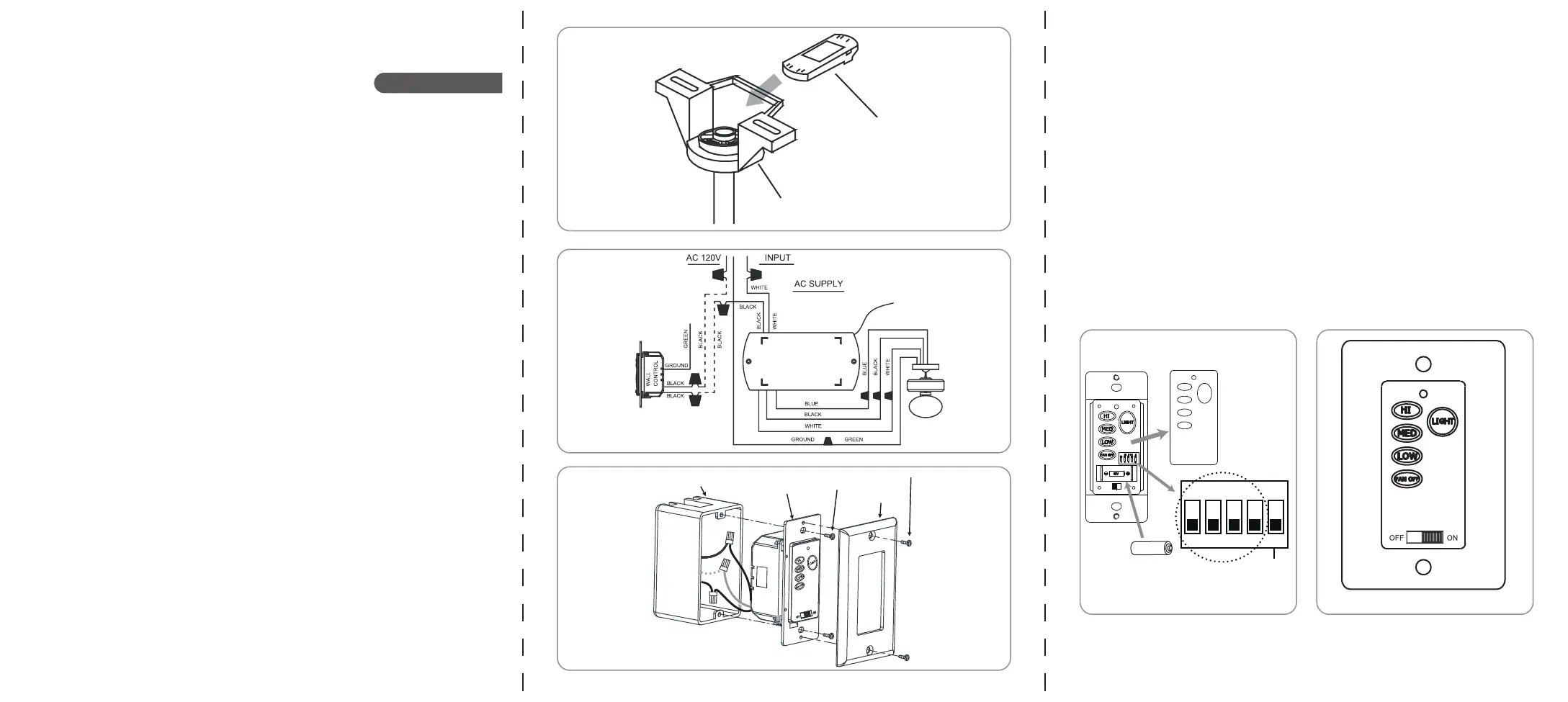
ATTACH THE RECEIVER
Step.1 Insert Receiver into Hanger Bracket with the flat side of the Receiver facing the ceiling. (Fig. 1)
Step.2 Motor to Receiver Electrical Connections:
Connect the WHITE wire from the fan to the WHITE wire marked ”TO MOTOR N” from the receiver.
Connect the BLACK wire from the fan to the BLACK wire marked ”TO MOTOR L” from the Receiver.
Connect the BLUE wire from the fan to the BLUE wire marked ”For Light” from the receiver. (Fig.2)
Step.3 Receiver to House Supply Wires Electrical connections:
Connect the WHITE wire (Neutral) from the ceiling outlet box to the WHITE wire marked”AC in N” from the
receiver. Connect the BLACK wire (Hot) from the ceiling outlet box to the BLACK wire marked “AC in L”
from the receiver.
Secure all wire connections with the plastic wire nuts provided. (Fig.2)
Step.4 If your ceiling outlet box has a GROUND wire (Green or Bare Copper) connect this wire to the
Hanger Ball and Hanger Bracket Ground wires.
If your outlet box does not have a Ground Wire, then connect the hanger Ball and Hanger Bracket Ground
Wire together. Secure wire connection with the plastic wire nut provided.(Fig.2)
Read and save these instructions
MODEL:WR4500
FIG. 3
FIG. 2
FIG. 1
Outlet box
Wall transmitter
Screw
Wall plate
Screw
OPERATING THE TRANSMITTER
a. “HI” , “MED” and “LOW” buttons:
These three buttons are used to select the fan speed.
Press and release the button of the desired speed setting:
LOW= Lowest speed MED= Medium speed HI= Highest speed
b. “LIGHT” button: This button will turn the light on or off and will also control the brightness setting. Press and
release the button and the light will turn on or cycle continuously between bright and dim settings as long as the
button is held down. The light key has auto resume, it will stay at the same brightness as the last time it was
turned off.
c. “FAN OFF” button: This button will turn the fan off.
d. “ON-OFF” : This button turns the power off for the fan and light.
FIG. 5FIG. 4
Mounting
bracket
Receiver
INSTALL THE WALL TRANSMITTER AND FINISH THE WIRE CONNECTION
WARNING! SHUT POWER OFF AT FUSE OR CIRCUIT BREAKER.
WARNING! HOOK UP “IN SERIES” ONLY. DO NOT CONNECT NEUTRAL SUPPLY WIRE OR ELECTRIC
CIRCUIT TO THE WALL TRANSMITTER, DAMAGE TO THE WALL TRANSMITTER AND POSSIBLE FIRE
COULD OCCUR.
Step.1 Make wire connections (Fig. 2) and secure with wire nuts supplied.
Black wire from the receiver to black wire from the wall transmitter.
Black wire from wall transmitter to black wire from the A/C supply source.
If your wall outlet box has a ground wire (green or bare copper) connect the wall transmitter's ground wire to it;
otherwise connect the wall transmitter's ground wire directly to one of the screws from the outlet box.
Step.2 Carefully tuck the wire connections inside the outlet box. Secure the wall transmitter with the two screws
provided. Attach the wall plate over the wall transmitter and secure with the two screws provided. (Fig. 3)
Programming the remote
Install a A23,12 Volt battery(included).To prevent damage to transmitter remove the battery if not used for
long periods of time.
Step 1: Turn the power off to your ceiling fan.
Step 2: Please use a small size tool to change the frequency settings on the control system.
The system is equipped with a learning frequency function which has 16 code combinations to prevent
potential interference from other remote units.The frequency on your receiver and transmitter units have
been preset at the factory.
Dimmable Function: Set code labeled “D” to “On” for dimming light function. If using CFL bulbs or
Non-Dimmable bulb, set code to "ON" position for non-dimming function.
Step 3: Return power to the unit.
Note: After the AC power is on, do not press any other button on the transmitter before pressing the "FAN
OFF" button; doing so will cause the procedure to fail.
Setp 4: Within 60 seconds of turning the Fan's AC power ON. Press the transmitter's "FAN OFF" button and
hold the "FAN OFF" button for 5 seconds.
Setp 5: Once the receiver has detected the set frequency, the down light of your fan will blink twice and the
fan will be gin to rotate for a short period and then shut off.
Setp 6: The receiver has now learned the frequency which has been selected on the transmitter. After
completing the steps above, you should be able to operate the ceiling fan and light. If the fan is not
responding to the transmitter, please turn the power off to the receiver, and repeat the process.
ON ECE
1 2 3 4 ON
D
Dimmable function
set code


Produkt Specifikationer

Mærke: Wind River
Kategori: Ikke kategoriseret
Model: WR4500

Har du brug for hjælp?

Hvis du har brug for hjælp til Wind River WR4500 stil et spørgsmål nedenfor, og andre brugere vil svare dig


Ikke kategoriseret Wind River Manualer

Wind River

Wind River KG400 Manual

16 December 2025
Wind River

Wind River WR4500 Manual

16 December 2025

Ikke kategoriseret Manualer

Nyeste Ikke kategoriseret Manualer

Vaxcel

Vaxcel T0776 Manual

16 December 2025
Vaxcel

Vaxcel T0677 Manual

16 December 2025
Gamdias

Gamdias Aura GP650 Manual

16 December 2025
Vaxcel

Vaxcel T0694 Manual

16 December 2025
Alice & Fox

Alice & Fox Bea Manual

16 December 2025
Arçelik

Arçelik A65 A 850 B Manual

16 December 2025
Vaxcel

Vaxcel T0372 Manual

16 December 2025
Pure Clean

Pure Clean PCTLW210 Manual

16 December 2025
Pure Clean

Pure Clean PCTLW310 Manual

16 December 2025
Vinotemp

Vinotemp EL-300COMM Manual

16 December 2025