APC Symmetra PX Power Module Manual

APC UPS Symmetra PX Power Module

Læs gratis den danske manual til APC Symmetra PX Power Module (2 sider) i kategorien UPS. Denne vejledning er vurderet som hjælpsom af 24 personer og har en gennemsnitlig bedømmelse på 3.8 stjerner ud af 12.5 anmeldelser. Har du et spørgsmål om APC Symmetra PX Power Module, eller vil du spørge andre brugere om produktet?

Side 1/2
Symmetra® PX Power Module Replacement
See the Safety sheet (990-2984) provided with the unit for additional safety instructions.
Warning: Only trained persons familiar with the construction and operation of the
equipment, as well as the electrical and mechanical hazards involved, may install and
remove system components.
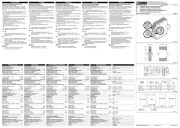
How to replace a power module
Warning: Before removing any power modules, make sure that the remaining power
modules can support the load.
Turn the locking latch until the arrow points down.
Unscrew the spring-activated knobs on both sidea of the module.
Pull the module up and out of the enclosure as far as the lock mechanism will allow.
Release the lock by pressing the black plastic tab on both sides of the module.
Pull the module out of the enclosure.
Push the replacement module into the enclosure.
Caution: Do not attempt to insert the power module using unnecessary force.
Tighten the spring-activated knobs on both sides of the module to ensure proper contact.
Use two people to lift components weighing between 18–32 kg (40–70 lb).
1
1
1
1


Produkt Specifikationer

Mærke: APC
Kategori: UPS
Model: Symmetra PX Power Module

Har du brug for hjælp?

Hvis du har brug for hjælp til APC Symmetra PX Power Module stil et spørgsmål nedenfor, og andre brugere vil svare dig