Atdec SD-POS-HA Manual


Læs gratis den danske manual til Atdec SD-POS-HA (2 sider) i kategorien Ikke kategoriseret. Denne vejledning er vurderet som hjælpsom af 28 personer og har en gennemsnitlig bedømmelse på 4.4 stjerner ud af 14.5 anmeldelser. Har du et spørgsmål om Atdec SD-POS-HA, eller vil du spørge andre brugere om produktet?
Side 1/2
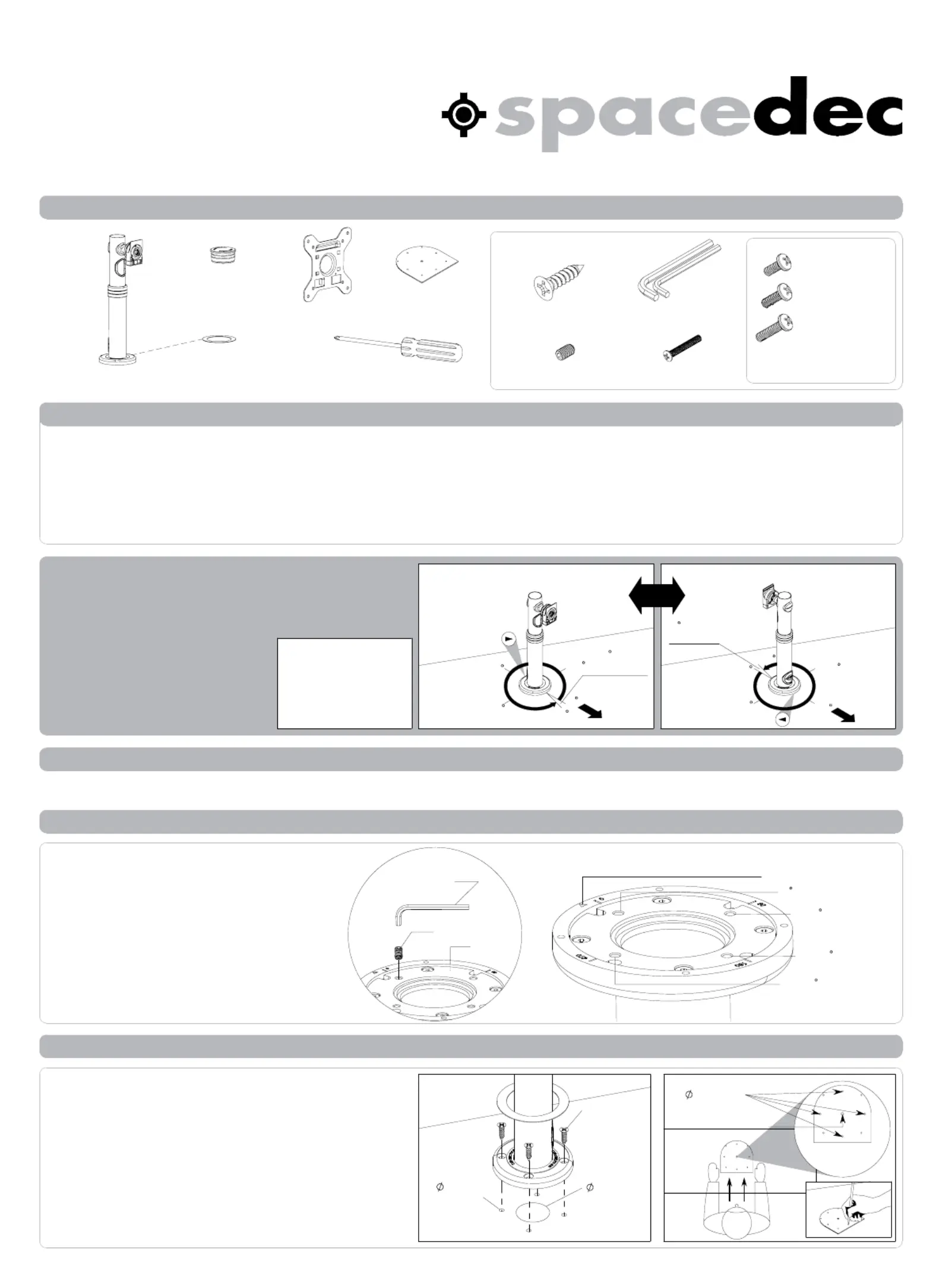
Component Checklist
3/2.5mm
Allen Key (x1 each)
M4x12mm (x4)
M4x16mm (x4)
POS Assembly (x1)
Screw Cover (x1)
VESA Plate (x1)
Top Cap (x1)
14 Gauge
Screws (x4)
Installation
Template (x1)
M4x10mm (x4)
90
180
270
355
5
Gap in
Rotation
0
90
180
270
355
0
5
Gap
in Rotation
USER
USER
Direction
Arrow
Direction Arrow
LOCKING HOLES
Direction Arrow
0
Locking Hole (Fixed)
0-90
Locking Hole
0-180
Locking Hole
0-270
Locking Hole
Base Plate
M5 Grub Screw
2.5mm Allen Key
4x
3mm (0.12")
Pilot Holes
45mm
(1.75") Cable
Access Hole
14 Gauge
Screws (x4)
INSTALLATION
TEMPLATE
4x
3mm (0.12")
USER
Security Screw (x1)
Installation Instructions
SD-POS-HA
Display l POS Height Adjustable
IMPORTANT INFORMATION:
Step 1. Check Components
Step 2. Limit Rotation
Step 3. Locate and Secure your POS Height Adjustable
! IMPORTANT - Install Spacedec POS Height Adjustable as per Installation Instructions.
! This product supports a maximum load of 20kg (44lbs).
! This product supports VESA mounting hole configurations: 75x75mm and 100x100mm.
! The height adjustment range (from desk level to the centre of the screen) 330-450mm (12.99"-17.72").
Display Mounting
Screws
Hardware
Your SD-POS-HA offers 355°
of Rotation. This can also be
limited to suit a specific
application. The direction in
which you mount SD-POS-HA
will determine where the 5°
gap in rotation is located,
and how you choose to limit
the rotation.
Determine the degree of rotation
A.
you require
(refer to Mounting Options above).
To limit the rotation, use the
B.
2.5mm Allen Key to insert the
supplied M5 Grub Screw into your
chosen Locking Hole until it sits
flush with the Base Plate.
NOTE: If you want the full
355° rotation, you do NOT
need to install a grub screw.
Mounting Options
Rotation Options
0° Rotation (Fixed)
0-90° Rotation
0-180° Rotation
0-270° Rotation
0-355° Rotation
OR
Position the Installation Template in the desired
A.
location on your work surface. Ensure the straight
edge sits perpendicular with the User’s line of
sight. Mark the center points of each of the
required holes onto the work surface with a pencil.
Drill 4 x 3mm (0.12") Pilot Holes to a depth of
B.
15mm (0.59"). Use a 45mm (1.75") hole saw to
drill the Cable Access Hole in the work surface.
Reposition SD-POS-HA with the “Direction Arrow”
C.
pointing in the direction required for your chosen
rotation. Secure the SD-POS-HA to the work surface
using the supplied 14 Gauge Screws (x4).
Check you have received all parts against the component checklist and Hardware above.
Pilot Holes
Cable Access Hole
NOTE: Philips-head
screwdriver not supplied
Centre for 45mm (1.75")
(optional)
! The minimum thickness of the mounting surface is 15mm (0.59") when using the manufacturer supplied Hardware.
! The manufacturer accepts no responsibility for incorrect installation.


Produkt Specifikationer

Mærke: Atdec
Kategori: Ikke kategoriseret
Model: SD-POS-HA
Produktfarve: Sort
Monteringstype: Gulv
Højde (efter britisk standard): 17.91 "
Maksimal vægtkapacitet: 20 kg
Minimal skærmstørrelse kompatibilitet: - "
Montering interface kompatibilitet (min.): 75 x 75 mm
Montering interface kompatibilitet (maks.): 100 x 100 mm

Har du brug for hjælp?

Hvis du har brug for hjælp til Atdec SD-POS-HA stil et spørgsmål nedenfor, og andre brugere vil svare dig


Ikke kategoriseret Atdec Manualer
Ikke kategoriseret Manualer

Nyeste Ikke kategoriseret Manualer

Waterstone

Waterstone 7800 Manual

11 December 2025
Kwikset

Kwikset 258 Manual

11 December 2025
Schlage

Schlage F170 Manual

11 December 2025
Moen

Moen Align 7565EV Manual

11 December 2025
ALNO

ALNO MC10244 Manual

11 December 2025
JET

JET TAK-ZX Manual

11 December 2025
Waterstone

Waterstone 1455 Manual

11 December 2025
Laica

Laica NE2015 Manual

11 December 2025