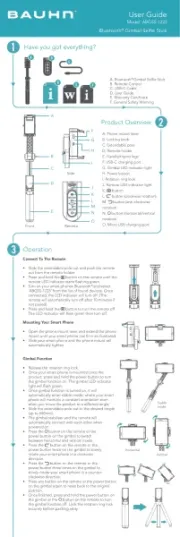
F. General Safety Warning
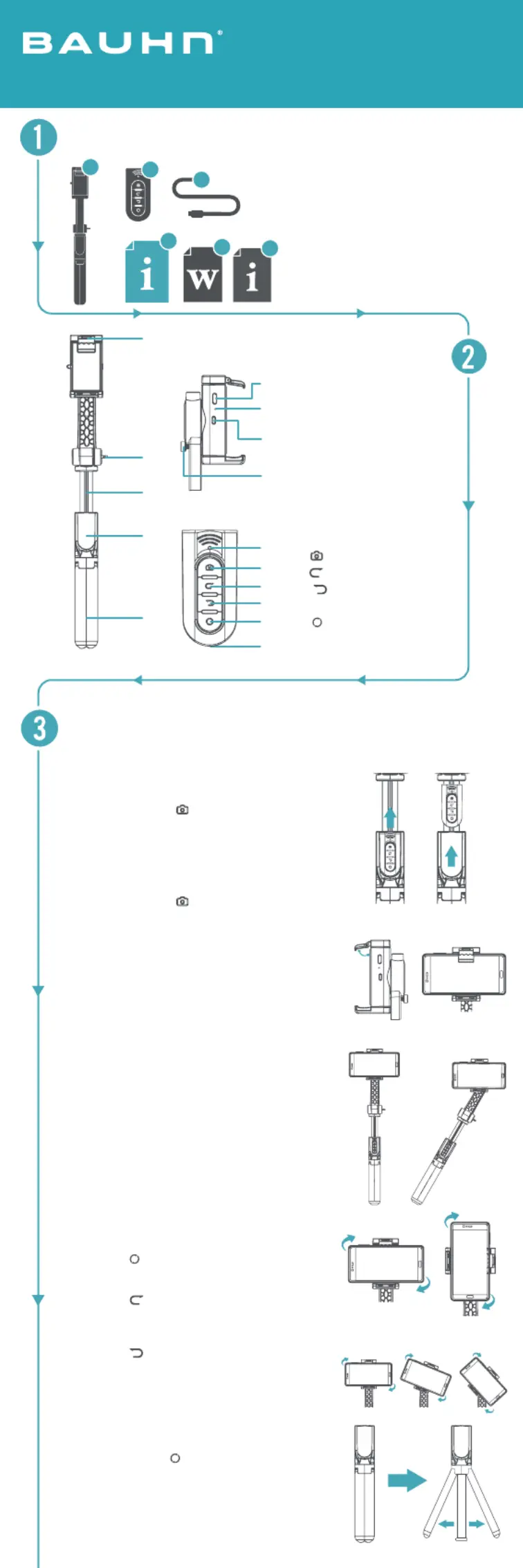
• Slide the extendable pole out and push the remote
out from the remote holder.
button on the remote until the
remote LED indicator starts ashing green.
• Turn on your smart phones Bluetooth
‘ABGSS-1223’ from the list of found devices. Once
connected, the LED indicator will turn off. (The
remote will automatically turn off after 10 minutes if
• Press and hold the button to turn the remote off.
The LED indicator will ash green then turn off.
Mounting Your Smart Phone
• Open the phone mount lever and extend the phone
mount until your smart phone can t in as illustrated.
• Slide your smart phone and the phone mount will
• Release the rotation ring lock.
• Once your smart phone is mounted onto the
product, press and hold the power button to turn
the gimbal function on. The gimbal LED indicator
• Once gimbal function is turned on, it will
automatically enter stable mode; where your smart
phone will maintain a constant orientation even
when you move the product to a different angle.
• Slide the extendable pole out to the desired length
• The gimbal stabiliser and the remote will
automatically connect with each other when
button on the remote or the
power button on the gimbal to switch
between horizontal and vertical mode
• Press the button on the remote or the
power button twice on the gimbal to slowly
rotate your smart phone in a clockwise
• Press the button on the remote or the
power button three times on the gimbal to
slowly rotate your smart phone in a counter-
• Press any button on the remote or the power button
on the gimbal again to reset back to the original
• Once nished, press and hold the power button on
the gimbal or the button on the remote to turn
the gimbal function off. Lock the rotation ring lock
securely before packing away.
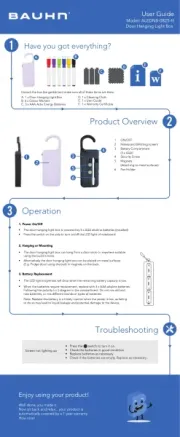
G. Gimbal LED indicator light
J. Remote LED indicator light
L. button (clockwise rotation)
M. button (anti-clockwise
N. button (horizontal/vertical
O. Micro USB charging port