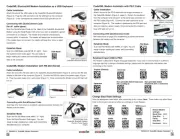
Code Corporation CodeXML M3 Manual


Læs gratis den danske manual til Code Corporation CodeXML M3 (2 sider) i kategorien Netværkskort/adapter. Denne vejledning er vurderet som hjælpsom af 10 personer og har en gennemsnitlig bedømmelse på 4.2 stjerner ud af 5.5 anmeldelser. Har du et spørgsmål om Code Corporation CodeXML M3, eller vil du spørge andre brugere om produktet?

Side 1/2
Connecting with QuickConnect Code
Scan the QuickConnect Code on the label of the CodeXML M3 Bluetooth® Modem using
the Code Reader with which you wish to establish a paired connection. The reader and
computer should connect within 10 seconds. The reader will beep once as con rmation,
the modems LED light will become solid once the connection is established. If the reader
does not connect, the reader will beep four times in rapid succession.
English (Default) Universal French German
CodeXML M3 Bluetooth® Modem Installation as a USB Keyboard
Figure 3
Attach the end of the USB cable to the CodeXML M3 Bluetooth® Modem (Figure 2). Plug
the USB connector into the USB port on the computer (Figure 3). Once plugged in the
modems blue LED light will ash.
Figure 2
Establish Mode
Establish connection (see above), then scan the USB Mode code
(M708_01). Scan the QuickConnect Code again. You are ready to begin
reading bar codes and transmitting data to the computer.
USB Cable installed to
CodeXML M3 Bluetooth® Modem
USB Mode
Non-printable ASCII
Keyboard (Crtl + character)
Japanese
Non-printable ASCII Keyboard
(No Leading 0)
Keyboard Input (USB)
The modem is defaulted to English language keyboards. If you need to communicate in a
dierent language requiring a change in keyboard settings, please scan the appropriate
code below, after connecting to the modem:
CodeXML M3 Blueooth® Modem Installation as a RS-232 (Serial)
Figure 4 Figure 5
Figure 6
Figure 7
Attach the end of the RS-232 cable to the CodeXML M3 Bluetooth® Modem
(Figure 4). Connect the RS-232 adapter to the back of the computer (Figure 5).
Connect the RS-232 cable to the power supply (Figure 6). Plug the power supply into
a wall socket (Figure 7). Once connected the Modems blue LED light will turn on.
RS-232 Cable (Left), CodeXML M3
Bluetooth® Modem (Center), Power
Supply (Right)
Change Baud Rate Settings: Scan the appropriate code below, after connecting to
the modem:
Note: Codes only aect Baud Rate for the modem and do not affect any settings on Code Readers.
9600
(Default) 19200 38400
57600 115200
Default Modem
settings:
Baud Rate: 9600
Stop Bits: 8
Parity: None
Stop Bits: 1
Hardware: None
Connecting with QuickConnect Code
See instructions on page 2 for establishing a Bluetooth connection between the modem
and the reader.
Establish Mode
Establish connection (see page 2), then scan the RS-
232 Mode code (M661_01). Scan the QuickConnect
Code again. You are ready to begin reading bar codes
and transmitting data to the computer.
RS-232 Mode
2 C003996_03_CodeXML_M3_Modem_Quickstart
C003996_03_CodeXML_M3_Modem_Quickstart 3


Produkt Specifikationer

Mærke: Code Corporation
Kategori: Netværkskort/adapter
Model: CodeXML M3
Bredde: 69.85 mm
Dybde: 81.28 mm
Højde: 25.4 mm
Produktfarve: Sort
Driftstemperatur (T-T): 0 - 70 °C
Bluetooth-version: 2.0+EDR
Forbindelsesteknologi: Trådløs
Certificering: CE, FCC
Modemhastighed: 115 Kbit/s
Wi-Fi-bånd: Enkelt band (2,4 GHz)
LED-indikatorer: Ja
Udgangsspænding: 5 V
Bæredygtighedscertifikater: RoHS
Understøttede Windows-operativsystemer: Ja
Understøttede Linux-operativsystemer: Ja
Grænseflade: Bluetooth
Intern: Ingen
Antenne: Ja
Maksimal dataoverførselshastighed: 1 Mbit/s
Plug and play: Ja
Strømforbrug: 100 mA
Maksimal driftstilstand: 10 m
Spread-spectrum-metode: FHSS
Tilslutning til pc: Ja

Har du brug for hjælp?

Hvis du har brug for hjælp til Code Corporation CodeXML M3 stil et spørgsmål nedenfor, og andre brugere vil svare dig


Netværkskort/adapter Code Corporation Manualer

Netværkskort/adapter Manualer

Nyeste Netværkskort/adapter Manualer

Approx

Approx APPUSB900 Manual

29 November 2025
D-Link

D-Link DWA-548 Manual

29 November 2025
EXSYS

EXSYS EX-62026POE Manual

28 November 2025
Digitus

Digitus DA-70852 Manual

28 November 2025
EXSYS

EXSYS EX-62010POE-SFP Manual

28 November 2025
D-Link

D-Link DWA-140 Manual

27 November 2025
D-Link

D-Link DUB-E135 Manual

27 November 2025
D-Link

D-Link DUB-E255 Manual

26 November 2025
Digitus

Digitus DA-70856 Manual

26 November 2025