CyberPower GXS604C2 Manual

CyberPower stikdase GXS604C2
Læs gratis den danske manual til CyberPower GXS604C2 (1 sider) i kategorien stikdase. Denne vejledning er vurderet som hjælpsom af 2 personer og har en gennemsnitlig bedømmelse på 4.9 stjerner ud af 1.5 anmeldelser. Har du et spørgsmål om CyberPower GXS604C2, eller vil du spørge andre brugere om produktet?

Side 1/1
FEATURES
YOUR ULTIMATE ALLY IN POWER
Cyber P er Systems (USA), Inc. ow
4241 12th Avenue East, Suite 400 | Shakopee, MN 55379
CyberP erSystems.com ow
SPECIFICATIONS
K01-1101151-P0
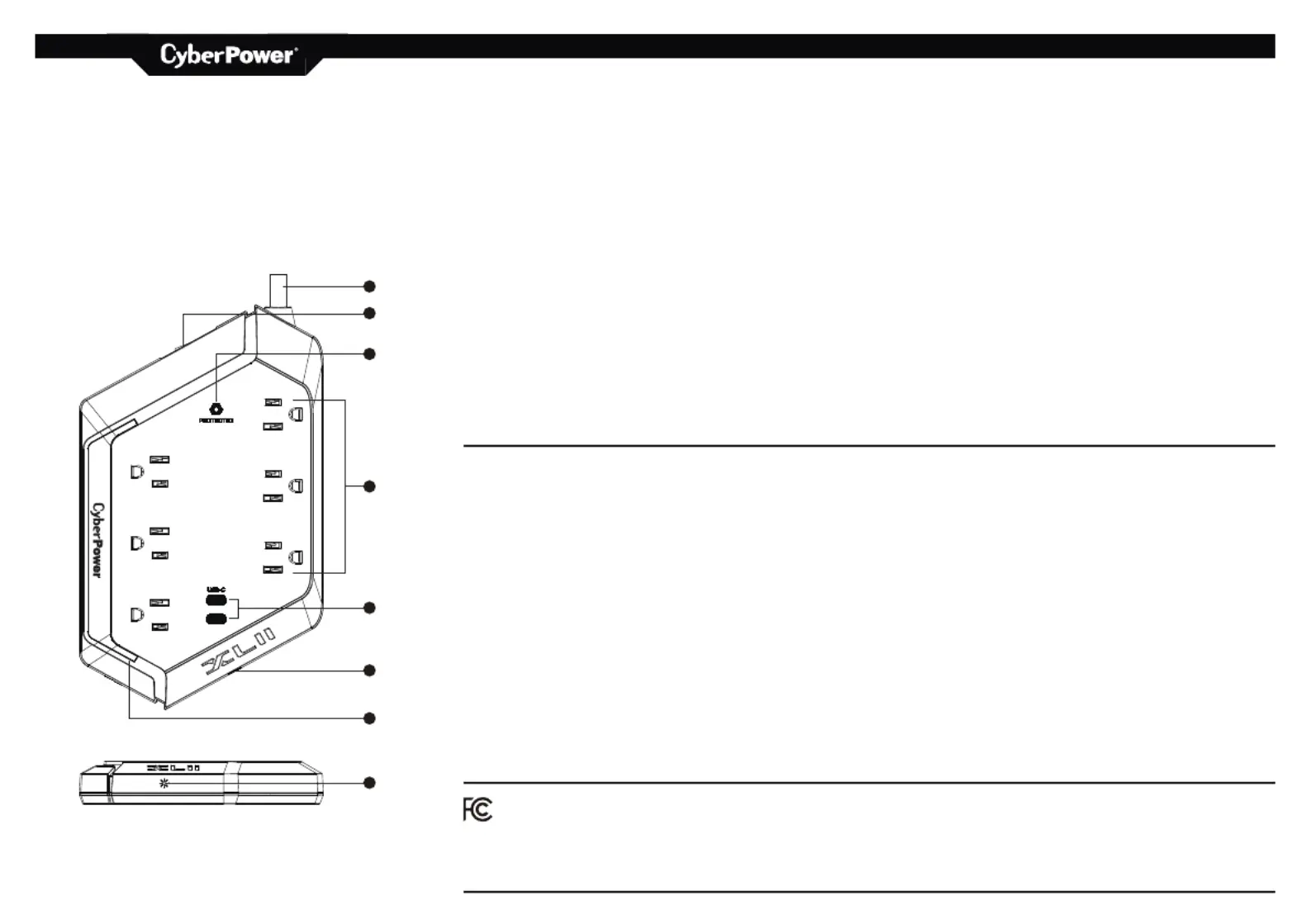
1. ON/OFF Reset Control Switch and Circuit Breaker
15A breaker. When an overload occurs, it will
automatically switch o˜. To resume operation, ensure the
overload condition is removed and reset the surge
protector by switching the unit ON.
2. Protected LED Indicator
Illuminated when the surge protection feature is working
properly.
3. Standard Grounded Outlets (6)
4. USB-C Charging Ports (2)
5. Customizable RGB Accent Lighting
6. Power Cord
7. Capacitive Touch RGB Light Control
Model Number: GXS604C2
Outlets: Standard Grounded Outlets (6),
USB-C Charging Ports (2)
P er Cord Length: 4 ft ow
Surge Protection: 2400 Joules
USB Charging Output: USB-C 5V / 3.6A
USB Total Output: 18W
Electrical Rating: 125V/15A/1875W
UL Clamping Voltage: UL1449 4th/800V(L-N, L-G, N-G)
Maximum Peak Current: 60,000 A
3 AC Lines Protected: L-N: 30,000 A; L-G: 15,000 A;
N-G: 15,000 A
Response Time: Less than 1 nanosecond
Circuit Breaker: Resettable 15 Amp
6-OUTLET
SURGE PROTECTOR
with 2 USB PORTS
GXS604C2
TECHNICAL SUPPORT
Visit: CyberP erSystems.com/support ow
Toll-Free: 1-877-297- 37 69
© 2025 Cyber Power Systems (USA), Inc. All rights reserved.
CyberPower and the CyberPower logo are trademarks of Cyber Power
Systems, Inc., and/or a°liates, which are registered in many countries and
regions. All other trademarks are the property of their respective owners.
TROUBLESHOOTING
If the ON/OFF Reset Control switches to the OFF position, the 15-amp circuit
breaker may have been tripped. Examine your connected equipment and
remove the device overloading the circuit, causing the trip. Then, turn the
ON/OFF Reset Control back to RESET.
If the PROTECTED indicator does not light, the surge protector’s outlets are no
longer protected from power surges or spikes. The surge protector may have
received a power surge or spike beyond its specified limits that have
overloaded the protection circuitry and rendered it inactive. The surge
protector has protected your connected equipment as designed, but it will not
protect against future surges and spikes. It should be replaced.
i WARNING: This product can expose you to chemicals including vinyl chloride
and bisphenol A (BPA), which are known to the State of California to cause
cancer and birth defects or other reproductive harm.
For more information go to www.P65Warnings.ca.gov.
CAUTION
TO REDUCE THE RISK OF ELECTRIC SHOCK:
Use only in dry locations and only indoors.
DO NOT plug into another relocatable power tap.
DO NOT “daisy chain” surge protectors.
DO NOT use with any aquarium equipment.
DO NOT use if properly grounded outlets are not available.
DO NOT install this device if there is less than 10 meters (30 feet) of wire between
the electrical outlet and electrical service panel.
DO NOT use for medical or life support equipment. This device features an internal
protection that will disconnect the surge protective component at the end of its
useful life, but it will maintain unprotected power to the load.
FOR MORE INFORMATION
Visit CyberPowerSystems.com for more information regarding:
• Product information and certifications
• Product warranty
• Connected equipment guarantee
CONFORMANCE APPROVALS
This device complies with Part 15 of the FCC Rules.
Operation is subject to the following two conditions: (1)
this device may not cause harmful interference, and (2) this device
must accept any interference received, including interference that
may cause undesired operation.
This equipment has been tested and found to comply with the limits
for a Class B digital device, pursuant to Part 15 of the FCC Rules.
These limits are designed to provide reasonable protection against
harmful interference in a residential installation. This equipment
generates, uses, and can radiate radio frequency energy and, if not
installed and used in accordance with the instructions, may cause
harmful interference to radio communications.
However, there is no guarantee that interference will not occur
in a particular installation. If this equipment does cause harmful
interference to radio or television reception, which can be determined
by turning the equipment on and o˜, the user is encouraged to try to
correct the interference by one or more of the following measures:
• Reorient or relocate the receiving antenna.
• Increase the separation between the equipment and receiver.
• Connect the equipment into an outlet on a circuit di˜erent from
that to which the receiver is connected.
• Consult the dealer or an experienced radio/TV technician for help.
WARNING: Changes or modifications not expressly approved by the
party responsible for compliance could void the user’ s authority to
operate the equipment.
RGB Lighting Instructions
Long press the capacitive touch button to turn on and turn o˜.
Double-tap the capacitive touch button quickly to change the brightness setting.
Single-tap the capacitive touch button to cycle through the available RGB
lighting modes.
1
4
5
6
7
7
2
3


Produkt Specifikationer

Mærke: CyberPower
Kategori: stikdase
Model: GXS604C2

Har du brug for hjælp?

Hvis du har brug for hjælp til CyberPower GXS604C2 stil et spørgsmål nedenfor, og andre brugere vil svare dig


stikdase CyberPower Manualer

stikdase Manualer

Nyeste stikdase Manualer

Vevor

Vevor WRC303-SYT Manual

3 December 2025
Vevor

Vevor WRC304-SYT Manual

29 November 2025
Vivanco

Vivanco PC 3W3USB Manual

6 November 2025
Vivanco

Vivanco EP 5SO Manual

2 November 2025
APC

APC AP6120A Manual

6 Oktober 2025
AMX

AMX ABS Manual

14 September 2025
Duro

Duro GT-WSL-01-K Manual

14 September 2025
Intellinet

Intellinet 163620 Manual

13 September 2025