Digital Watchdog DWC-PZCM Manual


Læs gratis den danske manual til Digital Watchdog DWC-PZCM (2 sider) i kategorien Ikke kategoriseret. Denne vejledning er vurderet som hjælpsom af 12 personer og har en gennemsnitlig bedømmelse på 3.5 stjerner ud af 6.5 anmeldelser. Har du et spørgsmål om Digital Watchdog DWC-PZCM, eller vil du spørge andre brugere om produktet?

Side 1/2
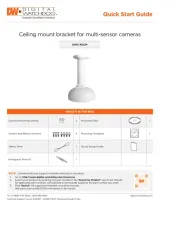
DWC-PZCM
Ceiling mount bracket for multi-sensor cameras
Quick Start Guide
Tel: +1 (866) 446-3595 / (813) 888-9555
Technical Support Hours: 9:00AM – 8:00PM EST, Monday through Friday
digital-watchdog.com
NOTE: Download all your support materials and tools in one place.
1. Go to: http://www.digital-watchdog.com/resources
2. Search your product by entering the part number in the Search by Product search bar. Results
for applicable part numbers will populate automatically based on the part number you enter.
3. Click Search. All supported materials, including manuals
and quick start guide (QSGs) will appear in the results.
WHATS IN THE BOX
Camera Mounting Screws
2
Mounting Pad
1
Screws and Plastic Anchors 4 Mounting Template 1
Safety Wire 1 Quick Setup Guide
Hexagonal Wrench 1
2. Installation 3. Dimension
Quick Manual
Ver. 1.0 / 2020.02
Before installing and using the Camera, please read this manual carefully.
Be sure to keep it handy for future reference.
Please check if all the camera and accessories are included in the package.
Multi-Sensor Outdoor Dome Camera
Ceiling Bracket Manual
1. Accessories
Screw &
Plastic Anchor-4pcs
Manual
Mount Screw Safety Wire
Allen Wrench
Mount Pad
202
278
2
3
4
1
Fix it with Safety Wire on the Bottom
case and fasten it to fit the joint of
Bracket and Bottom case well.
Remove the Rubber cap and tighten it
with a screw.
Secure the dome cover to the camera’s
bottom case using the torx wrench.
Remove the protective film from the
camera’s dome to complete the
installation.
UNLOCK
LOCK
2. Installation 3. Dimension
Quick Manual
Ver. 1.0 / 2020.02
Before installing and using the Camera, please read this manual carefully.
Be sure to keep it handy for future reference.
Please check if all the camera and accessories are included in the package.
Multi-Sensor Outdoor Dome Camera
Ceiling Bracket Manual
1. Accessories
Screw &
Plastic Anchor-4pcs
Manual
Mount Screw Safety Wire
Allen Wrench
Mount Pad
202
278
2
3
4
1
Fix it with Safety Wire on the Bottom
case and fasten it to fit the joint of
Bracket and Bottom case well.
Remove the Rubber cap and tighten it
with a screw.
Secure the dome cover to the camera’s
bottom case using the torx wrench.
Remove the protective film from the
camera’s dome to complete the
installation.
UNLOCK
LOCK
2. Installation 3. Dimension
Quick Manual
Ver. 1.0 / 2020.02
Before installing and using the Camera, please read this manual carefully.
Be sure to keep it handy for future reference.
Please check if all the camera and accessories are included in the package.
Multi-Sensor Outdoor Dome Camera
Ceiling Bracket Manual
1. Accessories
Screw &
Plastic Anchor-4pcs
Manual
Mount Screw Safety Wire
Allen Wrench
Mount Pad
202
278
2
3
4
1
Fix it with Safety Wire on the Bottom
case and fasten it to fit the joint of
Bracket and Bottom case well.
Remove the Rubber cap and tighten it
with a screw.
Secure the dome cover to the camera’s
bottom case using the torx wrench.
Remove the protective film from the
camera’s dome to complete the
installation.
UNLOCK
LOCK
2. Installation 3. Dimension
Quick Manual
Ver. 1.0 / 2020.02
Before installing and using the Camera, please read this manual carefully.
Be sure to keep it handy for future reference.
Please check if all the camera and accessories are included in the package.
Multi-Sensor Outdoor Dome Camera
Ceiling Bracket Manual
1. Accessories
Screw &
Plastic Anchor-4pcs
Manual
Mount Screw Safety Wire
Allen Wrench
Mount Pad
202
278
2
3
4
1
Fix it with Safety Wire on the Bottom
case and fasten it to fit the joint of
Bracket and Bottom case well.
Remove the Rubber cap and tighten it
with a screw.
Secure the dome cover to the camera’s
bottom case using the torx wrench.
Remove the protective film from the
camera’s dome to complete the
installation.
UNLOCK
LOCK
2. Installation 3. Dimension
Quick Manual
Ver. 1.0 / 2020.02
Before installing and using the Camera, please read this manual carefully.
Be sure to keep it handy for future reference.
Please check if all the camera and accessories are included in the package.
Multi-Sensor Outdoor Dome Camera
Ceiling Bracket Manual
1. Accessories
Screw &
Plastic Anchor-4pcs
Manual
Mount Screw Safety Wire
Allen Wrench
Mount Pad
202
278
2
3
4
1
Fix it with Safety Wire on the Bottom
case and fasten it to fit the joint of
Bracket and Bottom case well.
Remove the Rubber cap and tighten it
with a screw.
Secure the dome cover to the camera’s
bottom case using the torx wrench.
Remove the protective film from the
camera’s dome to complete the
installation.
UNLOCK
LOCK
2. Installation 3. Dimension
Quick Manual
Ver. 1.0 / 2020.02
Before installing and using the Camera, please read this manual carefully.
Be sure to keep it handy for future reference.
Please check if all the camera and accessories are included in the package.
Multi-Sensor Outdoor Dome Camera
Ceiling Bracket Manual
1. Accessories
Screw &
Plastic Anchor-4pcs
Manual
Mount Screw Safety Wire
Allen Wrench
Mount Pad
202
278
2
3
4
1
Fix it with Safety Wire on the Bottom
case and fasten it to fit the joint of
Bracket and Bottom case well.
Remove the Rubber cap and tighten it
with a screw.
Secure the dome cover to the camera’s
bottom case using the torx wrench.
Remove the protective film from the
camera’s dome to complete the
installation.
UNLOCK
LOCK
2. Installation 3. Dimension
Quick Manual
Ver. 1.0 / 2020.02
Before installing and using the Camera, please read this manual carefully.
Be sure to keep it handy for future reference.
Please check if all the camera and accessories are included in the package.
Multi-Sensor Outdoor Dome Camera
Ceiling Bracket Manual
1. Accessories
Screw &
Plastic Anchor-4pcs
Manual
Mount Screw Safety Wire
Allen Wrench
Mount Pad
202
278
2
3
4
1
Fix it with Safety Wire on the Bottom
case and fasten it to fit the joint of
Bracket and Bottom case well.
Remove the Rubber cap and tighten it
with a screw.
Secure the dome cover to the camera’s
bottom case using the torx wrench.
Remove the protective film from the
camera’s dome to complete the
installation.
UNLOCK
LOCK


Produkt Specifikationer

Mærke: Digital Watchdog
Kategori: Ikke kategoriseret
Model: DWC-PZCM

Har du brug for hjælp?

Hvis du har brug for hjælp til Digital Watchdog DWC-PZCM stil et spørgsmål nedenfor, og andre brugere vil svare dig


Ikke kategoriseret Digital Watchdog Manualer

Ikke kategoriseret Manualer

Nyeste Ikke kategoriseret Manualer

Waterstone

Waterstone 7800 Manual

11 December 2025
Kwikset

Kwikset 258 Manual

11 December 2025
Schlage

Schlage F170 Manual

11 December 2025
Moen

Moen Align 7565EV Manual

11 December 2025
ALNO

ALNO MC10244 Manual

11 December 2025
JET

JET TAK-ZX Manual

11 December 2025
Waterstone

Waterstone 1455 Manual

11 December 2025
Laica

Laica NE2015 Manual

11 December 2025