Customer Service Tel: 0845 130 5522
ustomer Service Fax: 0845 130 0622
echnical Helpline Tel: 0845 130 7722
Email: customer.care@invensyscontrols.com
User Guide 06490098001 IssA
he Digistat +3RF thermostat is a programmable thermostat
5-2 Day / 7 Day product. 5–2 day allows you to set a program for
weekdays and a program for the weekend. Full 7-day functionality
llows you to set a different program for every day of the week.
ach program type allows you to set 6 time and temperature events.
Your Digistat +3RF is fitted with a real-time clock, which is pre-set
at the factory. You will not have to alter the time settings.
A special feature of this real-time clock is to automatically update
he time during the summer/winter time change removing the
eed to manually alter the clock.
With the unit in Auto mode (the small arrow to bottom of screen
ill point to Auto) the temperature can be changed for a short
ime by using the + or - buttons. Changing the temperature in
his way will keep the Digistat +3RF set to your new temperature
ntil the next pre-programmed event (at which time it will revert
o programmed temperature). The temperature you are setting
will flash on the screen. Once temperature is set, the unit will
revert to showing the current temperature. The indicator will
show on the screen if the heating is turned on.
The Digistat +3RF thermostat is a programmable thermostat
5-2 Day / 7 Day product. 5–2 day allows you to set a program for
weekdays and a program for the weekend. Full 7-day functionality
llows you to set a different program for every day of the week.
ach program type allows you to set 6 time and temperature events.
Your Digistat +3RF comes with the following default settings
re-programmed for your convenience:
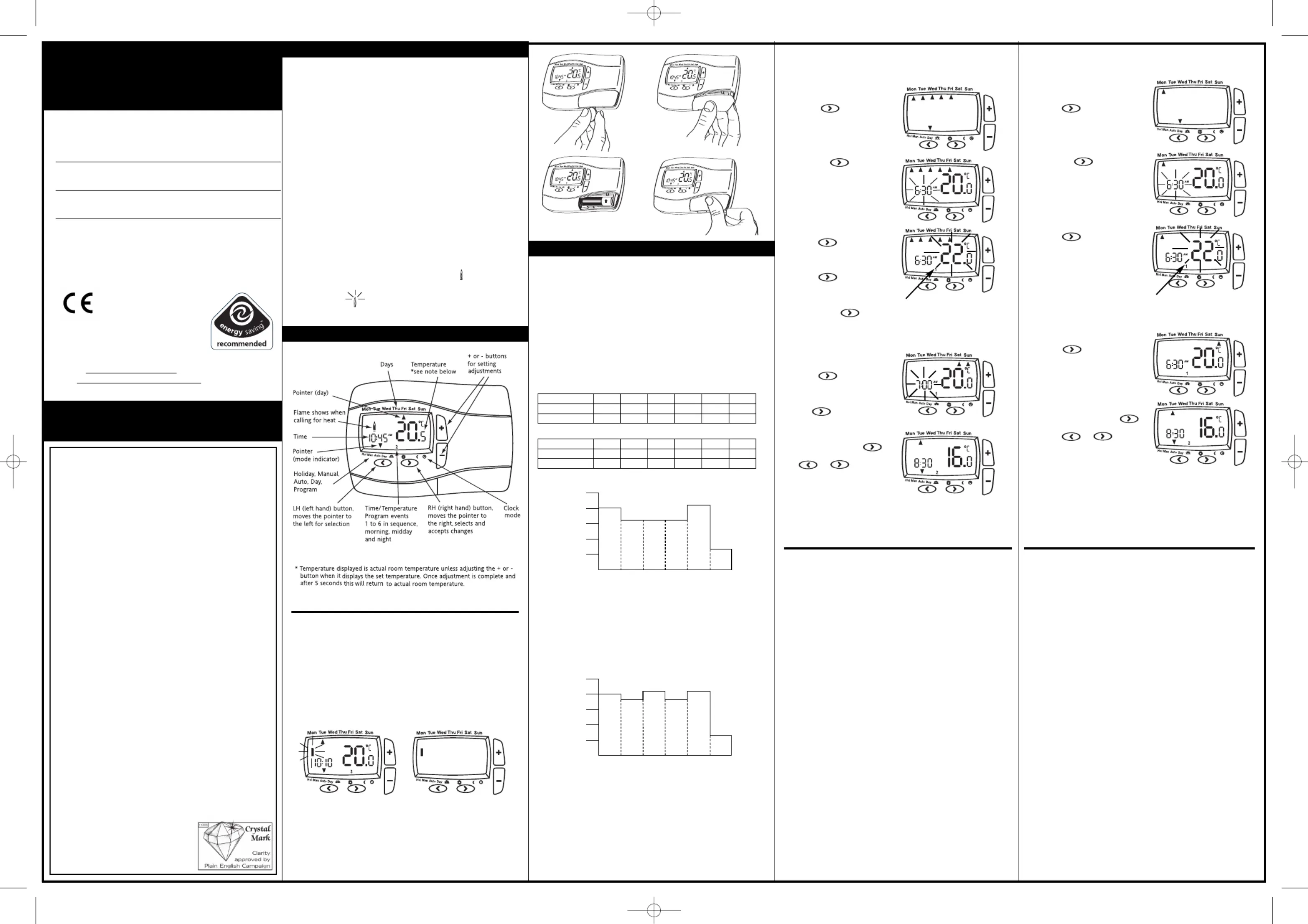
Controls and Display Layout
What is a programmable room thermostat?
...an explanation for householders
A programmable room thermostat is both a programmer and a room
thermostat. A programmer allows you to set ‘On’ and ‘Off
periods to suit your own lifestyle. A room thermostat works by sensing
the air temperature, switching on the heating when the air
temperature falls below the thermostat setting, and switching it off
once this set temperature has been reached.
So, a programmable room thermostat lets you choose what times you
want the heating to be on, and what temperature it should reach
while it is on. It will allow you to select different temperatures in your
home at different times of the day (and days of the week) to meet
Turning a programmable room thermostat to a higher setting will not
make the room heat up any faster. How quickly the room heats up
depends on the design of the heating system, for example, the size of
Neither does the setting affect how quickly the room cools down.
Turning a programmable room thermostat to a lower setting will result
in the room being controlled at a lower temperature, and saves energy
The way to set and use your programmable room thermostat is to
find the lowest temperature settings that you are comfortable with at
the different times you have chosen, and then leave it alone to do its
job. The best way to do this is to set low temperatures first, say 18
and then turn them up by one degree each day until you are
comfortable with the temperatures. You won’t have to adjust the
thermostat further. Any adjustments above these settings will waste
energy and cost you more money
If your heating system is a boiler with radiators, there will usually be only
one programmable room thermostat to control the whole house. But you
can have different temperatures in individual rooms by installing
thermostatic radiator valves (TRVs) on individual radiators. If you don’t
have TRVs, you should choose a temperature that is reasonable for the
whole house. If you do have TRVs, you can choose a slightly higher
setting to make sure that even the coldest room is comfortable, then
prevent any overheating in other rooms by adjusting the TRVs.
The time on the programmer must be correct. Some types have to be
adjusted in spring and autumn at the changes between Greenwich
Mean Time and British Summer Time.
ou may be able to temporarily adjust the heating programme, for
example, ‘Override’, ‘Advance’ or ‘Boost’. These are explained in the
manufacturer’s instructions.
Programmable room thermostats need
a free flow of air to sense the temperature,
so they must not be covered by curtains
or blocked by furniture. Nearby electric
fires, televisions, wall or table lamps
may prevent the thermostat from
How to replace the batteries see fig 3.
Remove the battery cover using a coin. Replace the spent
2 x 1.5V IEC LR6 (AA) Alkaline batteries
correct orientation. Replace the battery cover pressing fully home.
How do I know when to change the batteries.
When the batteries start to run low a battery icon will flash in the
display, to indicate “low battery” during this time the
will function normally (see fig 1).
Please replace batteries with 2 x 1.5V IEC LR6 (AA) Alkaline batteries.
When the battery icon alone is shown in the display, the batteries
are completely exhausted and the
Digistat +3RF will cease to
function (see fig 2). Re-activate by replacing the batteries.
Dig i
sta t+3RFDigi stat+3R
F
Dra
yton
D
ra y
to n
D
ra y
to n
Dig i
stat+3RFDig i
stat+3RF
Drayton
Time 6:30 8:30 12:00 14:00 16:30 22:30
Temperature 20.0 16.0 16.0 16.0 21.0 7.0
Time 7:00 9:00 12:00 14:00 16:00 23:00
Temperature 20.0 18.0 21.0 18.0 21.0 7.0
06:30 08:30 12:00 14:00 16:30 22:30
Time Period Monday-Friday
07:00 09:00 12:00 14:00 16:00 23:00
Time Period Saturday-Sunday
Pre-set Program 1 (9 til 5)
As you can see, at 06:30 , the heating will come on to raise the
C. A 08:30, the temperature set point is droppedt
C throughout the day, until
16:30 when the temperature increases to 21ºC. The temperature
then drops down to a night-setback temperature of 7ºC until 06:30
when the cycle repeats for the next day
changes to weekend setting see below.
As you can see, at 07:00, the heating will come on to raise the
temperature to 20ºC. At 09:00, the temperature set point is
dropped from 20ºC down to18ºC, it stays at 18ºC until 12:00 when
the heating comes on to raise the temperature to 21ºC. The
temperature stays at 21ºC until 14:00 when it drops down to 18ºC.
At 16:30 the heating comes on to raise the temperature to 21ºC
where it stays until 23:00 when the temperature then drops down
to a night-setback temperature of 7ºC until 07:00 when the cycle
repeats for the next day. (Saturday and Sunday) or changes to
weekday settings see above.
(* small 1 in lower half of screen
hows which time period is being set
e.g. 1=1st period, 2 = 2nd period etc)
. Once time has been set,
To adjust the times and temperatures for 7-Day
. With the product operating
as normal in the Auto mode
ress the + button until the
isplay is flashing and shows.
display will be as shown. The
time will be flashing, use the
or - buttons to adjust the
To adjust the times and temperatures for 5-2 Day
display will be as shown. The
time will be flashing, use the
or - buttons to adjust the
. Once time has been set,
move to the next time and
temperature periods to be
djusted confirming changes
ettings and allow adjustment
se the + and – butons and
5. Once the final temperature
confirm setting. To exit press
return to auto mode with the
bottom arrow pointing at Auto.
(* small 1 in lower half of screen
shows which time period is being set
e.g. 1=1st period, 2 = 2nd period etc)
The unit is now set correctly to follow your required timings.
4. Once Monday has been set,
5. Once the final temperature
to confirm settings. To exit
you return to auto mode with
the bottom arrow pointing
. With the product operating
s normal in the Auto mode
ress the + button until the
isplay is flashing and shows.
flashing flame indicates the product is in intelligent delayed
start mode (see special note).
06490098001 IssA 24-1-07 13/2/07 12:04 Page 1