Name and function of each part 各部件的名称和功能 各部分的名稱及功能 Nama dan fungsi dari setiap bagian각 부분별 명칭 및 기능
ENGLISH
Specifications
Power bank
Manual
How to charge your smartphone or tablet
* Other than a USB Type-C
®
to USB Type-C connector, no other USB cable is provided. Please purchase
separately.
* The actual output value may vary depending on conditions such as the connected device and its OS version.
Charging time may be slow or the device may not charge depending on circumstances.
Connect the charging cable to this product.
Connect the other end of the same
charging cable to your device. Push the
button (approximately 1 s or less) to start
charging.
Once charged, for your safety, remove the
charging cable by following the procedures
described in the illustration in the reverse
order of .
Once charged, for your safety, remove the
charging cable by following the procedures
described in the illustration in the reverse
order of ③→②→①.
To check the remaining charge
How to use the cable connector cap
Coil the cable up, hold the connectors
together and push the cap on.
Insert the coiled up cable into the cable
holder to carry it with this product.
· USB Type-C connector
· Lightning connector
· Micro-B connector
USB Type-C connector
Power
button
USB
Type-C port
How to charge the portable power bank
Connect the charging cable to the USB
Type-C port of this device.
Widen the slit on the band portion and push
one connector through.
Connect the other end of the attached
charging cable to an AC adapter.
This product will start charging when the
AC adapter is plugged into a household
power outlet.
· USB Type-C connector
· USB-A connector
④
USB Type-C connector
USB Type-C port
Power
button
AC adapter
25% or less
50% or less
75% or less
75% or more
Check the remaining charge
Push the power button for about 1 second or shorter.
The 4 blue LEDs will light up corresponding to the
amount of charge left.
Remaining charge indicator
Power button
Approximately 500 cycles
(based on JIS C 8711)
Do not connect to a device such as a smartphone or tabled with a USB Type-C port that
supports input and output. The device may charge this product instead.
规格
移动电源
使用说明书
如何为智能手机或平板电脑充电
* 除了USB Type-C
®
至USB Type-C
®
连接器外,不提供其他USB充电线请额外单独购买。
* 实际输出值可能因连接的设备及其操作系统版本等差异而有所不同。根据情况,充电时间可能会较慢,或
设备可能无法充电。
将充电线的一端连接至本产品。
将充电线的另一端连接至您的设备。按下
按钮(约1秒或更短)即可开始充电。
充电结束后,为安全起见,按图中相反步
骤②→①拔出充电线。
充电结束后,为安全起见,按图中相反步
骤③→②→①拔出充电线。
检查剩余电量
如何使用充电线连接器盖
将充电线卷起来,然后将连接器的两端靠
在一起,最后安上盖子。
将卷好的充电线插入充电器固定器中,随
本产品携带。
·USB Type-C连接器
·Lightning连接器
·Micro-B连接器
USB Type-C连接器
电源按钮
USB Type-C
端口
如何为便携式移动电源充电
将充电线连接至本品的USB Type-C端口。
将盖子连接带上的小孔撑大,然后将一个
连接器穿入。
将充电线的另一端连接至交流适配器。
将交流适配器插入家用电源插座后开始
为本产品充电。
·USB Type-C连接器
·USB-A连接器
④
USB Type-C连接器
USB Type-C 端口
电源按钮
交流适配器
25%或以下
50%或以下
75%或以下
75%或以上
检查剩余电量
按住电源按钮约1秒或更短的时间。
4个蓝色LED灯将亮起,指示剩余电
量。
剩余电量指示灯
电源按钮
约500次循环
(基于JIS C 8711标准)
请勿连接至支持输入和输出的智能手机或平板电脑等设备的USB Type-C端口。否则,此类设
备可能会为本产品充电。
規格
行動電源
手冊
如何為您的智慧型手機或平板電腦充電
如何檢查剩餘電量
如何使用電線接頭附蓋
如何為行動電源充電
④
檢查剩餘電量
Spesikasi
Power bank
Manual
Cara mengisi daya smartphone atau tablet Anda
* Selain konektor USB Type-C® ke USB Type-C®, tidak ada kabel USB lain yang disediakan. Silakan beli secara terpisah.
* Nilai output aktual dapat bervariasi tergantung pada kondisi seperti perangkat yang terhubung dan versi OS-nya.
Waktu pengisian daya mungkin lambat atau perangkat mungkin tidak mengisi daya tergantung keadaan.
Hubungkan kabel pengisi daya ke produk ini.
Hubungkan ujung lain dari kabel pengisi daya
ke perangkat Anda. Tekan tombol (sekitar 1
detik atau kurang) untuk mulai mengisi daya.
Setelah daya terisi, demi keselamatan Anda,
lepaskan kabel pengisi daya dengan mengikuti
prosedur yang dijelaskan dalam ilustrasi,
dengan urutan terbalik ②→①.
Setelah daya terisi, demi keselamatan Anda,
lepaskan kabel pengisi daya dengan mengikuti
prosedur yang dijelaskan dalam ilustrasi,
dengan urutan terbalik ③→②→①.
Untuk memeriksa sisa daya
Cara menggunakan tutup konektor kabel
Gulung kabel ke atas, pegang kedua konektor,
dan masukkan ke dalam tutup.
Gantungkan kabel yang digulung ke penggantung
kabel untuk membawanya bersama produk ini.
· Konektor USB Type-C
· Konektor Lightning
· Konektor Micro-B
Konektor USB Type-C
Tombol
daya
Port USB Type-C
Cara mengisi bank daya portabel
Hubungkan kabel pengisi daya ke port USB
Type-C perangkat ini.
Perlebar celah pada bagian pita dan dorong
masuk satu konektor.
Hubungkan ujung lain dari kabel pengisi daya
ke adaptor AC.
Produk ini akan mulai mengisi daya ketika
adaptor AC dipasang ke stopkontak rumah.
· Konektor USB Type-C
· Konektor USB-A
④
Konektor USB Type-C
Port USB Type-C
Tombol
daya
Adaptor AC
25% atau kurang
50% atau kurang
75% atau kurang
75% atau lebih
Periksa sisa daya
Tekan tombol daya selama sekitar 1 detik atau kurang.
Empat LED biru akan menyala sesuai dengan sisa daya.
Indikator sisa daya
Tombol daya
Kira-kira 500 siklus
(berdasarkan JIS C 8711)
Jangan hubungkan ke perangkat seperti smartphone atau tablet dengan port USB Type-C yang
mendukung input dan output. Perangkat itu malah akan mengisi daya produk ini.
기본 사양
보조 배터리
취급설명서
스마트폰 또는 태블릿 충전 방법
* USB Type-C to USB Type-C
®
커넥터 외에 다른 USB 케이블은 제공되지 않습니다. 별도로
구입하십시오.
* 실제 출력값은 연결된 장치 및 OS 버전과 같은 조건에 따라 다를 수 있습니다. 상황에 따라 충전 시간이
느리거나 기기가 충전되지 않을 수 있습니다.
충전 케이블을 본 제품에 연결합니다.
동일한 충전 케이블의 다른 쪽 끝을
장치에 연결합니다. 버튼을 눌러(약 1초
이하) 충전을 시작합니다.
충전이 완료되면 안전을 위해 그림에
설명된 절차에 따라 ②→①의 역순으로
충전 케이블을 분리합니다.
충전이 완료되면 안전을 위해 그림에
설명된 절차에 따라 ③→②→①의
역순으로 충전 케이블을 분리합니다.
남은 충전량을 확인하려면
케이블 커넥터 캡 사용 방법
케이블을 감고 커넥터를 함께 잡아 캡을
밉니다.
감은 케이블을 케이블 홀더에 삽입하여 본
제품과 함께 휴대합니다.
·USB Type-C 커넥터
·라이트닝 커넥터
·Micro-B 커넥터
USB Type-C 커넥터
전원 버튼
USB
Type-C 포트
휴대용 보조 배터리를 충전하는 방법
충전 케이블을 본 장치의 USB Type-C
포트에 연결합니다.
밴드 부분의 슬릿을 넓히고 한 쪽 커넥터를
밀어 넣습니다.
연결된 충전 케이블의 다른 쪽 끝을 AC
충전 어댑터에 연결합니다.
본 제품은 AC 어댑터를 가정용 전원
콘센트에 꽂으면 충전이 시작됩니다.
·USB Type-C 커넥터
·USB-A 커넥터
④
USB Type-C 커넥터
USB Type-C 포트
전원 버튼
AC 어댑터
25% 이하
50% 이하
75% 이하
75% 이상
남은 충전량 확인
전원 버튼을 약 1초 정도 누릅니다. 4개의 파란색
LED가 남은 충전량에 따라 켜집니다.
남은 충전량 표시기
전원 버튼
약 500 사이클
(JIS C 8711 기준)
입출력을 지원하는 USB Type-C 포트가 있는 스마트폰, 태블릿 등의 장치에 연결하지
마십시오. 장치는 대신 본 제품을 충전할 수 있습니다.
한국어 中文·简体
Compatible models
iPhone or smartphones, tablets, and other small electronics that
charge using USB
* Bluetooth headsets, earphones, and other devices with low
current values may not be charged.
Connector type (power input side) USB Type-C
®
to USB-C
®
port
Rated input voltage 5 V
Rated input current 2.4 A
Connector type (power output side) USB Type-C
®
to USB-C
®
port
Rated input voltage 5 V
Rated input current 2.4 A
Battery type Rechargeable lithium-ion battery
Rated battery capacity 3.6 V, 5000 mAh, 18 Wh
Charging time
Approximately 2 hours 10 minutes
* When using a 5 V/2.4 A AC charger
* This is an estimate for when only this product is being charged.
External
dimensions (W x D x H) Approximately 80 × 32 × 105 mm/Approximately 3.1 × 1.3 × 4.1 in
Weight Approximately 180 g (Approximately 6.3 oz)
Cycles Approximately 500 cycles
Accessories
USB Type-C
®
to USB Type-C
®
cable (0.1 m/0.3 ft),
cable connector cap
호환 모델
iPhone 또는 스마트폰, 태블릿 PC, USB를 사용하여 충전하는
기타 소형 전자 장치
* 블루투스 헤드셋, 이어폰, 기타 전류값이 낮은 기기는 충전되지
않을 수 있습니다.
커넥터 유형(전원 입력 측) USB Type-C
®
to USB-C
®
포트
정격 입력 전압 5 V
정격 입력 전류 2.4 A
커넥터 유형(전원 출력 측) USB Type-C
®
to USB-C
®
포트
정격 출력 전압 5 V
정격 출력 전류 2.4 A
배터리 유형 충전식 리튬 이온 배터리
정격 배터리 용량 3.6 V, 5000 mAh, 18 Wh
충전 시간
약 2시간 10분 *ㅤㅤ
* 5V/2.4A AC 충전기 사용 시
* 본 제품만 충전되는 경우의 추정치입니다.
외부 치수(폭x깊이x높이) 약 80 × 32 × 105 mm
무게 약 180 g
사이클 약 500 사이클
액세서리
USB Type-C
®
to USB Type-C
®
케이블(0.1m),
케이블 커넥터 캡
兼容型号
采用USB端口充电的iPhone或其他智能手机、平板电脑,及其他小
型电子设备
*低电流值的蓝牙耳机、耳机和其他设备可能无法充电。
连接器类型(电源输入一端) USB Type-C
®
到USB-C
®
端口
额定输入电压 5 V
额定输入电流 2.4 A
连接器类型(电源输出一端) USB Type-C
®
到USB-C
®
端口
额定输出电压 5 V
额定输出电流 2.4 A
电池类型 可充电锂离子电池
电池额定容量 3.6 V,5000 mAh,18 Wh
充电时间
约2小时10分钟
* 使用5 V/2.4 A交流适配器时
* 这是在仅为本产品充电时的预估值。
外形尺寸(宽×深×高) 约80 × 32 × 105 mm
重量 约180 g
充放电循环 约500次循环
配件 USB Type-C
®
至USB Type-C
®
充电线(0.1 m)、充电线连接器盖
Model yang kompatibel
iPhone atau smartphone, tablet, dan elektronik kecil lainnya yang
mengisi daya menggunakan USB
* Headset bluetooth, earphone, dan perangkat lain dengan nilai arus
rendah tidak dapat diisi daya.
Jenis konektor (sisi input daya) Port USB Type-C® ke USB-C®
Tegangan input 5 V
Arus input 2.4 A
Jenis konektor (sisi output daya) Port USB Type-C® ke USB-C®
Tegangan output 5 V
Arus output 2.4 A
Jenis baterai Baterai litium-ion isi ulang
Kapasitas baterai 3.6 V, 5000 mAh, 18 Wh
Waktu pengisian baterai
Kira-kira 2 jam 10 menit
* Saat menggunakan pengisi daya AC 5 V / 2.4 A
* Ini adalah perkiraan apabila hanya produk ini yang diisi daya.
Ukuran luar (P × L × T) Kira-kira 80 × 32 × 105 mm
Berat Kira-kira 180 g
Siklus Kira-kira 500 siklus
Aksesori Kabel USB Type-C® ke USB Type-C® (0,1 m), tutup konektor kabel
Model: DE-C35L-5000
型号: DE-C35L-5000 型式: DE-C35L-5000
Model: DE-C35L-5000
모델명: DE-C35L-5000
Bahasa Indonesia
Connecting to a USB Type-C port that supports input and output
连接至支持输入和输出的USB Type-C端口
若連線至支援輸入和輸出的 USB Type-C 連接埠
Menghubungkan ke port USB Type-C yang mendukung input dan output
입력 및 출력을 지원하는 USB Type-C 포트에 연결
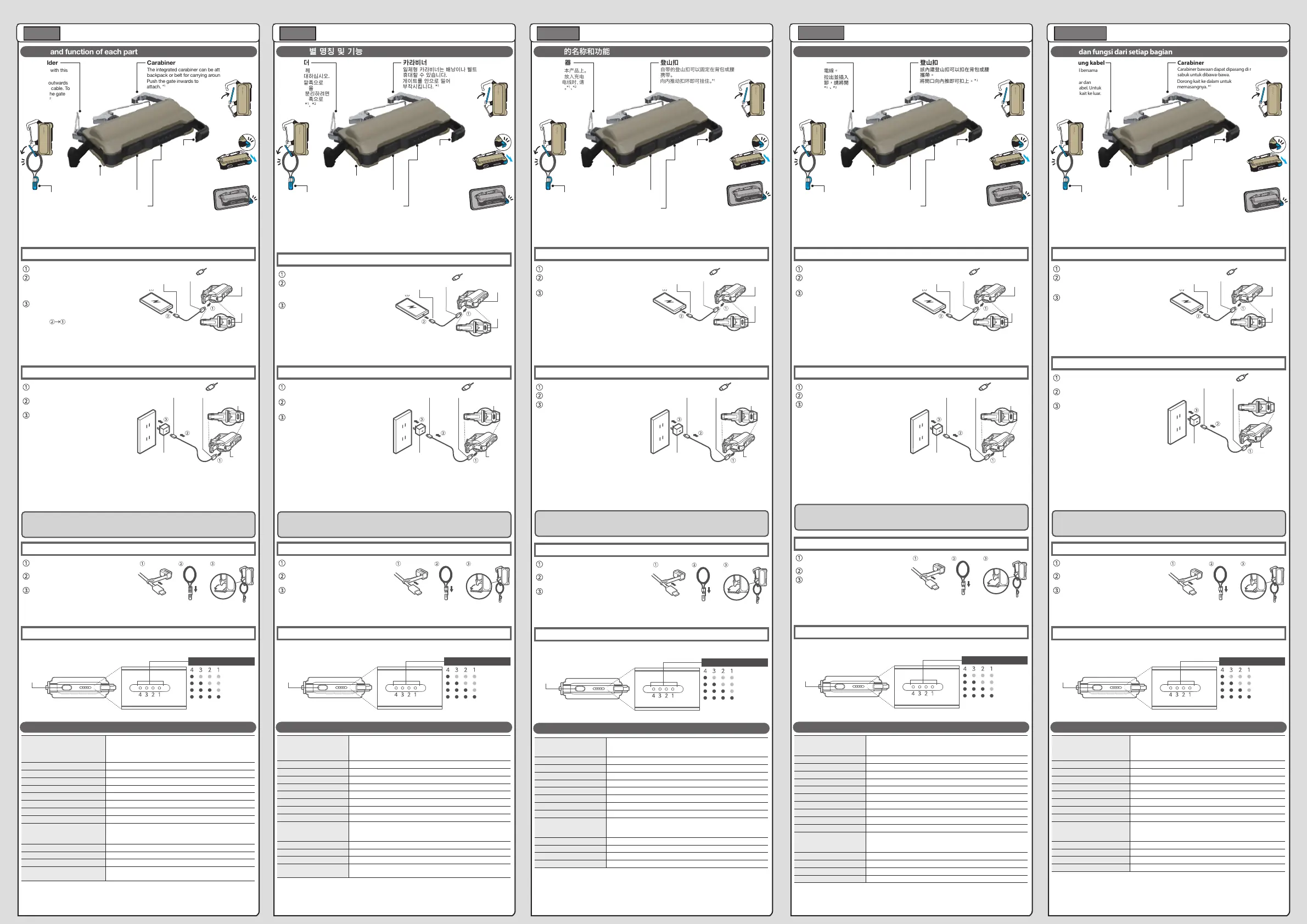
Push the gate inwards to
attach. *
1
Pull the gate outwards
and insert the cable. To
remove, pull the gate
outwards. *
1,
*
2
Carabiner
Cable holder
Carry a cable with this
product.
The integrated carabiner can be attached to a
backpack or belt for carrying around.
Simple smart phone stand
1. Slide the claw out in
the direction of the
arrow indicated by
“STAND
▼
”.
2. Place your smartphone between the
claw and this product, and
rest on a stable
surface such as a
table. *
3
USB Type-C port for output
Switch to check
remaining charge
Cable connector cap
Remaining charge LEDs
*1 Do not attach keys or accessories here. It can cause damage or be lost.
*2 Be sure to open the gate when removing the cable. Forcing the cable out can damage it.
*3 Supports smartphones that are 11 mm thick or thinner. Please understand that depending on the shape of
the device, some devices cannot be supported even if they are less than 11 mm thick.
* Tighten the screw on the carabiner if it loosens up with use. Check and maintain the carabiner regularly.
* Battery levels will decrease if the cable is left attached to this product. Please ensure that the cable is
removed when it is not in use.
* The LED will remain lit up while the USB Type-C connector or Lightning connector cables are attached.
Please ensure that the cable is removed when it is not in use.
* Please understand that depending on the shape and size of the connector, the connector cap may not fit.
* This accessory is not guaranteed to be waterproof. If the connector gets wet, be sure to wipe o any
moisture with a dry cloth before connecting it to this product or your device.
* A 12 W and above AC adapter is recommended.
Charging with an AC adapter or PC that has less than
12 W output can take more time or fail to charge.
* Please ensure that the cable is removed after charging. Leaving the cable attached may cause damage to the
connector.
* When charging, the LED light on the portable power charger will blink according to the amount of battery left.
* The device is fully charged when the LED indicators are either all lit up or not lit up at all.
* This device does not come with an AC adapter. Please prepare an AC adapter with USB Type-C port to use
with the provided cable.
向内推动扣环即可挂住。*
1
向外拉开扣环放入充电
线。要取出充电线时,请
向外拉开扣环。*
1
、*
2
登山扣
充电线固定器
将充电线挂在本产品上。
自带的登山扣可以固定在背包或腰带上,以便于
携带。
简易智能手机支架
1. 将支架脚向
“STAND▼”指示的
箭头方向推出。
2. 将本产品放在桌子等稳定平面上,
然后将智能手机放在支
架脚和本产品之间。*
3
USB Type-C端口(电力输出)
开关用于检查
剩余电量
充电线连接器盖
剩余电量LED灯
*1 请勿在此处挂放钥匙或配件。否则可能会导致损坏或丢失。
*2 取出充电线时请务必打开扣环。强行拉出充电线可能会将其损坏。
*3 支持厚度为11毫米或更薄的智能手机。需要注意的是,由于设备的形状等因素,某些设备即使厚度小
于11毫米,也可能无法支持。
* 在使用过程中,如有松动,请拧紧登山扣上的螺丝。定期检查和维护登山扣。
* 如果一直将充电线连接在本产品上,电池电量将会减少。请确保在不使用时拔下充电线。
* 当USB Type-C连接器或Lightening连接器充电线连接到设备上时,LED灯将保持亮起。请确保在不使
用时拔下充电线。
* 请注意,由于连接器的形状和大小等因素,连接器盖可能不适用。
* 此配件不保证防水。如果连接器被弄湿,请务必在将其连接至本产品或设备之前用干布将其擦干。
* 建议使用12 W及以上的交流适配器。使用输出功
率小于12 W的交流适配器或电脑充电可能需要更
长的时间或无法充电。
* 充电结束后请确保拔下充电线。未拔下充电线可能导致连接器损坏。
* 充电时,移动电源上的LED灯将根据电池的剩余电量闪烁。
* LED灯完全亮起或完全熄灭后,本产品充电完毕。
* 本产品不附带交流适配器。请准备带有USB Type-C端口的交流适配器,以便与随附的充电线一同使用。
* 消费者若使用电源适配器供电,则应购买配套使用获得CCC认证并满足标准要求的电源适配器。
登山扣
電線固定器
簡易智慧型手機支架
USB Type-C 輸出連接埠
切換即可查看
剩餘電量
電線接頭附蓋
剩餘電量 LED 燈
Dorong kait ke dalam untuk
memasangnya. *
1
Tarik kait ke luar dan
gantungkan kabel. Untuk
melepas, tarik kait ke luar.
*
1
, *
2
Carabiner
Penggantung kabel
Bawalah kabel bersama
produk ini.
Carabiner bawaan dapat dipasang di ransel atau
sabuk untuk dibawa-bawa.
Dudukan smartphone
sederhana
1. Geser keluar bagian
ujung ke arah panah
yang ditunjukkan oleh
"STAND
▼
”.
2. Tempatkan smartphone Anda di antara
bagian ujung dan produk ini,
lalu letakkan di
permukaan yang stabil
seperti meja. *
3
Port USB Type-C untuk output
Tombol untuk
memeriksa sisa daya
Tutup konektor kabel
LED sisa daya
*1 Jangan pasang kunci atau aksesori di sini. Hal ini dapat menyebabkan kerusakan atau hilang.
*2 Pastikan untuk membuka kait saat melepas kabel. Memaksa kabel keluar dapat merusaknya.
*3 Mendukung smartphone dengan ketebalan 11 mm atau lebih tipis. Perhatikan bahwa tergantung pada bentuk
perangkat, beberapa perangkat tidak dapat didukung meskipun tebalnya kurang dari 11 mm.
* Kencangkan sekrup pada carabiner jika mengendur karena digunakan. Periksa dan rawat carabiner secara teratur.
* Baterai akan berkurang jika kabel dibiarkan terpasang pada produk ini. Pastikan kabel dilepas saat tidak digunakan.
* LED akan tetap menyala saat konektor USB Type-C atau kabel konektor Lightning terpasang. Pastikan kabel dilepas
saat tidak digunakan.
* Perhatikan bahwa tergantung pada bentuk dan ukuran konektor, tutup konektor mungkin tidak pas.
* Aksesori ini tidak dijamin tahan air. Jika konektor basah, pastikan untuk menyeka cairan dengan kain kering sebelum
menghubungkannya ke produk ini atau perangkat Anda.
* Disarankan untuk menggunakan adaptor AC 12 W ke atas.
Mengisi daya dengan adaptor AC atau PC yang memiliki
output kurang dari 12 W dapat memakan waktu lebih lama
atau gagal mengisi daya.
* Harap pastikan bahwa kabel dilepas setelah mengisi daya. Membiarkan kabel terpasang dapat menyebabkan
kerusakan pada konektor.
* Saat mengisi daya, lampu LED pada pengisi daya portabel akan berkedip sesuai dengan sisa baterai.
* Perangkat terisi penuh ketika indikator LED semuanya menyala atau semuanya tidak menyala.
* Adaptor AC tidak termasuk saat membeli perangkat ini. Harap siapkan adaptor AC dengan port USB Type-C untuk
digunakan bersama kabel yang disediakan.
게이트를 안으로 밀어
부착시킵니다. *
1
게이트를 바깥쪽으로
당기고 케이블을
연결합니다. 분리하려면
게이트를 바깥쪽으로
당기십시오. *
1
, *
2
카라비너
케이블 홀더
본 제품과 함께
케이블을 휴대하십시오.
일체형 카라비너는 배낭이나 벨트에 부착하여
휴대할 수 있습니다.
간단한 스마트폰 스탠드
1. ‘STAND▼’로
표시된 화살표
방향으로 걸쇠를
밉니다.
2. 걸쇠와 본 제품 사이에 스마트폰을
놓고 테이블과 같은
평평한 표면에 올려
놓습니다. *
3
출력용 USB Type-C 포트
남은 충전량을
확인하기 위해 변경
케이블 커넥터 캡
남은 충전량 LED
*1 여기에 열쇠나 액세서리를 부착하지 마십시오. 손상되거나 분실될 수 있습니다.
*2 케이블을 제거할 때는 반드시 게이트를 여십시오. 케이블을 강제로 빼면 손상될 수 있습니다.
*3 11mm 이하 두께의 스마트폰을 지원합니다. 장치의 모양에 따라 두께가 11mm 미만인 경우에도
일부 장치는 사용이 불가능할 수 있습니다.
* 사용 중 카라비너의 스크루가 느슨해지면 조여주십시오. 카라비너를 정기적으로 점검하고
유지관리하십시오.
* 본 제품에 케이블을 연결한 상태로 두면 배터리가 감소합니다. 케이블을 사용하지 않을 때는 반드시
분리하십시오.
* USB Type-C 커넥터 또는 라이트닝 커넥터 케이블이 연결되어 있으면 LED는 계속 켜져 있습니다.
케이블을 사용하지 않을 때는 반드시 분리하십시오.
* 커넥터의 모양과 크기에 따라 커넥터 캡이 맞지 않을 수 있습니다.
* 본 액세서리는 방수가 아닙니다. 커넥터가 젖었을 경우 본 제품이나 장치에 연결하기 전에 마른 천으로
물기를 닦아내십시오.
* 12W 이상의 AC 어댑터를 사용하는 것이 좋습니다.
출력이 12W 미만인 AC 어댑터 또는 PC 충전은
시간이 더 걸리거나 충전이 되지 않을 수 있습니다.
* 충전 후 케이블을 분리하십시오. 케이블을 그대로 연결해 두면 커넥터가 손상될 수 있습니다.
* 충전할 때 휴대용 전원 충전기의 LED 표시등이 남은 배터리 양에 따라 깜박입니다.
* LED 표시등이 모두치 켜지거나 모두 켜지지 않을 때 장치가 완전히 충전됩니다.
* 본 장치에는 AC 충전 어댑터가 제공되지 않습니다. 제공된 케이블과 함께 사용할 USB Type-C 포트가
있는 AC 어댑터를 준비하십시오.


