Emerson ITM8110 Manual


Læs gratis den danske manual til Emerson ITM8110 (1 sider) i kategorien Ikke kategoriseret. Denne vejledning er vurderet som hjælpsom af 15 personer og har en gennemsnitlig bedømmelse på 4.6 stjerner ud af 8 anmeldelser. Har du et spørgsmål om Emerson ITM8110, eller vil du spørge andre brugere om produktet?

Side 1/1
Visit our website at www.emersonradio.com
To obtain a manual in Spanish, please download it on our website
Https://www.emersonradio.com/documents/
UNAUTHORIZED MODIFICATIONS TO THIS DEVICE COULD VOID MANUFACTURER'S WARRANTY.
ITM8110
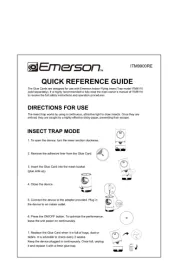
1. To open the device, turn the lower section clockwise.
2. Remove the adhesive liner from the Glue Card.
3. Insert the Glue Card into the mesh basket
4. Close the device.
5. Connect the device to the adapter provided. Plug in
the device to an indoor outlet.
6. Press the ON/OFF button. To optimize the performance,
leave the unit power on continuously.
7. Replace the Glue Card when it is full of bugs, dust or
debris. It is advisible to check every 2 weeks.
Keep the device plugged in continuously. Once full, unplug
it and replace it with a fresh glue trap.
WARNING
W hen using ele ri applian ct c ces, basic precau ion t s should alway s
be followed, including the following:
1. Read all the ins truc iont s be oref using he t appliance.
2 o . T reduce the ri sk of injur loy, c se ssupervi ion is necess y ar when an appliance i s used
near children . THE APPLIA E NC MUST BE KEPT O T OF TU HE REACH OF
CH LDRI EN AND PETS.
3. Do not con movingtact parts.
4. ONLY use attac ts hmen recommended or sold by the manu fac urert .
5. DO NOT use ou door his appliant s. T ce is NOT designed for ou tdoor use.
6 o s. T di connec urn allt, t con rolst to the off (O) po sition hen remo, t ve plug rom ou f tlet.
7. Do not unplug pulling by on cord . To unplug gra, sp the plug , no he ordt t c .
8. Do not operate any appliance wi th a damaged cord or plug or, after the applian ce
mal uncf tion ors is dropped or damaged in an y manner Re. turn applian ce to the neare st
au horit zed servi ce facility for examina iont
, , repair or ele ri ct cal or me hanic cal
adju menst t.
9 o . T reduce the ri sk of ele rical hockct s , do no t pu appliant ce and adap ter in wa ert or ot her
liquid. D to no ce pla or store appliance where it can fall or be pulled into a tub or in s k.
10 ay. P atten iont to all warning s and au c tionary marking s on he t appliance.
11 hi appliance. T s is no t in endedt for use by per ons s (in ludingc children) wi th redu edc
phy icals , sensory or men alt capabili iet s, or lack of experience and knowledge unles, s
t hey have been given super vision or ins ru iont ct con erningc use o f the appliance b a y
person respon sible or f their safety.
12. DO NOT in er ingers or anys t f other foreign obje cts toin the applian ce.
13. D to no a o ttempt t repair or modi his fy t appliance yourself. Such ac ionst ma iny validate
t he warran andty could lead to produ damagect or per sonal injury .
14. DO NOT clean
this appliance wi th wa ert spray.
15. DO NOT expo hisse t appliance to rain or mois uret .
16. DO NOT use near hea sour t ces, steam or, corrosive .gases
1
17 lwa. A ys plug the appliance dire ly inct to a wall ou tle ort re epc tacle Ne. ver use it with an
ex ensiont cord or power rip st .
18 Unplug. from ou tle whent no int use and be fore ervi s cing leaning or, c replacing he t
G lue Card.
19. ONLY plug into a e cc ssible wall ou le t ts where he t appliance is well-ven ilat ted and
cannot contact bed covering or other ma terials.
20 Colle ed. ct insects in the uni t ma poy se a fire ri sk; replace t Ghe lue Card as needed.
21. To reduce the risk of fire, ct c ele ri sho orck, injury, D NOTO use unau horit zed
replacemen part ts, in ludingc 3D-prin edt components.
22 oid ou. Av t ching he t glue when in ers ting or repla ingc the lue G Card.
23 oid loo. Av king direc tly a t the ligh ourt s ce under insect trap mode for extended periods .
2
1
3
4
2
5
4
5
Adapter x 1
Mesh Basket
Cord
3
4
Make sure the glue side of the glue card is facing up.
5
6
Model ITM8110
5 V DC 0.4A
Power Consumption 2 W
Unit Dimensions 4.76"Wx4.76"Dx8.46"H /121x121x215 mm(Incl.glue cards)
Unit Weight 0.98 Ib / 445 g (Incl. glue cards)
ITM8110
7
Emerson Part No M8110-20250711-0 rin ed. IT 0 P t in Chin a
Ratings
订单号
名称
尺寸
材质
表面处理
备注
KV25-0532X
DYT-15说明书
400*141.5mm
90g 铜版纸
/
印刷要清晰 风琴折, , Emerson logo第一面朝上


Produkt Specifikationer

Mærke: Emerson
Kategori: Ikke kategoriseret
Model: ITM8110

Har du brug for hjælp?

Hvis du har brug for hjælp til Emerson ITM8110 stil et spørgsmål nedenfor, og andre brugere vil svare dig


Ikke kategoriseret Emerson Manualer

Emerson

Emerson ITL7103 Manual

3 November 2025
Emerson

Emerson ITL9907RE Manual

3 November 2025
Emerson

Emerson ITM9900RE Manual

31 Oktober 2025
Emerson

Emerson ITL9905RE Manual

31 Oktober 2025
Emerson

Emerson ITM8110 Manual

30 Oktober 2025
Emerson

Emerson CKS1855 Manual

20 September 2025
Emerson

Emerson MW1101W Manual

19 September 2025
Emerson

Emerson SR5999 Manual

19 September 2025
Emerson

Emerson MW8106W Manual

19 September 2025
Emerson

Emerson BAR800 Manual

19 September 2025

Ikke kategoriseret Manualer

Nyeste Ikke kategoriseret Manualer

Waterstone

Waterstone 7800 Manual

11 December 2025
Kwikset

Kwikset 258 Manual

11 December 2025
Schlage

Schlage F170 Manual

11 December 2025
Moen

Moen Align 7565EV Manual

11 December 2025
ALNO

ALNO MC10244 Manual

11 December 2025
JET

JET TAK-ZX Manual

11 December 2025
Waterstone

Waterstone 1455 Manual

11 December 2025
Laica

Laica NE2015 Manual

11 December 2025