EXSYS EX-62030MPOE Manual

EXSYS Ikke kategoriseret EX-62030MPOE
Læs gratis den danske manual til EXSYS EX-62030MPOE (2 sider) i kategorien Ikke kategoriseret. Denne vejledning er vurderet som hjælpsom af 3 personer og har en gennemsnitlig bedømmelse på 3.6 stjerner ud af 2 anmeldelser. Har du et spørgsmål om EXSYS EX-62030MPOE, eller vil du spørge andre brugere om produktet?

Side 1/2
LED Name Color LED Function
L/A Green
On: Linked
Flashing: Data Transmission
PWR Yellow
Steady on: Switch is powered
Off: No power supply connected
6
5
1
AUFBAU
CONNECTORS & STATUS LEDs HARDWARE INSTALLATION
Switzerland:
EXSYS Vertriebs GmbH
Dübendorfstrasse 17
8602 Wangen
www.exsys.ch
Germany:
EXSYS Vertriebs GmbH
Industriestrasse 8
61449 Steinbach
www.exsys.de
Italy:
EXSYS Italia Srl
Via Belvedere, 45/B
I-22100 Como
www.exsys.it
Anleitung
Vers. 1.1 / 21.10.25
Anleitung
EX-62030MPoE
RJ45 Port:
Procedure for STP Cable Grounding
When using shielded cables to connect two Ethernet devices, a ground loop may occur if the
shielding on the cables generates an additional grounding connection path. This can cause
ground current to flow through to the Ethernet ports and damage the devices. If it is necessary
to use shielded cables, we recommend using a metallic RJ45 connector on one end and a non-
metallic connector on the other end. Alternatively, a patch panel can be used in between the
two devices to prevent ground loops from occurring.
Switch off the power supply before disconnecting modules or wires.
The propper power supply voltage is indicated on the product label. Check the voltage of your
power source to ensure you are using the correct voltage. DO NOT use a voltage higher than
what is specified on the product.
NOTICE & CLEANING
Please read the following installation instructions.
1. Install the EX-62030MPoE on a mounting rail using the DIN-Rail kit.
2. Connect your network devices to the switch using a network cable.
3. Connect the power connector of the optionally available power supply to the terminal block
and switch on the power supply.
4. After the power is turned on, the PWR indicator lights up. If the indicator does not light up,
check that it is connected to the power supply correctly.
5. When all cables are connected correctly, the indicators light up according to the port status
of the LEDs (page 5).
Status LEDs:
To clean the device, please use only a dry, non-fibrous cloth and remove the dirt with light
pressure. In the area of the connections, please make sure that no fibers of the cloth are left in
the socket.
Attention! Never use a moist or wet cloth for cleaning!
MANAGEMENT
Make sure that the IP addresses of the switch and the PC are in the same network segment to
access the switch via the web. The default IP address of the switch is 192.168.1.118.
Open your browser, type the switch's IP address 192.168.1.118 in the address bar and press
'Enter'.
In the user login pop-up window, enter the following username and password.
Username: admin
Password: admin
After confirming your login, you will be taken to the main page of the switch, where you can
change the settings to suit your needs.
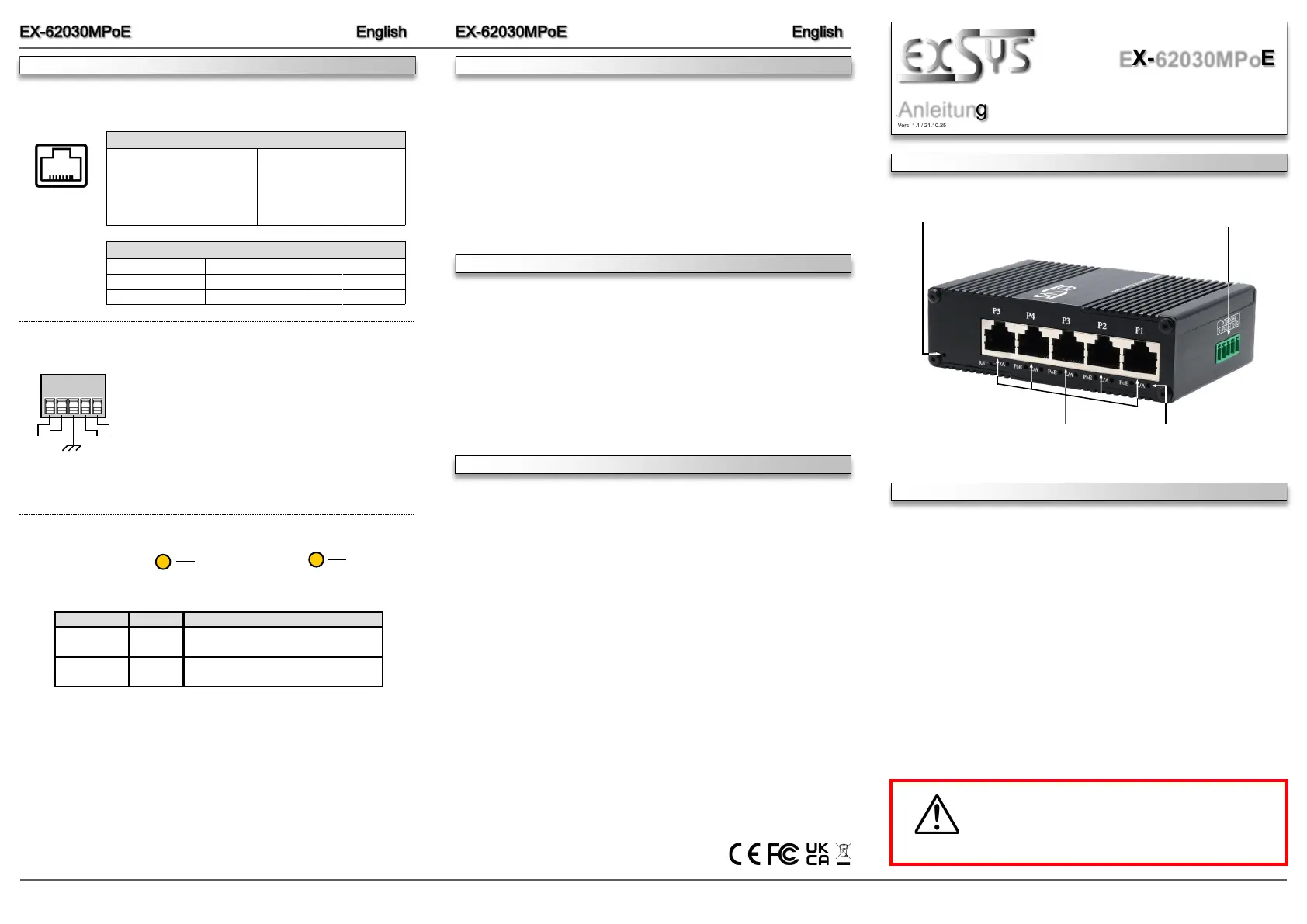
Der kompakte industrietaugliche 5-Port Gigabit Web-Managed PoE-Switch EX-62030MPoE
bietet trotz seiner geringen Aussenmaße volle Gigabit Leistung an allen Ports. An vier der fünf
RJ45-Ports stehen jeweils bis zu 30W für den Anschluss von PoE Powered Devices (PD) wie
z.B. IP-Kameras oder IP-Telefone zur Verfügung. Die benutzerfreundliche Web-basierte
Management-Benutzeroberfläche des EX-62030MPoE ermöglicht eine schnelle und bequeme
Einrichtung, Konfiguration und Verwaltung, inklusive Konfigurationssicherungen und Firmware-
Upgrades. Dank dem robusten Metallgehäuse und dem erweiterten Betriebstemperaturbereich
von -40°C bis 80°C ist er für eine Vielzahl von Anwendungen auch in rauen Umgebungen
geeignet. Die Stromversorgung erfolgt über den Terminal Block (12-48VDC) und kann zur
Verminderungen von Betriebsausfällen auch redundant erfolgen. Im Lieferumfang ist ein DIN-
Rail Kit (vormontiert) und ein Wandmontagebügel enthalten.
BESCHREIBUNG & TECHNISCHE DATEN
12-48V T-Block für optional
erhältliches Netzteil
Status LEDs
5x RJ45
Gigabit PoE
Power LED
Kompatibilität: Gigabit Ethernet 10/100/1000Base-T
PoE: IEEE 802.3af/at (PoE+), Mode/Alternative B
Betriebssysteme: Alle Betriebssysteme
Anschlüsse: 5x RJ45-Buchse, 1x SFP-Slot, 1x Terminal Block 12-48VDC
Lieferumfang: EX-62030MPoE, DIN-Rail Kit, Wandmontagehalterung,
Anleitung
RJ45 Port
Pin Signal PoE Pin Signal PoE
1 BI_DA+ 5 BI_DC- VCC+
2 BI_DA- 6 BI_DB-
3 BI_DB+ 7 BI_DD+ VCC-
4 BI_DC+ VCC+ 8 BI_DD- VCC-
87654321
Power over Ethernet IEEE802.3af/at (PoE+), Mode B
ACHTUNG!
Bei geerdetem Minuspol der Stromversorgung
unbedingt den Technischen Hinweis auf Seite 3
beachten.
Link / Activity LED
PWR LED
Redundant power supply possible to reduce operational failure.
Both power supplies must use the same voltage!
ATTENTION!
Please pay attention to the correct polarity!
Never connect the power supply to the terminal block
while it is switched on!
12V to 48V T-Block:
V- V+ V- V+
GND
PoE Budget
@48VDC @24VDC @12VDC
Total 120W Total 90W Total 60W
30W / Port 22.5W / Port 15W / Port


Produkt Specifikationer

Mærke: EXSYS
Kategori: Ikke kategoriseret
Model: EX-62030MPOE

Har du brug for hjælp?

Hvis du har brug for hjælp til EXSYS EX-62030MPOE stil et spørgsmål nedenfor, og andre brugere vil svare dig


Ikke kategoriseret EXSYS Manualer

EXSYS

EXSYS EX-62030MPOE Manual

3 December 2025
EXSYS

EXSYS EX-6009POE Manual

30 November 2025
EXSYS

EXSYS EX-6083 Manual

28 November 2025
EXSYS

EXSYS EX-46022 Manual

27 November 2025
EXSYS

EXSYS EX-6008POE Manual

26 November 2025
EXSYS

EXSYS EX-42372 Manual

12 November 2025
EXSYS

EXSYS EX-1334HMV-2 Manual

12 November 2025
EXSYS

EXSYS EX-1331TTL-VIS Manual

12 November 2025
EXSYS

EXSYS EX-44044-2 Manual

12 November 2025

Ikke kategoriseret Manualer

Nyeste Ikke kategoriseret Manualer