HID Identity OMNIKEY 3121 Manual

HID Identity kort maskine OMNIKEY 3121

Læs gratis den danske manual til HID Identity OMNIKEY 3121 (2 sider) i kategorien kort maskine. Denne vejledning er vurderet som hjælpsom af 57 personer og har en gennemsnitlig bedømmelse på 4.5 stjerner ud af 29 anmeldelser. Har du et spørgsmål om HID Identity OMNIKEY 3121, eller vil du spørge andre brugere om produktet?

Side 1/2
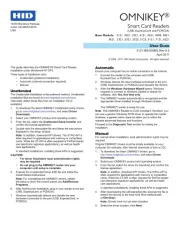
This guide describes the OMNIKEY® Smart Card Reader
installation under Windows® XP SP3.
Three types of installation exist:
Unattended (preferred installation)
Automatic (internet connection required)
Manual
Unattended
The Unattended installation is the preferred method. Unattended
installation les are found at www.hidglobal.com/omnikey.
Optionally, obtain these les from an installation CD (if
available).
1. To download the latest OMNIKEY Unattended setup drivers,
go to: www.hidglobal.com/omnikey, and select Driver
Downloads.
2. Select your OMNIKEY product and operating system.
3. From the list, select the Unattended Setup Installer and
conrm the license agreement.
4. Double-click the executable le and follow the instructions
displayed in the setup window.
Note: In addition, download API drivers. The SYNC-API is
often required for applications with memory or contactless
cards. While the CT-API is often required for PinPad reader
use (electronic signature applications), as well as health
care applications.
In standard installations, installing these APIs is suggested.
CAUTION:
For driver installation local administration rights
may be required.
Do not plug-in the OMNIKEY reader into your
computer until setup is complete.
5. Execute the Unattended Setup.EXE le and follow the
Install Wizard instructions.
Note: For uninstalling the OMNIKEY drivers, restart
the setup or (from the control panel) use Add/Remove
Programs.
6. After nishing the installation, plug-in your reader to the port
(USB, ExpressCard, or PCMCIA).
7. Windows automatically detects and installs the new
hardware connected to the port (USB, ExpressCard, or
PCMCIA).
Automatic
Ensure your computer has an online connection to the Internet.
1. Connect the reader to the computer port (USB,
ExpressCard, or PCMCIA).
2. Windows detects the new hardware connected to the port
(USB, ExpressCard, or PCMCIA) and requests the drivers.
3. After the Windows Hardware Wizard opens. Windows
requests to connect to Windows Update to search for
software, click Yes, this time only.
4. The OMNIKEY reader automatically is recognized and the
appropriate driver installed through Windows Update.
The OMNIKEY reader is ready for use.
Note: This OMNIKEY Reader is CCID compliant, therefore, you
can use a generic Windows CCID driver to operate the reader.
However, a generic driver does not allow you to utilize the
readers advanced features and functions.
Proceed to the Diagnostic Tool section for testing the
installation.
Manual
For manual driver installation, local administration rights may be
required.
Original OMNIKEY drivers must be locally available on your
computer (for example, after internet download or from a CD).
1. To download the latest OMNIKEY drivers, go to:
http://www.hidglobal.com/omnikey, and select Driver
Downloads.
2. Select your OMNIKEY product and operating system.
3. From the list, select the driver for download and conrm the
license agreement.
Note: In addition, download API drivers. The SYNC-API is
often required for applications with memory or contactless
cards. While the CT-API is often required for PinPad reader
use (electronic signature applications), as well as health
care applications.
In standard installations, installing these APIs is suggested.
4. After downloading the self-extracting le, execute the le to
extract the drivers to the local hard drive (default path
c:\Omnikey).
Note: Drivers have not yet been installed.
5. Select the driver location, click Next.
OMNIKEY
®
Smart Card Readers
(USB, ExpressCard and PCMCIA)
Base Models: 3121, 3021, 1021, 6121, 4321, 4040, 3821,
3621, 5321, 6321, 5325, 5125, 5121, 7121, 6221
User GUide
3121-905-ENEN, Rev A.3
April 2011
© 2008 - 2011 HID Global Corporation. All rights reserved.
15370 Barranca Parkway
Irvine, CA 92618-2215
USA


Produkt Specifikationer

Mærke: HID Identity
Kategori: kort maskine
Model: OMNIKEY 3121
Vægt: 141 g
Produktfarve: Sort, sølv
Relativ luftfugtighed ved drift (H-H): 10 - 90 %
Driftstemperatur (T-T): 0 - 55 °C
Dimensioner (BxDxH): 80 x 28 x 67 mm
Strømkilde: USB
Certificering: CE, WEEE, FCC, UL, VCCI, MIC
LED-indikatorer: Ja
Bæredygtighedscertifikater: RoHS
Understøttede Windows-operativsystemer: Ja
Understøttede Mac-operativsystemer: Ja
Understøttede Linux-operativsystemer: Ja
Grænseflade: USB 2.0
Plug and play: Ja
USB-drevet: Ja

Har du brug for hjælp?

Hvis du har brug for hjælp til HID Identity OMNIKEY 3121 stil et spørgsmål nedenfor, og andre brugere vil svare dig