Intermatic EI500C Manual


Læs gratis den danske manual til Intermatic EI500C (6 sider) i kategorien Ikke kategoriseret. Denne vejledning er vurderet som hjælpsom af 4 personer og har en gennemsnitlig bedømmelse på 4.6 stjerner ud af 2.5 anmeldelser. Har du et spørgsmål om Intermatic EI500C, eller vil du spørge andre brugere om produktet?

Side 1/6
Electronic
7-Day
In-Wall
Time Switch
MODEL EI500 Series
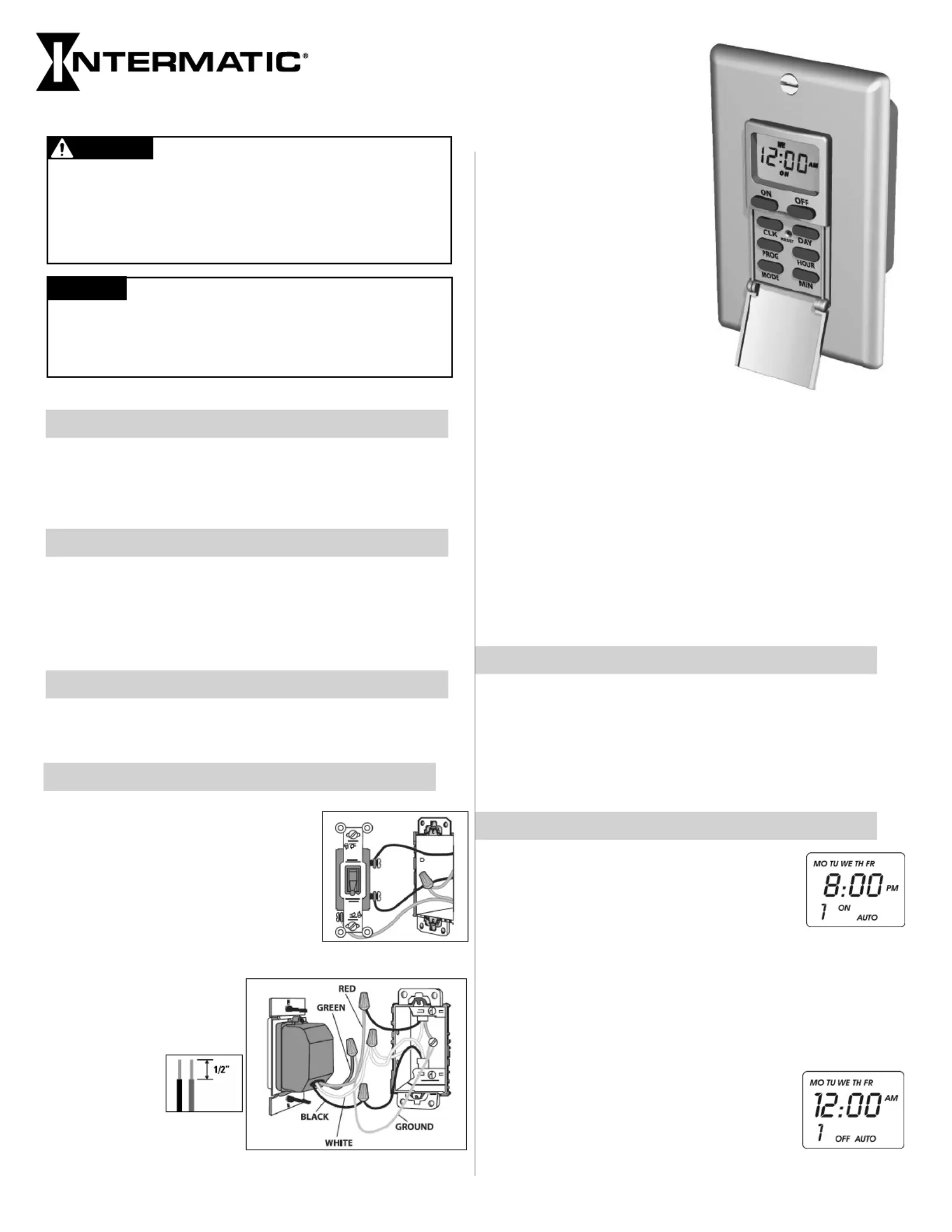
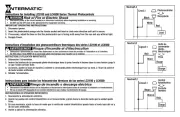
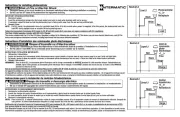
1. Remove wall plate and disconnect
existing light switch.
2. Make sure both “hot” and
“neutral” wires are present in the
completed.
3. Connect red timer wire to wire from
fixture using wire connector.
4. Connect black timer
wire to the “hot” (usually
black or red) wire in
junction box using wire
connector.
5. Cut white
wire in
j u n c t i o n
box (or
open splice) and strip
½” of insulation on both
wires.
Installation Instructions
All Ratings 125 VAC, 60 Hz
15 A / 1875 W Resistive / Heater
15 A, General Purpose
8 A / 1000 W Tungsten
8 A / 1000 VA Inductive / STD Ballast
500 VA Electronic Ballast
1/4 HP Motor
Installation and User Instructions
7-Day Control Schedule
Up to 7 ON and 7 OFF Events per day
Works with multiple load types including: incandescent,
compact fluorescent, HID, motors, and heaters
Available in White, Ivory, and Light Almond
Ratings
Features
Black = Line
White = Neutral
Red = Load
Green = Ground
Leads
6. Connect white timer wire to white wires in junction box
using wire connector.
7. If the wall switch you are replacing had separate grounding
conductors connected to the GREEN screw on the switch,
make sure to connect these to the green wire from the timer
with a wire connector.
8. Check that all wire connections are secure.
9. Place all wires inside junction box.
10. Fit timer into junction box and install using two (2) mounting
screws (furnished).
11. Reconnect the electrical power.
Setting the Clock
1. Press and the (Clock) button.HOLD CLK
2. Press the button until the display shows the current day.DAY
3. Press the HOUR button until the display shows the current
hour.
4. Press the MIN (Minute) button until the display shows the
current minute.
Setting Programs
1. Press the (Program) button once. ThePROG
display will look as shown at the right.
You will now set up the time in which you
want your device turned ON.
The number 1 in the lower left hand corner
indicates that you are now programming
EVENT 1.
2. Press the button repeatedly until the display shows theDAY
day(s) when you want the timer to turn on. The options are:
- All days of the week (MO TU WE TH FR SA SU)
- Individual days of the week (MO etc.)
- Weekdays only (MO TU WE TH FR)
- Weekends only (SA SU)
3. Press the and (Minute) buttonsHOUR MIN
to set the time when you want the timer to
turn on.
4. Press the (Program) button again. ThePROG
display reads as shown at the right.
Disconnect power at the circuit breaker(s) or disconnect
switch(es) before installing or servicing.
Installation and/or wiring must be in accordance with national and
local electrical code requirements.
Use COPPER conductors ONLY.
WARNING
Risk of Fire or Electric Shock
No user-serviceable parts.
The internal battery requires up to 30 minutes to charge. If the
battery is not charged and power is lost, schedule information
may have to be re-configured.
NOTICE


Produkt Specifikationer

Mærke: Intermatic
Kategori: Ikke kategoriseret
Model: EI500C

Har du brug for hjælp?

Hvis du har brug for hjælp til Intermatic EI500C stil et spørgsmål nedenfor, og andre brugere vil svare dig


Ikke kategoriseret Intermatic Manualer
Intermatic

Intermatic EK4536 Manual

12 November 2025
Intermatic

Intermatic LC4521C Manual

11 November 2025
Intermatic

Intermatic OP2GY24 Manual

8 November 2025
Intermatic

Intermatic OP2BK24 Manual

6 November 2025
Intermatic

Intermatic WP1250MXD Manual

5 November 2025
Intermatic

Intermatic OP2BK18 Manual

4 November 2025
Intermatic

Intermatic WP1030MXD Manual

4 November 2025
Intermatic

Intermatic OP5BK24 Manual

4 November 2025
Intermatic

Intermatic OP5GY24 Manual

4 November 2025

Ikke kategoriseret Manualer

Nyeste Ikke kategoriseret Manualer

Topping

Topping DX5 Manual

4 December 2025
CyberPower

CyberPower GX150C2 Manual

4 December 2025
SPT

SPT SM-1024K Manual

4 December 2025
Novy

Novy 990037 Manual

4 December 2025
D&R

D&R Hybrid-2 Manual

4 December 2025
Iogear

Iogear GHDSW4K3 Manual

4 December 2025
Vevor

Vevor WK320016-1 Manual

4 December 2025
ELO

ELO E426554 Manual

4 December 2025