Intermatic ET1115CM Manual


Læs gratis den danske manual til Intermatic ET1115CM (3 sider) i kategorien Ikke kategoriseret. Denne vejledning er vurderet som hjælpsom af 10 personer og har en gennemsnitlig bedømmelse på 4.7 stjerner ud af 5.5 anmeldelser. Har du et spørgsmål om Intermatic ET1115CM, eller vil du spørge andre brugere om produktet?

Side 1/3
Slide down
to remove
battery case
Snap out catch
Tilt top forward
Electronic 24-Hour
Time Switch
Time Switch
Input Voltage: 120/208/240/277 VAC, 60 Hz
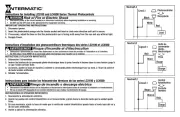
Contact Conguration: SPST (ET1105C), DPST (ET1125C). See
wiring diagrams on next page.
Switch Ratings—ET1105C, ET1125C (per pole)
30 A Inductive/Resistive, 120/240 VAC, 60 Hz
20 A Magnetic Ballast, 120-277 VAC, 60 Hz
1 A Electronic Ballast 120-277 VAC, 60 Hz
20 A Resistive, 28 VDC
5 A Tungsten: 120/240 VAC, 60 Hz
1 HP, 120 VAC, 60 Hz
2 HP, 240 VAC, 60 Hz
Set Points (Events)—Each load output of the Time Switch can sup-
port up to 14 timed ON and 14 timed OFF events per day.
Battery-Powered Clock Operation—3 years minimum (uses 2 AAA
industrial grade alkaline batteries, supplied)
Minimum ON or OFF time—1 minute
Maximum ON or OFF time—23 hours, 59 minutes
Shipping Weight—2.5 lb. (1.1 kg)
Installation and User Instructions
MODEL ET1100 Series
The Intermatic ET1100 Series Electronic 24-Hour Time Switch
automatically switches loads to a preset daily schedule with to-the-
minute accuracy.
Use the ET1100 series as an ON/OFF timer in applications requiring
24-hour load control such as lighting, air conditioning systems, pumps,
etc. Each load output of the Time Switch can support up to 14 timed
ON and 14 timed OFF events per day. The program can be overridden
by pushing the ON/OFF load override button(s).
The ET1100 Series Time Switch is designed to directly switch tungsten
or ballast loads up to its rating, and inductive or resistive loads up to
30 A at 120, 208, 240, or 277 VAC.
Specifications
With Battery
Carryover
Description
Installation Instructions
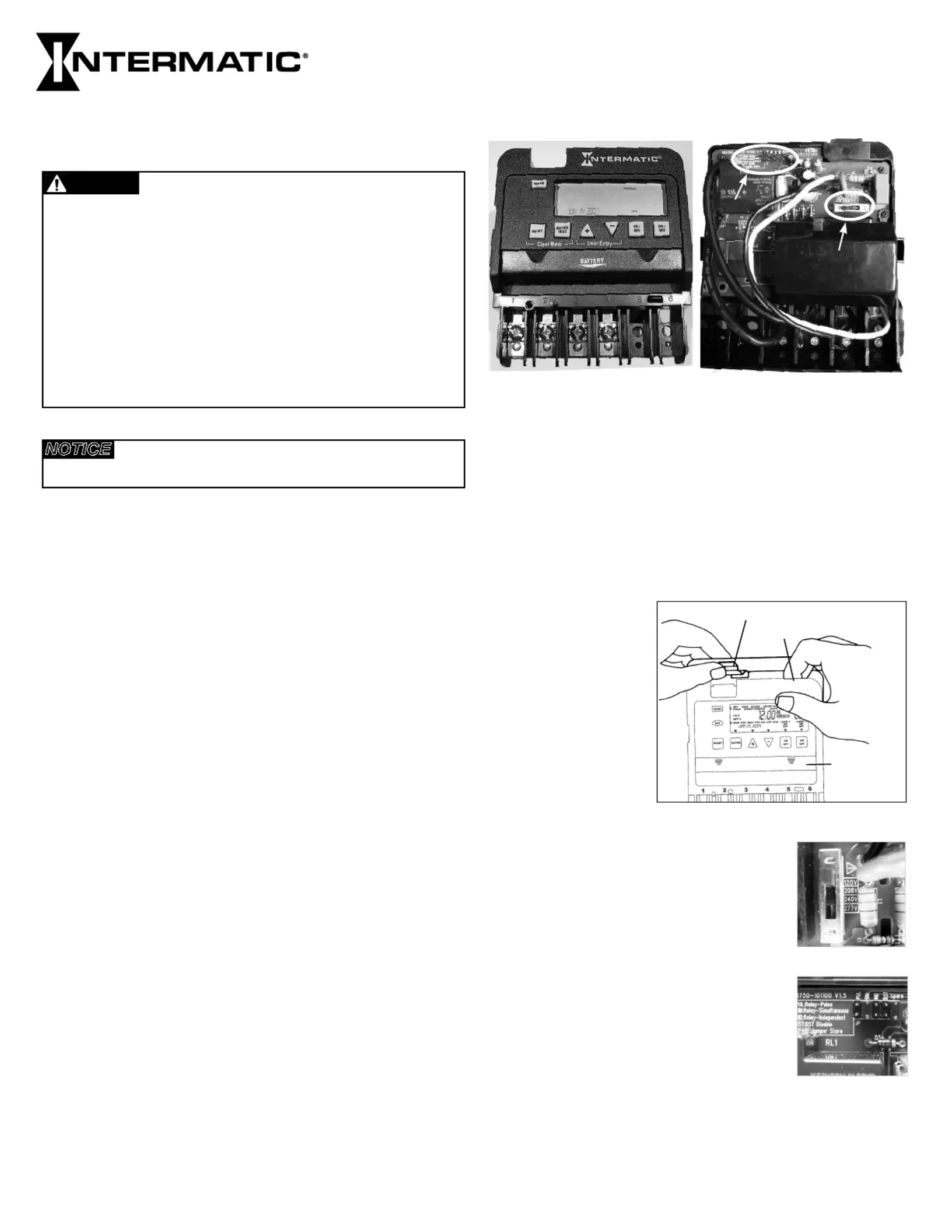
Front View
Rear View
B
A
WARNING
Risk of Fire or Electric Shock
• Disconnect power at the circuit breaker(s) or disconnect switch(es) before installing or servicing.
Installation and/or wiring must be in accordance with national and local electrical code
requirements.
For outdoor locations or wet locations (rain-tight), conduit hubs that comply with requirements of
the UL514B (standard for fitting conduit and outlet boxes) are to be used.
This enclosure does not provide grounding between conduit connections. When metallic conduit
is used, you must also install grounding type bushings and jumper wire.
For plastic enclosures, bonding between conduit connections is not automatic and must be
provided as part of the installation.
• Use #18 - #10 AWG wires, rated at least 75°C - COPPER conductors ONLY.
If the power disconnect point is out of sight, lock it in the OFF position and tag it to prevent
unexpected application power.
Make sure there is no wire insulation under the terminal plate on the time switch connector.
Firmly tighten terminal screws.
• Do not remove insulator that is covering terminals.
• KEEP DOOR CLOSED AT ALL TIMES when not servicing.
NOTICE
Do NOT touch circuit board components, contact can create a static discharge, which can
damage the microprocessor.
1. Remove the mechanism
from the case by
depressing the catch at
the top of the case and
pulling out, as shown.
3. The timer is shipped with DST (Daylight Saving
Time) enabled. To disable DST, insert a jumper
at location marked DST. See location in Rear B
View above and detail at the right.
4. ET1125C ONLY—Decide whether you want
to control multiple loads simultaneously (SIM),
independently (IND), or with a 2-second pulse
(PUL) (e.g., for use with mechanically held
contactors or bell ringing applications), and
make sure the jumper is positioned accordingly.
See location in Rear View above and detail B
at the right. (The unit is shipped with the loads
set for IND.)
EnclosuresET11x5C – TYPE 1 indoor metal enclosure
KnockoutsCombination 1/2-3/4 inch size, 1 on back and each side,
2 on bottom
Wire SizeAWG #18 through #10
2. Set voltage selector for desired input voltage.
The timer is shipped with voltage set for 277
VAC. To operate at 120, 208 or 240 VAC, move
the selector switch to the desired setting as
marked on the circuit board. See location in A
Rear View above and detail at the right.
1


Produkt Specifikationer

Mærke: Intermatic
Kategori: Ikke kategoriseret
Model: ET1115CM

Har du brug for hjælp?

Hvis du har brug for hjælp til Intermatic ET1115CM stil et spørgsmål nedenfor, og andre brugere vil svare dig


Ikke kategoriseret Intermatic Manualer
Intermatic

Intermatic EK4536 Manual

12 November 2025
Intermatic

Intermatic LC4521C Manual

11 November 2025
Intermatic

Intermatic OP2GY24 Manual

8 November 2025
Intermatic

Intermatic OP2BK24 Manual

6 November 2025
Intermatic

Intermatic WP1250MXD Manual

5 November 2025
Intermatic

Intermatic OP2BK18 Manual

4 November 2025
Intermatic

Intermatic WP1030MXD Manual

4 November 2025
Intermatic

Intermatic OP5BK24 Manual

4 November 2025
Intermatic

Intermatic OP5GY24 Manual

4 November 2025

Ikke kategoriseret Manualer

Nyeste Ikke kategoriseret Manualer

Topping

Topping DX5 Manual

4 December 2025
CyberPower

CyberPower GX150C2 Manual

4 December 2025
SPT

SPT SM-1024K Manual

4 December 2025
Novy

Novy 990037 Manual

4 December 2025
D&R

D&R Hybrid-2 Manual

4 December 2025
Iogear

Iogear GHDSW4K3 Manual

4 December 2025
Vevor

Vevor WK320016-1 Manual

4 December 2025
ELO

ELO E426554 Manual

4 December 2025