Intermatic FM1D14E Manual


Læs gratis den danske manual til Intermatic FM1D14E (2 sider) i kategorien Ikke kategoriseret. Denne vejledning er vurderet som hjælpsom af 9 personer og har en gennemsnitlig bedømmelse på 4.7 stjerner ud af 5 anmeldelser. Har du et spørgsmål om Intermatic FM1D14E, eller vil du spørge andre brugere om produktet?

Side 1/2
Specifications
Input
12VDC-24 VAC/VDC, 50/60 Hz (FM1D14-LV)
120-277 VAC, 50/60 Hz (FM1D14-AV)
Output
NO Contact
General Purpose: 15 A, 277 VAC
Tungsten: 1000 W, 120 VAC
Ballast : 8 A, 277 VAC
Electronic Ballast: 4.9 A, 120 VAC
Motor: 10 FLA, 60 LRA @ 250 VAC; ½ HP,
120 VAC; 1 HP, 250 VAC
NC Contact
General Purpose: 15 A, 277 VAC
Resistive: 12 A, 24 VDC
Ballast : 8 A, 120 VAC
Motor: 10 FLA, 60 LRA @ 250 VAC; ½ HP,
120/240 VAC
Operating Temperature: 5˚ F to 135˚ F (-15˚ C to 55˚ C)
Carry-over: 2500 hours fully charged
Description
This manual provides installation and
programming instructions for the FM1D14
series timer.
Timer
Day
h+ m+
+1h
OVR
Reset
Figure 1. FM1D14 Timer
1.26 in.
[32 mm]
.14 in
[3.56 mm]
1 2 3 4
5
2.36 in.
[60 mm]
.14 in
[3.56 mm]
2.36 in.
[60 mm]
2.13 in.
[54 mm]
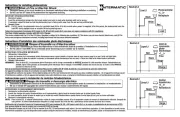
Figure 3. Connect FM1D14 Wiring (Front View Shown).
COM NCNO
M
1
2
3 4
5
LOAD
12 VDC
(+) (-)
Typical Wiring (12 VDC Application)
COM NCNO
M
1
2
3 4
5
LOAD
24 VDC
(+) (-)
Typical Wiring (24 VDC Application)
COM NCNO
1
2
3 4
5
LOAD
24-277
VAC
L1 L2/N
Typical Wiring (24-277 VAC Application)
COM NCNO
M
1
2
3 4
5
L1 L2/N
NO
(Dry Contact)
NC
(Dry Contact)
M
+
-
+
-
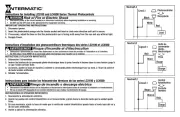
FM1D14 Series 24-Hour/7-Day Time Switch Operation and User Instructions
Disconnect power prior to installation.
Connect FM1D14 wiring in accordance with all applicable national and local
electrical code requirements.
Risk of Fire or Electric Shock
WARNING
Setting the Time of Day
Follow this procedure to set the time of day and day of the week.
1. Press and release the button with a blunt object to reset the unit. Reset
The timer screen ashes.
2. Press and hold and h+ simultaneously to access the 12:00 AM
screen.
3. Take one of these actions.
If Then…
Your time zone currently is in
Daylight Saving Time,
Press the +1h button.
Go to step 4.
Your time zone is not in
Daylight Saving Time,
Go to step 4 to set the
4. Press and hold and press repeatedly until you advance to the h+
current hour.
5. Press and hold and press repeatedly until you advance to the m+
current minute.
6. Press and hold and press repeatedly until you advance to the Day
current day.
Programming Events
To set ON/OFF event pair, set ON event and
then repeat procedure to set OFF event.
The timer enables up to 7 ON/OFF event
pairs.
1. Press the button. Dashed lines Timer
appear to indicate no event is set for
event 1.
2. Press to select the days of the week for the ON event. Day
NOTE: To set the ON event:
ON a Specic Day Select: The desired day
Every Day of Week Select: MO, TU, WE, TH, FR,
SA, SU
Every Weekday: Select: MO, TU, WE, TH, FR
Every Weekend: Select: SA, SU
Monday through Saturday Select: MO through SAT
Monday, Wednesday, Friday Select: MO, WE, FR
MO
TU WE TH
FR SA SU
ON
Figure 2. FM1D14 Timer Dimensions
Mounting the FM1D14 Series Timer
The standard FM1D14 timer can be surface mounted inside a panel or ush
mounted. Mount the timer as required. Refer to the dimension drawing in
Figure 2.
Connecting the FM1D14 Series Timer Wiring
Follow this procedure to connect the FM1D14 timer wiring.
1. Make sure supply power is disconnected.
2. Check input and output ratings marked on timer to verify the product is
suitable for your supply voltage, load, and application.
3. Connect the FM1D14 wiring. See Figure 3 for reference.


Produkt Specifikationer

Mærke: Intermatic
Kategori: Ikke kategoriseret
Model: FM1D14E

Har du brug for hjælp?

Hvis du har brug for hjælp til Intermatic FM1D14E stil et spørgsmål nedenfor, og andre brugere vil svare dig


Ikke kategoriseret Intermatic Manualer
Intermatic

Intermatic EK4536 Manual

12 November 2025
Intermatic

Intermatic LC4521C Manual

11 November 2025
Intermatic

Intermatic OP2GY24 Manual

8 November 2025
Intermatic

Intermatic OP2BK24 Manual

6 November 2025
Intermatic

Intermatic WP1250MXD Manual

5 November 2025
Intermatic

Intermatic OP2BK18 Manual

4 November 2025
Intermatic

Intermatic WP1030MXD Manual

4 November 2025
Intermatic

Intermatic OP5BK24 Manual

4 November 2025
Intermatic

Intermatic OP5GY24 Manual

4 November 2025

Ikke kategoriseret Manualer

Nyeste Ikke kategoriseret Manualer

Topping

Topping DX5 Manual

4 December 2025
CyberPower

CyberPower GX150C2 Manual

4 December 2025
SPT

SPT SM-1024K Manual

4 December 2025
Novy

Novy 990037 Manual

4 December 2025
D&R

D&R Hybrid-2 Manual

4 December 2025
Iogear

Iogear GHDSW4K3 Manual

4 December 2025
Vevor

Vevor WK320016-1 Manual

4 December 2025
ELO

ELO E426554 Manual

4 December 2025