JLab Create Wireless Manual

JLab Mikrofon Create Wireless

Læs gratis den danske manual til JLab Create Wireless (2 sider) i kategorien Mikrofon. Denne vejledning er vurderet som hjælpsom af 26 personer og har en gennemsnitlig bedømmelse på 4.6 stjerner ud af 13.5 anmeldelser. Har du et spørgsmål om JLab Create Wireless, eller vil du spørge andre brugere om produktet?
Side 1/2
We love that you are rocking JLab!
We take pride in our products and fully stand behind them.
CREATE WIRELESS
LAV MIC SYSTEM
YOUR WARRANTY
All warranty claims are subject to JLab authorization
and at our sole discretion. Retain your proof of
purchase to ensure warranty coverage.
CONTACT US
Reach out to us at support@jlab.com
REGISTER TODAY
jlab.com/register
Product updates How-to tips|
FAQs & more
L
I
M
I
T
E
D
T
W
O
Y
E
A
R
W
A
R
R
A
N
T
Y
S
U
P
P
O
R
T
T
E
A
M
#
T
E
A
M
J
L
A
B
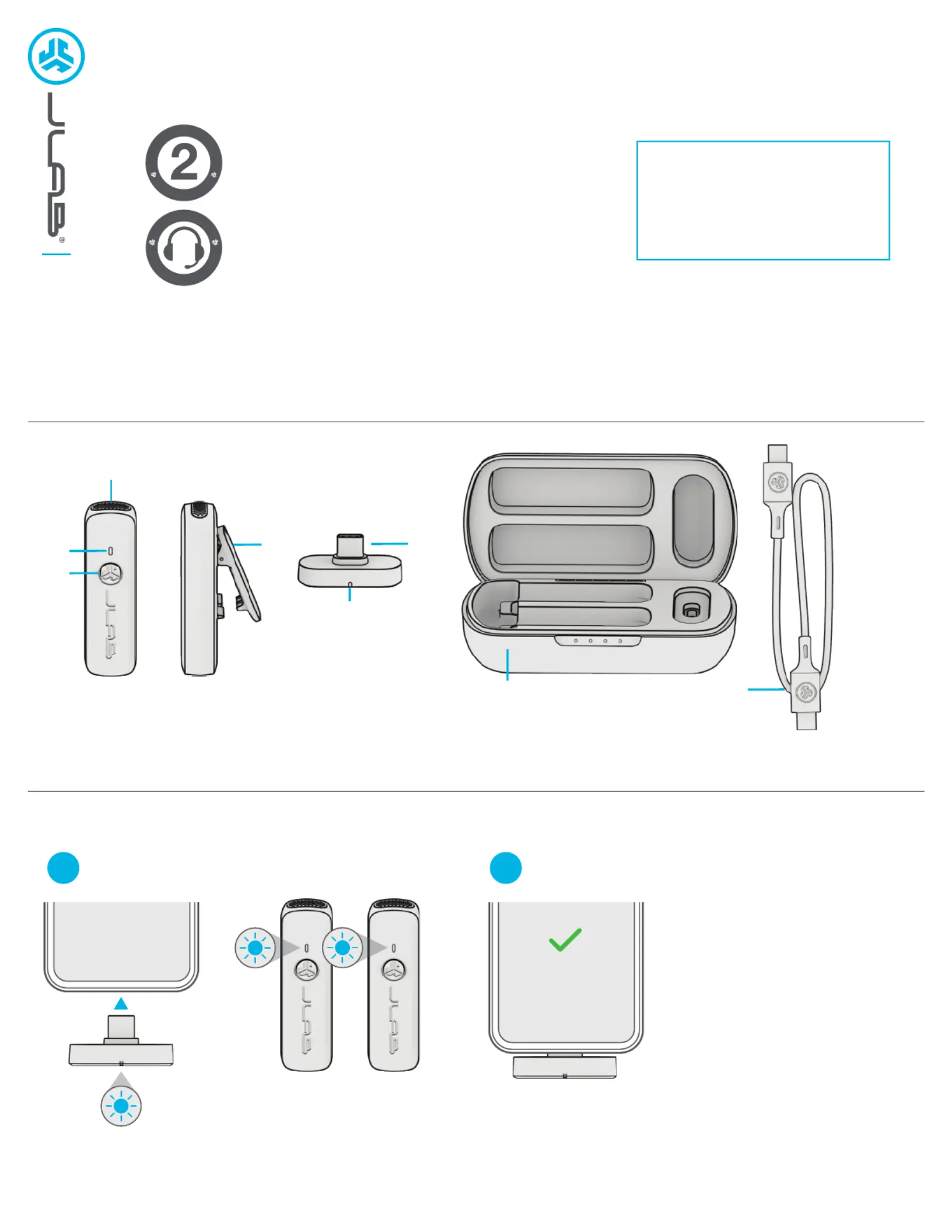
PAIR UP
Dongle Blinks Blue = Searching for Microphone(s)
Dongle Solid Blue = Microphone(s) Connected
Plug USB-C dongle into compatible device*.
Remove single or both microphones.
1
Most devices default Create Wireless
as the recording source. Check your
device audio settings to confirm.
Create Wireless
*Compatible devices:
Android (12 or later) USB-C mobile devices and tablets
Windows PC (7 or later)
macOS (11 or later)
iPhone 15+
iPad Pro 11-inch (1st generation or later)
iPad Pro 12.9-inch (3rd generation or later)
iPad Air (4th generation or later)
iPad mini (6th generation)
2
1
2
3
4
5
6
7
8
1 Microphone
2 LED Indicator
3 Multifunction Button
4 Lapel Clip
5 USB-C Dongle
7 Charging Case
8 USB-C Charging Cable


Produkt Specifikationer

Mærke: JLab
Kategori: Mikrofon
Model: Create Wireless

Har du brug for hjælp?

Hvis du har brug for hjælp til JLab Create Wireless stil et spørgsmål nedenfor, og andre brugere vil svare dig