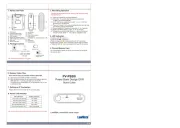
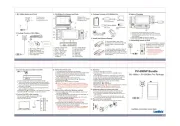
3. Assemble & disassemble DVR cover
Disassemble the DVR cover
1. Hold the DVR from the bottom by left hand.
Carefully twist the cover of DVR by right
hand following red arrow pointed direction.
following red arrow pointed
1. Align the guiding points on the cover
to the red arrow mark on the DVR before assembly.
2. Twist the cover by following
red arrow pointed direction
until it is properly locked.
Warning! Follow instructions below to avoid lens damage.
Connect to PC via USB cable
1. Remove the cover from the DVR and connect the supplied USB cable
2. Plug the USB cable to PC, the green Charge LED of the device will
illuminate to show the charging is in process.
3. Green LED will turn off when the battery is fully charged.
When battery is fully charged,
the green LED will turn off.
1. Long press the Format Button and hold.
2. Use another finger to press the Power On
3. Power LED will illuminate Blue, hold the Format
button until the Rec LED starts to blink.
4. Release the Format button. Rec LED will go
out after 5 seconds to show the formatting is
WARNING: DO NOT FILL THE CUP WITH HOT WATER.
1080p Coffee Cup Lid Wi-Fi DVR
LawMate, innovation never stops
Switch to On/Off to activate/deactivate vibration mode.
With device powered on, short press to turn on Wi-Fi function.
To turn off the WiFi function, just short press
For more information about WiFi connection setup, please refer to
PV Cam Viewer quick guide.
6. Retrieve files from DVR
1. Use memory card reader to download video/photo files.
2. With the device powered on and memory card inserted, connect the
device to PC by USB cable. It will be recognized by PC as an external
drive for user to retrieve the files.
There are two ways to download video/photo files.
Please note, memory card needs to be formatted on the device
for the unit to recognize it. Formating memory card by a PC is
not recommended and may result in recording failure.
Please refer to the Synchronize the Time steps on
the PV Cam Viewer for IP Cam quick guide.
When the unit is assembled,press the area on the cover for 3
seconds. DVR will power on and start to record automatically after
vibrating once. To turn off the device, press the area on the cover
for 3 seconds and the DVR will be turned off after vibrating twice.