E
N
G
L
I
S
H
2
CQ-DP102W
9
E
N
G
L
I
S
H
1
CQ-DP102W
8
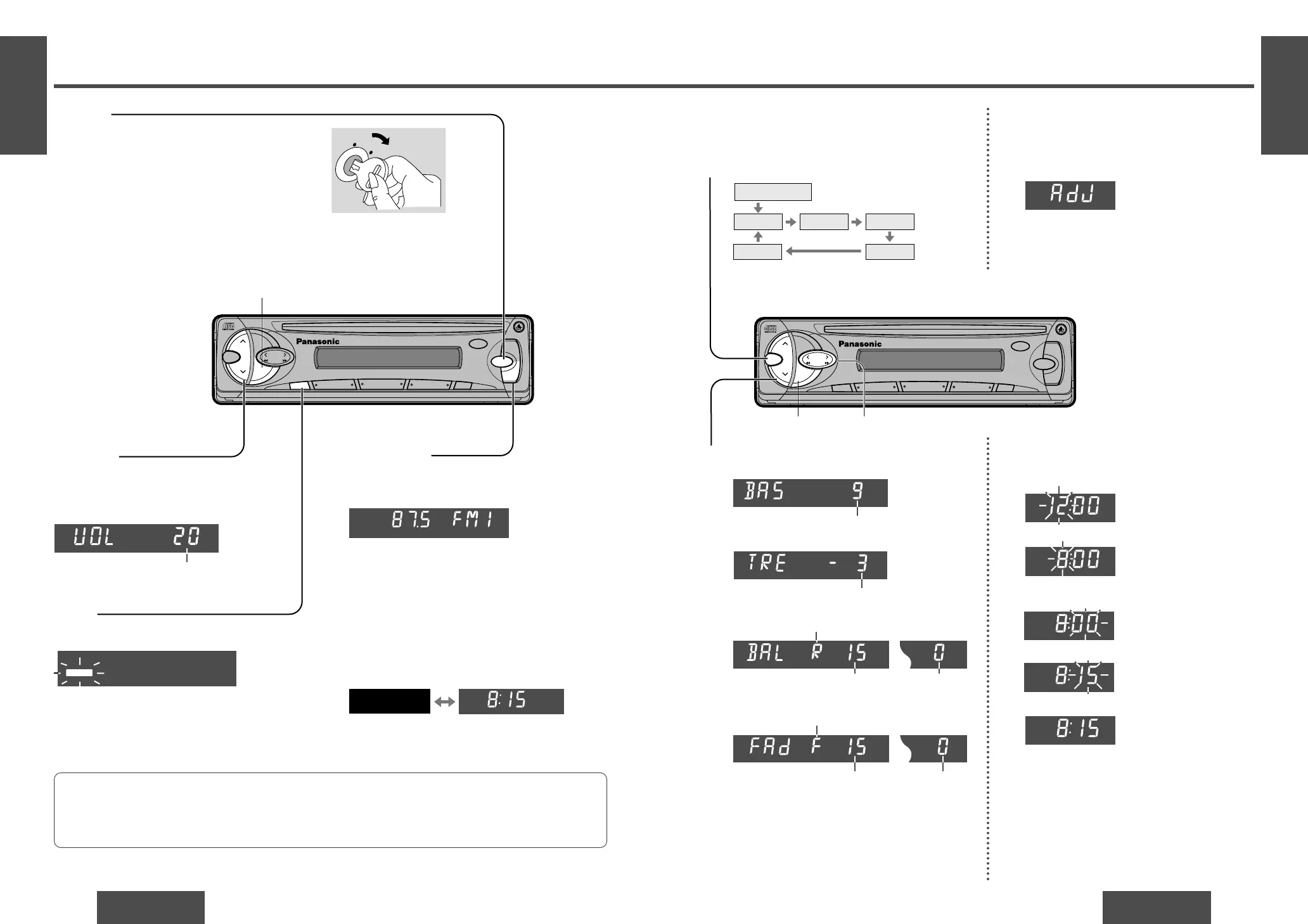
Power and Sound Controls
Power
Turn the key in the ignition until the accessory indica-
tor lights.
Power on: Press [SOURCE] (PWR).
Power off: Press [SOURCE] (PWR) again and hold.
Mute
Press [MUTE] to mute the sound completely.
Press [MUTE] again to cancel.
Volume
[" VOL]: Up
[# VOL]: Down
Press and hold for rapid adjustment.
Volume level (0 to 40)
Anti-volume-blast circuit:
When the power is switched off and on again, the volume slowly rises to the previous level.
The anti-volume-blast circuit will not work when the volume level is set lower than position 20 on the dis-
play.
<
VOL
SEL
BAND
TUNE
MUTE M/L
12
34
5
6
712
SOURCE
REP
CQ-DP102W
CD RECEIVER
45W
X4
LOUD
RANDOM
PWR
811
910
TRACK
DISP
M
O
N
O
/L
O
C
SC
A
N
/A
PM
<
VOL
SEL
BAND
TUNE
MUTE M/L
12
34
5
6
712
SOURCE
REP
CQ-DP102W
CD RECEIVER
45W
X4
LOUD
RANDOM
PWR
811
910
TRACK
DISP
MONO/LOC
SCA
N/APM
Audio Mode
(Bass/Treble/Balance/Fader)
Regular mode
Volume Bass Treble
BalanceFader
Note:
≥ If no operation takes place for more than 5 seconds
in audio mode (2 seconds in volume mode), the dis-
play returns to the regular mode.
≥ If a preamp output connector (rear) is used and the
fader is set to Front, there will be no audio output.
Bass:
Adjustable range: j12 to i12 (by 3 step)
Treble:
Adjustable range: j12 to i12 (by 3 step)
Balance:
R (right speaker) or L (left speaker)
Fader:
F (front speaker) or R (rear speaker)
Adjustable range: Balance center
1 to 15 (by 1 step)
Adjustable range: Fader center
1 to 15 (by 1 step)
Loudness
Press [LOUD] to enhance bass and treble tones at
low or medium volume.
Press [LOUD] again to cancel.
Press [SEL] to select the audio mode.
1
Press [" VOL] or [# VOL] to change each level.
2
Clock Basics
The 24-hour system is used for the clock.
Hours
2 Press and hold [DISP] (display) for more than
2 seconds.
3 Press [% TUNE] or [$ TUNE].
Minutes
4 Press [DISP] (display).
5 Press [% TUNE] or [$ TUNE].
6 Press [DISP] (display).
Note:
≥ Press and hold [% TUNE] or [$ TUNE] to
change numbers rapidly.
(Hours blink.)
(Hours set.)
(Minutes blink.)
(Minutes set.)
(End.)
Initial Time
1 Press [DISP] (display).
(Clock display.)
Time Reset
Press and hold [DISP] (display) for more than
2 seconds to activate the time setting mode to
reset the time.
Then, repeat steps 3 to 6.
[DISP] (Display) [% TUNE], [$ TUNE] (Hours, minutes)
[DISP] (Display)
Display Change
Press [DISP] (display) to switch to the clock dis-
play.
When the power is off:
No display Clock display