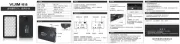
USING THE LIGHT IN WHITE DAYLIGHT MODE
USING THE LIGHT IN COLOR MODE
(5) Press the “Color” knob and the light switches to its RGB color bulbs.
(6) The light will initially default to red with a corresponding value of 0 on the LCD display.
(7) As the "Color" knob is turned clockwise, 360 distinct colors can be dialed in.
Each color has its own unique reference number displayed on the LCD
readout allowing the user to record the color used for future use.
The power in RGB mode can be adjusted by turning the "Power" button. Note:
Note: Light can be powered using optional AC power cord sold separately. (MFR #RGB-VL-PS)
Simply plug into the AC power plug for unlimited run time.
Light can be steplessly adjusted from 10 - 100% and power level is visible on rear display.
(8) While in RGB mode, press and hold the color knob for 2 seconds.
The RGB360 will begin to scroll through all 360 colors.
Note: The RGB360 can run for 2 hours at full power in daylight/tungsten mode or 3 1/2 hours in RGB mo
It is also possible to run the light on AC power with AC power cord (sold separately) for unlimited run time.
(9) Push the "Power" button to turn off.
(1) Charge the included NP-F750 battery by inserting into the included charger.
(2) The LED light on the front of the charger will be red while charging and change
to green when the battery is at full power.
The RGB360 is capable of adjusting color temperature from 3200K (tungsten) to 5700K (daylight)
or blending the two light sources to achieve Kelvin temperatures in between. Almost all room lighting
falls between 3200K and 5700K. This feature allows the user to match the color temperature of the
(3) Press the "Power” button to turn on. Light will default to the 5700 Kelvin bulbs.
To adjust the Kelvin temperature, simply turn the color knob counter clockwise.
The color temperature will gradually change until reaching 3200K.
(4) The power can be adjusted by turning the "Power" button. Light can be steplessly
adjusted from 10% to 100% and power level is visible on rear display.
- Press “Power” button to turn on/off
- Rotate to adjust power level
- Press “Color” button to switch to color mode
- Rotate to change colors