StarTech.com ST10GPEXNDPI Manual


Læs gratis den danske manual til StarTech.com ST10GPEXNDPI (2 sider) i kategorien Netværkskort/adapter. Denne vejledning er vurderet som hjælpsom af 32 personer og har en gennemsnitlig bedømmelse på 4.4 stjerner ud af 16.5 anmeldelser. Har du et spørgsmål om StarTech.com ST10GPEXNDPI, eller vil du spørge andre brugere om produktet?

Side 1/2
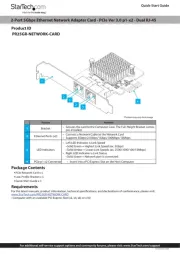
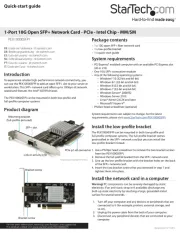
Ethernet ports
PCIe p1-x4 connector
Quick-start guide
FR: Guide de l’utilisateur - fr.startech.com
DE: Bedienungsanleitung - de.startech.com
ES: Guía del usuario - es.startech.com
NL: Gebruiksaanwijzing - nl.startech.com
PT: Guia do usuário - pt.startech.com
IT: Guida per l’uso - it.startech.com
Manual Revision: 07/13/2017
For the latest information, technical specications, and support for
this product, please visit www.StarTech.com/ST10GPEXNDPI.
Package contents
1 x network card
1 x low-prole bracket
1 x quick-start guide
Requirements
PCI Express enabled computer with a PCIe slot (x4, x8, or x16)
Any of the following operating systems:
Windows® 10 (64-bit)
Windows 8.1 (64-bit)
Windows 7 (64-bit)
Windows Server® 2012
Windows Server 2008R
Linux®
Requirements are subject to change. For the latest requirements,
please visit www.StarTech.com/ST10GPEXNDPI.
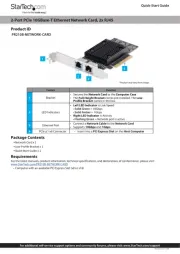
ST10GPEXNDPI
2-Port 10GBase-T / NBASE-T Ethernet Network Card - with Intel X550 Chip
*actual product may vary from photos
Product diagram
Link speed LEDs
Link state and activity LEDs
Install the network card
Warning! Network cards can be severely damaged by static
electricity. Make sure that you are properly grounded before you
open your computer case or touch your PCIe card. You should wear
an anti-static strap when you install any computer component.
If an anti-static strap isn’t available, discharge any built-up static
electricity by touching a large grounded metal surface for several
seconds. Only handle the PCIe card by its edges and don’t touch the
gold connectors.
1. Turn o your computer and any peripherals that are connected
to it (for example, printers, external storage, and so on).
2. Unplug the power cable from the back of your computer.
3. Disconnect any peripheral devices that are connected to your
computer.
4. Remove the cover from your computer case. For more
information about how to do this, consult the documentation
that came with your computer.
5. Locate an open PCIe slot and remove the corresponding metal
cover plate from the back of your computer case. Consult the
documentation that came with your computer for details about
how to do this safely. This card works in PCIe slots of additional
lanes (x4, x8, or x16 slots).
6. Gently insert the card into the open PCIe slot and fasten the
bracket to the back of the case.
Note: Install the card into a small form factor or a low-prole
desktop system, it may be necessary to replace the preinstalled
standard-prole bracket with the included low-prole (half-height)
installation bracket.
7. Place the cover back onto your computer case.
8. Reconnect the power cable to the back of your computer.
9. Reconnect all of the peripheral devices that you disconnected in
step 3.
10. Turn on your computer and peripherals.
Install drivers on your computer
1. If the Found New Hardware dialog box appears on your screen,
close the dialog box or click Cancel.
2. To download the latest drivers, navigate to www.StarTech.com/
ST10GPEXNDPI.
3. Click the Support tab.
4. Under Driver(s), locate and download the drivers for the
operating system that you’re currently running.
5. When the download is complete, right-click the .zip folder that
you downloaded, and click Extract All.
6. Double-click the folder for the version of operating system that
youre currently running, and follow the on-screen instructions to
complete the download.
7. Restart your computer, when prompted.


Produkt Specifikationer

Mærke: StarTech.com
Kategori: Netværkskort/adapter
Model: ST10GPEXNDPI
Bredde: 15 mm
Dybde: 228 mm
Højde: 132 mm
Vægt: 98 g
Produktfarve: Sort
Pakkevægt: 199 g
Pakkedybde: 286 mm
Pakkebredde: 221 mm
Pakkehøjde: 116 mm
Opbevaringstemperatur (T-T): -20 - 60 °C
Relativ luftfugtighed ved drift (H-H): 20 - 80 %
Ethernet LAN-porte (RJ-45): 2
Ethernet LAN: Ja
Driftstemperatur (T-T): 5 - 50 °C
Ethernet LAN-datahastigheder: 10,100,1000,2500,5000,10000 Mbit/s
Hurtig start guide: Ja
Forbindelsesteknologi: Ledningsført
Certificering: CE, FCC, REACH
Kabelteknologi: 10GBase-T
Netværksstandarder: IEEE 802.1Q, IEEE 802.3ab, IEEE 802.3an, IEEE 802.3u, IEEE 802.3x
LED-indikatorer: Activity, Link, Speed
Harmoniseret systemkode (HS): 85176990
Bæredygtighedscertifikater: RoHS
Understøttede Linux-operativsystemer: Ja
Hovedkassen højde (udvendigt): 316 mm
Hovedkassens længde (udvendigt): 436 mm
Hovedkassens bredde (udvendigt): 420 mm
Værtsgrænseflade: PCI Express
Grænseflade: Ethernet
Intern: Ja
Maksimal dataoverførselshastighed: 10000 Mbit/s
Produkter pr. hovedkasse (udvendigt): 40 stk
Fuld duplex: Ja
Understøttede operativsystemer til servere: Windows Server 2008 R2, Windows Server 2012, Windows Server 2012 R2, Windows Server 2016, Windows Server 2019
Flowkontrol support: Ja
Jumbo Frames support: Ja
Jumbo rammer: 9000
Auto MDIX IEEE: Ja
iSCSI-understøttelse: Ja
VLAN mærkning: Ja
Simpelt beslag: Ja
Chipsæt: Intel X550AT
PCI version: 3.0

Har du brug for hjælp?

Hvis du har brug for hjælp til StarTech.com ST10GPEXNDPI stil et spørgsmål nedenfor, og andre brugere vil svare dig


Netværkskort/adapter StarTech.com Manualer
Netværkskort/adapter Manualer

Nyeste Netværkskort/adapter Manualer

Simply45

Simply45 S45-2012U Manual

7 December 2025
Approx

Approx APPUSB900 Manual

29 November 2025
D-Link

D-Link DWA-548 Manual

29 November 2025
EXSYS

EXSYS EX-62026POE Manual

28 November 2025
Digitus

Digitus DA-70852 Manual

28 November 2025
EXSYS

EXSYS EX-62010POE-SFP Manual

28 November 2025
D-Link

D-Link DWA-140 Manual

27 November 2025
D-Link

D-Link DUB-E135 Manual

27 November 2025
D-Link

D-Link DUB-E255 Manual

26 November 2025