StarTech.com TB310G2 Manual
Læs gratis den danske manual til StarTech.com TB310G2 (2 sider) i kategorien Netværkskort/adapter. Denne vejledning er vurderet som hjælpsom af 34 personer og har en gennemsnitlig bedømmelse på 3.8 stjerner ud af 17.5 anmeldelser.
Har du et spørgsmål om StarTech.com TB310G2, eller vil du spørge andre brugere om produktet?
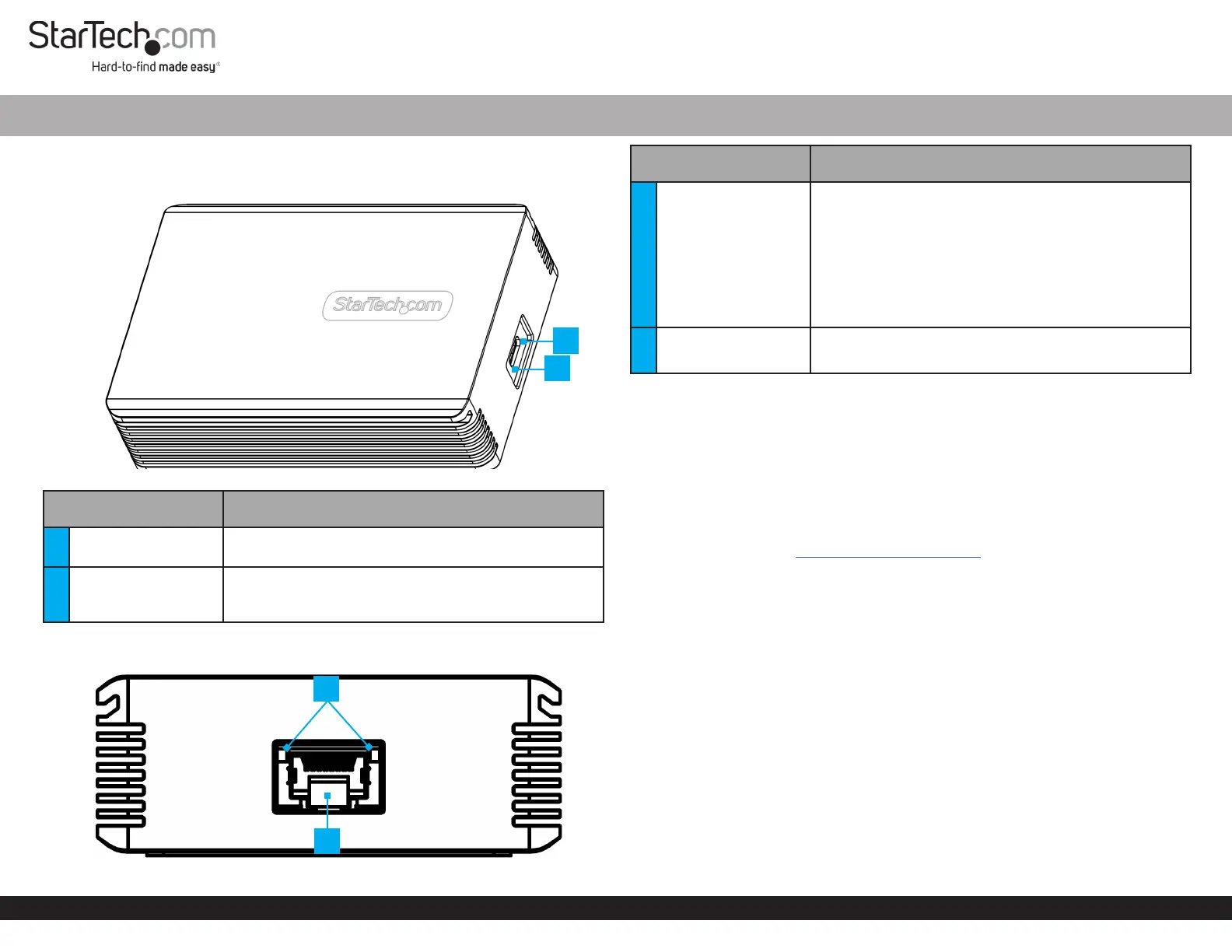
Produkt Specifikationer
| Mærke: | StarTech.com |
| Kategori: | Netværkskort/adapter |
| Model: | TB310G2 |
| Bredde: | 108 mm |
| Dybde: | 75 mm |
| Højde: | 29 mm |
| Vægt: | 500 g |
| Produktfarve: | Grå |
| Pakkevægt: | 700 g |
| Pakkedybde: | 134 mm |
| Pakkebredde: | 170 mm |
| Pakkehøjde: | 74 mm |
| Relativ luftfugtighed ved drift (H-H): | 20 - 80 % |
| Ethernet LAN-porte (RJ-45): | 1 |
| Ethernet LAN: | Ja |
| Ethernet LAN-datahastigheder: | 100,1000,2500,5000,10000 Mbit/s |
| Husmateriale: | Aluminium |
| Hurtig installationsvejledning: | Ja |
| Kabler inkluderet: | Thunderbolt |
| Forbindelsesteknologi: | Ledningsført |
| Kabelteknologi: | 10GBase-T |
| Netværksstandarder: | IEEE 802.3ab, IEEE 802.3an, IEEE 802.3bz, IEEE 802.3u |
| LED-indikatorer: | Activity, Link |
| Kabellængde: | 0.7 m |
| Understøttede Windows-operativsystemer: | Windows 10, Windows 10 Education, Windows 10 Education x64, Windows 10 Enterprise, Windows 10 Enterprise x64, Windows 10 Home, Windows 10 Home x64, Windows 10 IOT Core, Windows 10 IoT Enterprise, Windows 10 Pro, Windows 10 Pro x64, Windows 10 x64, Windows 11, Windows 11 x64 |
| Understøttede Mac-operativsystemer: | Mac OS X 10.15 Catalina, Mac OS X 10.15.3 Catalina, Mac OS X 11.0 Big Sur, Mac OS X 12.0 Monterey, Mac OS X 13.0 Ventura |
| Hovedkassen højde (udvendigt): | 313 mm |
| Hovedkassens længde (udvendigt): | 395 mm |
| Hovedkassens bredde (udvendigt): | 318 mm |
| Værtsgrænseflade: | Thunderbolt 3 |
| Grænseflade: | Ethernet |
| Intern: | Ingen |
| Maksimal dataoverførselshastighed: | 40000 Mbit/s |
| Produkter pr. hovedkasse (udvendigt): | 20 stk |
| Fuld duplex: | Ja |
| Ethernet-grænsefladetype: | 2.5 Gigabit Ethernet, 5 Gigabit Ethernet, 10 Gigabit Ethernet, Fast Ethernet, Gigabit Ethernet |
| Komponent til: | PC |
| Jumbo Frames support: | Ja |
| Jumbo rammer: | 16000 |
| Auto MDIX IEEE: | Ja |
Har du brug for hjælp?
Hvis du har brug for hjælp til StarTech.com TB310G2 stil et spørgsmål nedenfor, og andre brugere vil svare dig
Netværkskort/adapter StarTech.com Manualer
Netværkskort/adapter Manualer
- Extron
- Ugreen
- LogiLink
- Netgear
- Pioneer
- Steren
- Lenovo
- Digium
- Juniper
- Sony
- Goobay
- IC Intracom
- Aukey
- Martin Logan
- InLine
Nyeste Netværkskort/adapter Manualer


