StarTech.com US1GC303APD Manual


Læs gratis den danske manual til StarTech.com US1GC303APD (2 sider) i kategorien Netværkskort/adapter. Denne vejledning er vurderet som hjælpsom af 32 personer og har en gennemsnitlig bedømmelse på 4.8 stjerner ud af 16.5 anmeldelser. Har du et spørgsmål om StarTech.com US1GC303APD, eller vil du spørge andre brugere om produktet?

Side 1/2
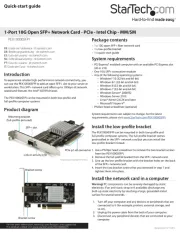
Quick-start guide
FR: Guide de l’utilisateur - fr.startech.com
DE: Bedienungsanleitung - de.startech.com
ES: Guía del usuario - es.startech.com
NL: Gebruiksaanwijzing - nl.startech.com
PT: Guia do usuário - pt.startech.com
IT: Guida per l’uso - it.startech.com
Manual Revision: 01/17/2017
For the latest information, technical specications, and support for
this product, please visit www.StarTech.com/US1GC303APD.
Package contents
1 x USB network adapter
1 x quick-start guide
Requirements
A laptop with a USB-C port
If your laptop doesn’t support USB Power Delivery 2.0, you can’t use
the US1GC303APD network adapter to pass power through to your
laptop.
USB Power Delivery 2.0 requirements
A laptop with a USB-C port that supports USB Power Delivery 2.0
A USB-C power adapter
An AC electrical outlet
Not all USB-C ports support the full functionality of the USB Type-C™
standard. To use the US1GC303APD to power and charge your
laptop, make sure that the USB-C port on your laptop supports USB
Power Delivery 2.0
Requirements are subject to change. For the latest requirements,
please visit www.StarTech.com/US1GC303APD.
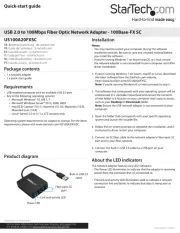
US1GC303APD
USB-C to GbE Adapter with 3-Port Hub - PD Charging
*actual product may vary from photos
Introduction
You can connect the US1GC303APD to the USB-C™ port on your
laptop to add three USB 3.0 ports and one GbE port. When you
use a USB-C based power adapter (not included) with this network
adapter, you can power and charge your laptop using USB Power
Delivery 2.0.
Product diagram
USB-A ports
(USB 3.0)
USB-C port
(power input only)
About USB 3.0 and USB 3.1 Gen 1
USB 3.0 is also known as USB 3.1 Gen 1. This connectivity standard
oers speeds up to 5Gbps. Any mention of USB 3.0 in this manual or
on the StarTech.com website for US1GC303APD refers to the 5Gbps
USB 3.1 Gen 1 standard.
USB Power Delivery 2.0
USB Power Delivery 2.0 is a specication that allows power (up to
100 watts) to be sent over a USB-C or Thunderbolt™ 3 cable that
supports the specication.
The US1GC303APD network adapter supports USB Power Delivery
2.0 and will deliver up to 60 watts of power through the USB-C or
Thunderbolt 3 port on your laptop.
Connect the network adapter
1. Connect the USB-C connector on the network adapter to a USB-C
port on your laptop.
2. Connect your USB peripherals to the USB-A ports on the network
adapter.
3. Connect an RJ-45 network cable to your network gateway (router
or switch) and to the Ethernet port on the network adapter.
The US1GC303APD is natively supported and when you connect it
to your laptop, your laptop automatically detects and installs the
required drivers.
Powering the network adapter
You can power the network adapter in the following ways:
Bus power
USB Power Delivery 2.0
If you use bus power to power the network adapter, it might not
provide sucient power to all of your connected peripherals. To
make sure that your connected devices are detected and functional,
you should use a USB-C power adapter (for example, your laptop
USB-C power adapter) to power the network adapter.
USB-C connector
Ethernet port
(10/100/1000)
Connection and
activity LEDs


Produkt Specifikationer

Mærke: StarTech.com
Kategori: Netværkskort/adapter
Model: US1GC303APD
Bredde: 41 mm
Dybde: 95 mm
Højde: 17 mm
Vægt: 44.9 g
Produktfarve: Sort
Pakkevægt: 123 g
Pakkedybde: 142 mm
Pakkebredde: 170 mm
Pakkehøjde: 30 mm
Opbevaringstemperatur (T-T): -10 - 70 °C
Relativ luftfugtighed ved drift (H-H): 10 - 90 %
Ethernet LAN-porte (RJ-45): 1
Ethernet LAN: Ja
Driftstemperatur (T-T): 0 - 45 °C
Ethernet LAN-datahastigheder: 10,100,1000 Mbit/s
Husmateriale: Plast
Hurtig start guide: Ja
Forbindelsesteknologi: Ledningsført
Certificering: CE, FCC
Kabelteknologi: 10/100/1000BaseT(X)
Netværksstandarder: IEEE 802.1Q, IEEE 802.1p, IEEE 802.3, IEEE 802.3ab, IEEE 802.3az, IEEE 802.3u, IEEE 802.3x
Harmoniseret systemkode (HS): 85176990
USB version: 3.2 Gen 1 (3.1 Gen 1)
Antal USB-porte: 4
Bæredygtighedscertifikater: RoHS
Understøttede Mac-operativsystemer: Mac OS X 10.10 Yosemite, Mac OS X 10.11 El Capitan, Mac OS X 10.12 Sierra, Mac OS X 10.13 High Sierra, Mac OS X 10.14 Mojave, Mac OS X 10.7 Lion, Mac OS X 10.8 Mountain Lion, Mac OS X 10.9 Mavericks, Mac OS X 13.0 Ventura
Understøttede Linux-operativsystemer: Ja
Hovedkassen højde (udvendigt): 310 mm
Hovedkassens længde (udvendigt): 530 mm
Hovedkassens bredde (udvendigt): 330 mm
Værtsgrænseflade: USB
Grænseflade: Ethernet
Intern: Ingen
Maksimal dataoverførselshastighed: 5000 Mbit/s
USB-drevet: Ja
Produkter pr. hovedkasse (udvendigt): 60 stk
Fuld duplex: Ja
Ethernet-grænsefladetype: Gigabit Ethernet
Understøttede operativsystemer til servere: Windows Server 2003, Windows Server 2008 R2, Windows Server 2012, Windows Server 2016, Windows Server 2019
Flowkontrol support: Ja
Jumbo Frames support: Ja
Jumbo rammer: 9000
Auto-forhandling: Ja
Strømforsyning: 60 W
Auto MDIX IEEE: Ja
Wake-on-LAN klar: Ja
Understøtter UASP: Ja
Antal USB 3.2 Gen 1 (3.1 Gen 1) Type-A hub porte: 3
VLAN mærkning: Ja
Chipsæt: VIA/VLI - VL100, VIA/VLI - VL813, Realtek - RTL8153

Har du brug for hjælp?

Hvis du har brug for hjælp til StarTech.com US1GC303APD stil et spørgsmål nedenfor, og andre brugere vil svare dig


Netværkskort/adapter StarTech.com Manualer
Netværkskort/adapter Manualer

Nyeste Netværkskort/adapter Manualer

Simply45

Simply45 S45-2012U Manual

7 December 2025
Approx

Approx APPUSB900 Manual

29 November 2025
D-Link

D-Link DWA-548 Manual

29 November 2025
EXSYS

EXSYS EX-62026POE Manual

28 November 2025
Digitus

Digitus DA-70852 Manual

28 November 2025
EXSYS

EXSYS EX-62010POE-SFP Manual

28 November 2025
D-Link

D-Link DWA-140 Manual

27 November 2025
D-Link

D-Link DUB-E135 Manual

27 November 2025
D-Link

D-Link DUB-E255 Manual

26 November 2025