StarTech.com USB31000S2H Manual
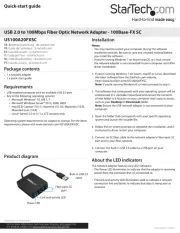
Læs gratis den danske manual til StarTech.com USB31000S2H (2 sider) i kategorien Netværkskort/adapter. Denne vejledning er vurderet som hjælpsom af 7 personer og har en gennemsnitlig bedømmelse på 5.0 stjerner ud af 4 anmeldelser.
Har du et spørgsmål om StarTech.com USB31000S2H, eller vil du spørge andre brugere om produktet?

Produkt Specifikationer
| Mærke: | StarTech.com |
| Kategori: | Netværkskort/adapter |
| Model: | USB31000S2H |
| Bredde: | 37 mm |
| Dybde: | 255 mm |
| Højde: | 17 mm |
| Vægt: | 25.9 g |
| Brugervejledning: | Ja |
| Produktfarve: | Sort |
| Pakkevægt: | 106 g |
| Pakkedybde: | 220 mm |
| Pakkebredde: | 128 mm |
| Pakkehøjde: | 30 mm |
| Opbevaringstemperatur (T-T): | -10 - 55 °C |
| Relativ luftfugtighed ved drift (H-H): | 40 - 50 % |
| Ethernet LAN-porte (RJ-45): | 1 |
| Ethernet LAN: | Ja |
| Driftstemperatur (T-T): | 0 - 70 °C |
| Ethernet LAN-datahastigheder: | 10,100,1000 Mbit/s |
| Husmateriale: | Plast |
| Forbindelsesteknologi: | Ledningsført |
| Kabelteknologi: | 10/100/1000BaseT(X) |
| Netværksstandarder: | IEEE 802.1Q, IEEE 802.3, IEEE 802.3ab, IEEE 802.3az, IEEE 802.3u, IEEE 802.3x |
| Harmoniseret systemkode (HS): | 85176990 |
| Bæredygtighedscertifikater: | CE, RoHS |
| Understøttede Mac-operativsystemer: | Mac OS X 10.10 Yosemite, Mac OS X 10.11 El Capitan, Mac OS X 10.12 Sierra, Mac OS X 10.13 High Sierra, Mac OS X 10.14 Mojave, Mac OS X 10.15 Catalina, Mac OS X 10.15.3 Catalina, Mac OS X 10.7 Lion, Mac OS X 10.8 Mountain Lion, Mac OS X 10.9 Mavericks, Mac OS X 11.0 Big Sur, Mac OS X 13.0 Ventura |
| Understøttede Linux-operativsystemer: | Ja |
| Andre understøttede operativsystemer: | ChromeOS |
| Hovedkassen højde (udvendigt): | 270 mm |
| Hovedkassens længde (udvendigt): | 455 mm |
| Hovedkassens bredde (udvendigt): | 355 mm |
| Værtsgrænseflade: | USB |
| Grænseflade: | Ethernet |
| Intern: | Ingen |
| Maksimal dataoverførselshastighed: | 5000 Mbit/s |
| USB-drevet: | Ja |
| Strømforbrug: | 1092 mA |
| Produkter pr. hovedkasse (udvendigt): | 200 stk |
| Fuld duplex: | Ja |
| Gennemsnitstid mellem fejl (MTBF): | 637901 t |
| Understøttede operativsystemer til servere: | Windows Server 2003, Windows Server 2008 R2, Windows Server 2012, Windows Server 2016, Windows Server 2019 |
| Flowkontrol support: | Ja |
| Jumbo Frames support: | Ja |
| Jumbo rammer: | 9000 |
| Auto MDIX IEEE: | Ja |
| Wake-on-LAN klar: | Ja |
| Antal USB 3.2 Gen 1 (3.1 Gen 1) Type-A hub porte: | 2 |
| VLAN mærkning: | Ja |
| Chipsæt: | Realtek RTL8153 |
Har du brug for hjælp?
Hvis du har brug for hjælp til StarTech.com USB31000S2H stil et spørgsmål nedenfor, og andre brugere vil svare dig
Netværkskort/adapter StarTech.com Manualer

Netværkskort/adapter Manualer
- EQ-3
- Motu
- Viewsonic
- Goobay
- ComNet
- Aluratek
- Speed-Link
- Star Micronics
- Asustor
- EQ3
- CLUB3D
- Ernitec
- SVS
- AViPAS
- Lenovo
Nyeste Netværkskort/adapter Manualer


