This device (FCC ID: 2ALP8SC2A
part 15 of the FCC Rules.
Operation is subject to the following two
this device may not cause harmful interference.
this device must accept any interference
received, including interference that may
cause undesired operation.
Note: This equipment has been tested and found
to comply with the limits for a Class B digital
device, pursuant to part 15 of the FCC Rules.
These limits are designed to provide reasonable
protection against harmful interference in a
residential installation. This equipment
generates, uses and can radiate radio frequency
energy and, if not installed and used in
accordance with the instructions, may cause
harmful interference to radio communications.
However, there is no guarantee that interference
will not occur in a particular installation.
If this equipment does cause harmful
interference to radio or television reception,
which can be determined by turning the
equipment off and on, the user is encouraged to
try to correct the interference by one or more of
reorient or relocate the receiving antenna,
increase the separation between the
connect the equipment to an outlet on a circuit
diff erent from that to which the receiver is
consult an authorized STIHL servicing dealer
or an experienced radio/TV technician for
Do not change or modify this product in any way
unless specifi cally allowed in this manual, since
this could void your authority to operate it.
STIHL Incorporated Limited Warranty Policy
This product is sold subject
to the STIHL Incorporated Limited Warranty
warranty.html. It can also be
obtained from your authorized STIHL dealer or
by calling 1-800-GO- STIHL (1-800-467-8445).
This product contains chemicals known to
the State of California to cause cancer, birth
Thank you for your purchase. The information
contained in this manual will help you receive
maximum performance and satisfaction from
your STIHL product and, if followed, reduce the
risk of injury from its use.
The STIHL Smart Connector 2 A allows you to
track runtime and other information about
compatible STIHL power tools, which can be
synchronized with the STIHL connected Portal
through the STIHL connected App. When the
Smart Connector is within Bluetooth
smartphone or tablet running the STIHL
connected App, you can also track the location
and status of a connected product using GPS
data of your mobile device.
It is important that you read and
observe the following information and
warnings. Improper use can cause
Read this instruction manual and the
instruction manual for your STIHL
power tool thoroughly before use and
periodically therea er. Careless or
improper use of the STIHL Smart
Connector can cause serious or fatal
For further information, or if you do not
understand any of the instructions in this manual,
please go to www.stihlusa.com or contact your
authorized STIHL servicing dealer.
Additional assistance can be found on the STIHL
This manual contains safety information that
requires your special attention. Such information
is introduced with the safety alert symbol and the
Indicates a hazardous situation that, if not
result in death or serious injury.
Protective Battery Foil (remove
3 Important Safety Instructions
Read all safety warnings and instructions.
Failure to follow the warnings and instructions
may result in electric shock, fi re and/or serious
Use the STIHL Smart Connector only as
described in these instructions and the STIHL
Your STIHL Smart Connector is designed for
use only with a properly inserted CR2450
button cell battery. Do not attempt to use
another button cell or electrical power supply.
Use with an unauthorized battery can result in
fi re, explosion, or leakage of battery fl uid.
Swallowing or ingesting the button cell battery
can cause serious internal chemical burns
which may lead to death in less than 2 hours.
Always secure the battery
Keep battery away from children.
If you think a battery has been
swallowed, seek emergency
medical attention immediately.
Ensure the battery compartment on the
STIHL Connector is closed securely.
If the compartment will not remain closed,
remove the battery and discontinue use.
Properly dispose of the battery and replace
Risk of fi re and explosion
Never attempt to re-charge the
Never heat the battery above 212°F
(100 °C) or place it in or near fi res,
stoves or other high-temperature
Do not crush or expose to
High temperatures may cause the battery to
generate heat, rupture, leak, ignite or explode.
Use and store the battery only
within an ambient temperature
range of -20°F to 140 °F (-30°C to
Never store the battery inside a
Risk of short circuit, which could lead to
rupture, fi re or explosion.
Never bridge the terminals with
wires or with paper clips, coins, keys,
nails or other metallic objects that
can make a connection from one
Never carry the battery in your
Leaking battery fl uid can cause skin and eye
irritation or chemical burns.
Never attempt to open or dis-assemble the
battery. In the event of leakage, avoid contact
Clean up spilled fl uid with an inert absorbent
such as sand or an absorbent cloth.
Avoid skin and eye contact with battery fl uid.
Avoid vapor generated from leaking or burning
Rinse aff ected skin thoroughly with mild soap
Flush eyes with clean water for 15 minutes
Handle discharged/depleted batteries
Keep away from children.
Properly dispose of batteries immediately at
the end of their useful life. Never dispose of
batteries with household waste.
Observe all federal, state and local disposal
California: Perchlorate material – special
may apply, see www.dtsc.ca.
hazardouswaste/perchlorate
Before mounting, read and follow all warnings
and safety instructions provided with the
Mount the Smart Connector 2 A as specifi ed
in these instructions and the manual for your
compatible STIHL power tool. Installation
information is also found in the STIHL
The Smart Connector 2 A is designed for use
only with STIHL products having a dedicated
mounting recess. (See power tool instruction
manual or the STIHL connected App for
compatibility information.)
Mount the Smart Connector 2 A only in the
specially designed mounting recess of
compatible STIHL power tools. Never mount
to non-STIHL products. Never mount to
STIHL products designed without a mounting
Reduce the risk of short circuit:
Keep the Smart Connector free of foreign
Clean with a dry cloth or so , dry brush.
Never clean with detergents or solvents,
which may damage the polymer housing.
Never spray with a pressure washer or
otherwise spray with water or other liquids.
Improper storage can lead to unauthorized use,
damage to the Smart Connector and the power
tool it´s connected to, and increase the risk of
personal injury and property damage.
Store indoors in a dry, secure place that is
inaccessible to children and other
4 Connecting to the STIHL connected App
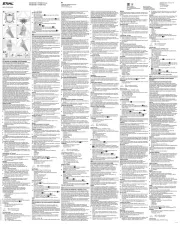
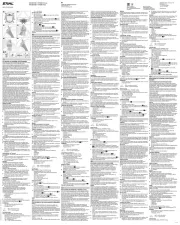
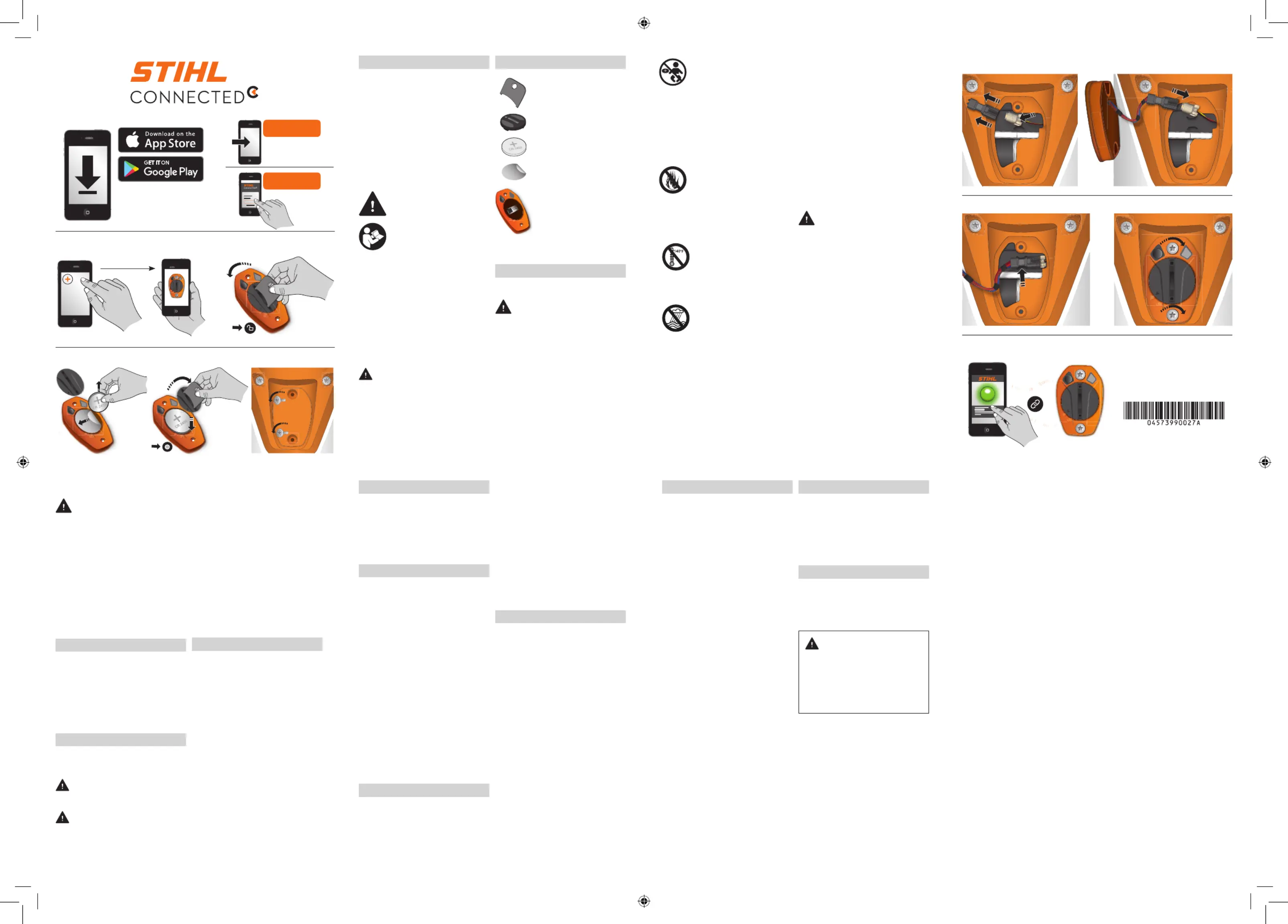
Download the STIHL connected App from
Google Play or the App Store (Illustration 1).
Follow in-app instructions for creating a new
user account (Illustration 2). Returning users
should log in using their existing account
information (Illustration 3).
Follow the step-by-step instructions for adding
a product to your product list
The STIHL Smart Connector is powered by a
CR2450 button-cell battery. Never attempt to
use any other type of battery.
Chemical burn hazard. Keep battery away from
This product contains a lithium button/coin cell
battery. If a new or used button/coin cell battery
is swallowed or enters the body, it can cause
severe internal burns and can lead to death in as
little as 2 hours. Always completely secure the
battery compartment. If the battery
compartment does not close securely, stop using
the product, remove the battery, and keep it
away from children. If you think batteries might
have been swallowed or placed inside any part
of the body, seek immediate medical attention.
To install the battery in the Smart Connector:
Using the tool provided, turn the Smart
Connector cover counter-clockwise to the
unlocked position (Illustration 5).
Remove the cover (Illustration 6).
Remove the battery (Illustration 6).
Remove and discard the protective battery foil
Install the battery with the polarity (+) pointing
upwards (Illustration 7).
Replace the cover (Illustration 7.
Using the tool provided, turn the cover
clockwise to the locked position (Illustration 7).
Mounting the Smart Connector 2 A
The Smart Connector 2 A can be mounted to
compatible STIHL power tools. Compatible tools
have a mounting recess designed specifi cally for
To mount the Smart Connector:
Remove the screws from the mounting recess
of the power tool (Illustration 8). The screws
will be reused for mounting the Smart
Disconnect the dummy plug and remove it
Connect the Smart Connector plug to the
power tool (Illustration 10).
Position the plug inside the recess of the
power tool (Illustration 11)
Insert the Smart Connector 2 A into the recess
(Illustration 12). Take care not to pinch or
otherwise damage any cables.
Insert the screws and fasten the Smart
Connector 2 A securely to the power tool
7 Linking to the STIHL connected App
Linking the Smart Connector 2 A to the STIHL
A er the battery is installed and the Smart
Connector 2 A is mounted, start the power
tool as instructed in your power tool manual.
Follow the instructions on your smartphone or
tablet to link the Smart Connector 2 A to the
STIHL connected App (Illustration 13).
Once you have linked your STIHL connected App
account to your STIHL Smart Connector 2 A, you
will be prompted for information to help you
Once the Smart Connector 2 A is attached to a
STIHL power tool and the tool is switched on, the
Smart Connector will start tracking runtime and
other data, which will be submitted to the STIHL
connected App when the smartphone or tablet is
and location services must be
enabled on your mobile device to enable tracking
The Smart Connector's signal range may vary
depending on ambient conditions and the
performance of the smartphone or tablet. The
range may be limited when the signal
is transmitted through metallic barriers (e.g.,
walls, shelving units, etc.) or near strong
For more information on the STIHL connected
App, please visit www.stihlusa.com or view the
Separate terms and conditions apply to the use
of the STIHL connected App and are available for
The LED does not glow when the battery is
Battery is fully depleted or the battery is
inserted the wrong way (reversed polarity).
Replace the battery or place the battery with
the side (+) pointing upwards.
The Smart Connector does not work properly.
Battery is low or fully depleted.
The LED does not light up when the push button
Battery is low, fully depleted or the Smart
Connector has a malfunction.
Replace the battery. If the LED still does not
light up, replace the battery.
Approved battery type: CR2450 button cell.
Battery service life: approximately 12 months.
Ambient temperature range for use and
storage: - 20 °F to 140 °F
IP protection rating: IP67 (protection from
total dust ingress and protection from
immersion up to 3 . (1 m) depth, limited
Data transmission protocol: Bluetooth
mobile receiving devices must be compatible
Low Energy version 4.0 and
support the Generic Access Profi le (GAP).
Frequency bands: ISM band 2.4 GHz
Radiated maximum transmission power: 1 mW
signal range: maximum 33 . (10 m).
The signal range may vary depending on
ambient conditions and the performance of
the designated receiving device, i.e.,
smartphone or tablet. The Bluetooth
may be limited when the signal is transmitted
through metallic barriers (e.g., walls, shelving
units, etc.) or near strong electromagnetic
Minimum device (e.g., tablet, smartphone)
system requirements: Android 5.0 or iOS 11.0
© ANDREAS STIHL AG & Co. KG original Instruction Manual
Apple and the Apple logo are trademarks of Apple Inc., registered in the U.S. and
other countries. App Store is a service mark of Apple Inc. Google Play and the Google
Play logo are trademarks of Google Inc.
This instruction manual is protected by copyright. All rights reserved, especially the
rights to reproduce, translate and process with electronic systems.
© ANDREAS STIHL AG & Co. KG, 0457 399 0027 A J20