Crestron CLC-FANDELVEX-W Manual

Crestron Ikke kategoriseret CLC-FANDELVEX-W
Læs gratis den danske manual til Crestron CLC-FANDELVEX-W (2 sider) i kategorien Ikke kategoriseret. Denne vejledning er vurderet som hjælpsom af 31 personer og har en gennemsnitlig bedømmelse på 3.6 stjerner ud af 16 anmeldelser. Har du et spørgsmål om Crestron CLC-FANDELVEX-W, eller vil du spørge andre brugere om produktet?

Side 1/2
The Crestron® CLC-FANDELVEX-W is a wireless fan and light controller. The compact design
allows the CLC-FANDELVEX-W to be securely placed inside most fan canopies.
Check the Box
Item Qty
CLC-FANDELVEX-W 1
Nut, Wire, Blue (P/N 2045230) 5
WARNINGS:
To avoid fire, shock, or death, turn off the power at the circuit breaker or fuse and test
that the power is off before wiring!
control or switch.
CAUTION: To reduce the risk of overheating and possible damage to other equipment, do not
install to control a receptacle.
NOTES: Observe the following points:
Install and use this product in accordance with appropriate electrical codes and
regulations.
A licensed electrician should install this product.
Do not install in a damp or moist environment. This product is for indoor use only.
Refer to the documentation for the fan for proper installation or disassembly and
reassembly.
Wiring the CLC-FANDELVEX-W
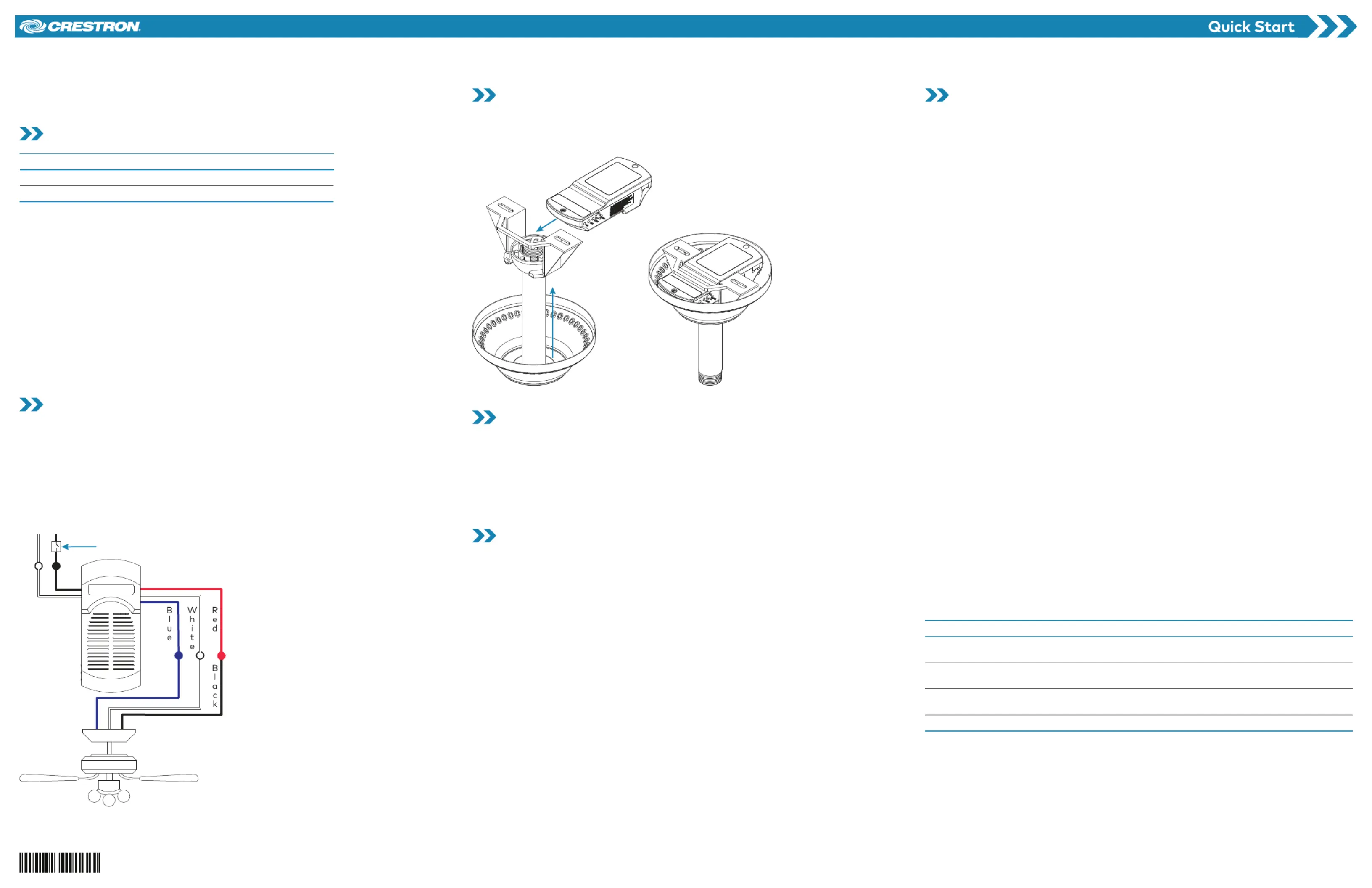
Connections to the CLC-FANDELVEX-W are made using flying leads.
Connect the line power to the black (hot) and white (neutral) flying leads.
Connect the fan (load) to the blue (light), red (fan), and white (neutral) flying leads.
NOTES:
Refer to the fan manufacturer’s documentation to ensure that the fan is wired properly.
Remove any pre-installed fan remote controller before installing the CLC-FANDELVEX.
Line Power
110 VAC, 60 Hz
Wall switch
Install the CLC-FANDELVEX-W
1. Insert the CLC-FANDELVEX-W into the fan mounting bracket.
2. Assemble the fan canopy according to the manufacturer’s instructions.
3. Using the fan’s hardware controls, turn the lights on and set the fan speed to high.
Local Control
Use the button on the CLC-FANDELVEX-W to join an infiNET EX network, test the ACQUIRE
connected lights, and acknowledge a TSID (Touch-Settable ID) command.
Press the ACQUIRE button to toggle the lights on and off.
Press the ACQUIRE button to acknowledge a TSID command.
Connect to an infiNET EX wireless network. Refer to the “Wireless Communications
section for details.
LED Indicators
STATUS LED:
Lights green when the CLC-FANDELVEX-W is receiving power. The LED turns off
after 1 minute.
Lights and/or flashes green during the infiNET EX acquire process. Refer to the “Wireless
Communications” section for details.
Flashes red to indicate error conditions. Refer to the “Error States” section for details.
LIGHT LED:
Lights when the CLC-FANDELVEX-W receives a command to turn on the lights. The LED
turns off after 1 minute.
FAN LED:
Lights when the CLC-FANDELVEX-W receives a command to turn on the fan. The LED
extinguishes after 1 minute.
Wireless Communications
The CLC-FANDELVEX-W communicates with the Crestron control system using the infiNET EX
wireless network. Follow the procedures below to join or leave an infiNET EX wireless network
and to verify communications between the CLC-FANDELVEX-W and the control system.
Join the infiNET EX Network
Before the CLC-FANDELVEX-W can communicate with a control system, it must first join an
infiNET EX network.
NOTES:
The CLC-FANDELVEX-W may be acquired by only one network.
Ensure that the CLC-FANDELVEX-W is within range of the infiNET EX wireless network.
In an environment where multiple gateways are installed, place only one gateway in
Acquire mode at a time.
To join an infiNET EX network:
1. Put the infiNET EX gateway into Acquire mode from the front of the device or using
Crestron Toolbox™ software.
2. Press the ACQUIRE button on the CLC-FANDELVEX-W three times, and then press
and hold it down (press, press, press, press+hold) until the green STATUS LED on the
CLC-FANDELVEX-W flashes once (this can take up to 10 seconds), then release the
button. The LED flashes slowly to show that the CLC-FANDELVEX-W is attempting to join
the infiNET EX wireless network.
When the green STATUS LED turns on for 5 seconds, it has joined the infiNET EX
wireless network.
If the green STATUS LED flashes quickly, it did not join the infiNET EX wireless network.
Press the ACQUIRE button to acknowledge, and then repeat step 2 to join the
infiNET EX wireless network.
3. Exit Acquire mode on the infiNET EX gateway.
Leaving an infiNET EX Network
1. Verify that the CLC-FANDELVEX-W is not within range of an infiNET EX network that is in
Acquire mode.
2. Press the ACQUIRE button on the CLC-FANDELVEX-W three times, and then press
and hold it down (press, press, press, press+hold) until the green STATUS LED on the
CLC-FANDELVEX-W flashes once (this can take up to 10 seconds), then release the
button. The LED flashes slowly.
3. The LED flashes quickly to indicate that the CLC-FANDELVEX-W has left the
infiNET EX wireless network. Press the ACQUIRE button to acknowledge that the
CLC-FANDELVEX-W has left the infiNET network and to stop the flashing LED.ACQUIRE
Verifying Communications Status
To check the communications status of the CLC-FANDELVEX-W, press the ACQUIRE button
three times and then press and hold it down (press, press, press, press+hold) for up to 2 seconds.
The green STATUS LED flashes to indicate the communications status.
LED Communications Status
The STATUS LED turns on for
five seconds.
The device is communicating with the control system.
The STATUS LED blinks three
times.
The device is communicating with the gateway, but the
gateway is not communicating with the control system.
The STATUS LED blinks twice. The device was previously joined to the network but is not
communicating with the gateway.
The STATUS LED blinks once. The device is not joined to the network.
CLC-FANDELVEX-W
infiNET EX® Wireless Light and Fan Controller


Produkt Specifikationer

Mærke: Crestron
Kategori: Ikke kategoriseret
Model: CLC-FANDELVEX-W

Har du brug for hjælp?

Hvis du har brug for hjælp til Crestron CLC-FANDELVEX-W stil et spørgsmål nedenfor, og andre brugere vil svare dig


Ikke kategoriseret Crestron Manualer

Crestron

Crestron HZ-FP-G4 Manual

5 December 2025
Crestron

Crestron HZ2-FP-G1 Manual

3 December 2025
Crestron

Crestron CM2-KPEX Manual

3 December 2025
Crestron

Crestron CM2-SWEX Manual

3 December 2025
Crestron

Crestron HZ-FP-G2 Manual

2 December 2025
Crestron

Crestron CM2-KPCN Manual

2 December 2025
Crestron

Crestron HZ2-AUX Manual

7 Oktober 2025
Crestron

Crestron PW-2407WUL Manual

29 September 2025
Crestron

Crestron C2N-UNI8IO Manual

28 September 2025

Ikke kategoriseret Manualer

Nyeste Ikke kategoriseret Manualer

Vinotemp

Vinotemp VT-24PR125 Manual

16 December 2025
Wind River

Wind River KG400 Manual

16 December 2025
Dals

Dals LEDWALL-G-CC Manual

16 December 2025
Silverstone

Silverstone UC04-PRO Manual

16 December 2025
Vinotemp

Vinotemp VT-122TS-2Z Manual

16 December 2025
Vaxcel

Vaxcel T0082 Manual

16 December 2025
Vaxcel

Vaxcel T0773 Manual

16 December 2025
Vaxcel

Vaxcel T0483 Manual

16 December 2025
Aqprox

Aqprox appLS22 Manual

16 December 2025