Crestron FT2A-CHGR-USBA-BASIC Manual

Crestron Ikke kategoriseret FT2A-CHGR-USBA-BASIC
Læs gratis den danske manual til Crestron FT2A-CHGR-USBA-BASIC (2 sider) i kategorien Ikke kategoriseret. Denne vejledning er vurderet som hjælpsom af 29 personer og har en gennemsnitlig bedømmelse på 4.9 stjerner ud af 15 anmeldelser. Har du et spørgsmål om Crestron FT2A-CHGR-USBA-BASIC, eller vil du spørge andre brugere om produktet?

Side 1/2
The Crestron® FT2A-CHGR-USBA-BASIC is a
single-slot module designed for installation in Crestron
FT2 FlipTop™ cable management assemblies. This module
provides two USB Type-A charging ports, which may be
used simultaneously to quickly charge two mobile phones,
laptops, or tablet devices at the table. The module is
engraved with the icon depicting the international symbol
for a high-powered USB charging port.
NOTE: The rapidity of the charge depends on the connected
device and how much power it draws.
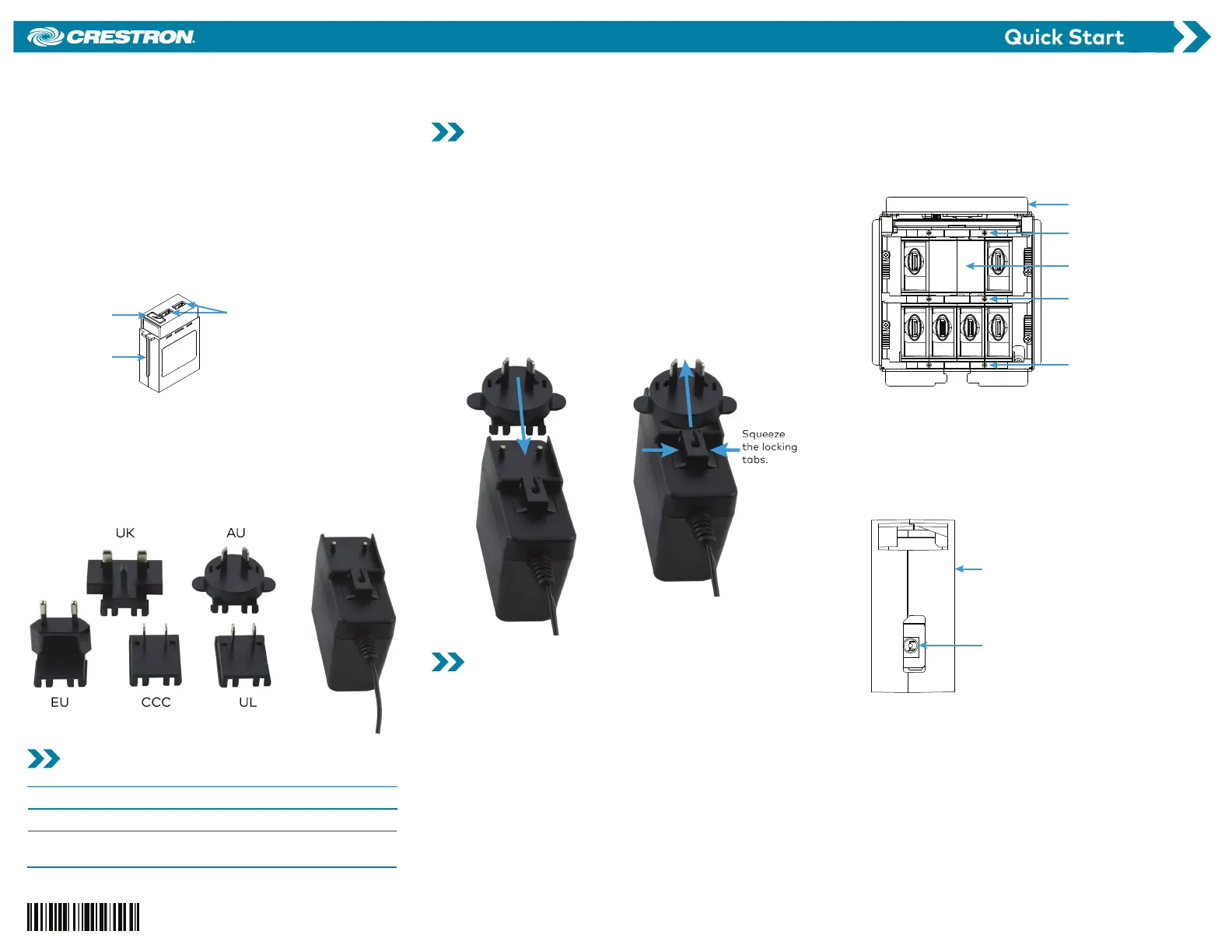
FT2A-CHGR-USBA-BASIC Module
Engraved icon
USB Type-A
charging port (2)
Front guide rib
An included power pack provides 5 amps (maximum) to
the module for simultaneous charging of two standard
USB loads. Each USB Type-A port supplies a maximum of
2.4 amps charging current with short circuit and overload
protection. The power pack has a 6 ft (1.83 m) cord and
five detachable plugs (UK, AU, EU, CCC, and UL) to
accommodate international standards.
Power Pack with Plugs (Included)
Check the Box
Item Qty
FT2A-CHGR-USBA-BASIC 1
Power Pack, 5 VDC 5 A, 100-240 VAC,
PW-0550WU (P/N 2053365)
1
Assemble the Power Pack
Assemble the included power pack before connecting it to
the module.
1. Select the detachable power plug appropriate for
your region. Follow the plug and socket standards of
the installation site.
2. Place the detachable plug onto the power pack, and
slide the plug downward toward the locking tabs. The
plug clicks into place.
NOTE: To remove a plug from the power pack, squeeze
the locking tabs together and slide the plug upward
off of the power pack.
Attach Plug Remove Plug
Install the Module
Install the FT2A-CHGR-USBA-BASIC module into the FT2
FlipTop assembly. If the bezel and locking bars have not
been installed on the FT2 FlipTop assembly, skip to step 4.
1. Tap the lid retraction button to retract the one-touch
lid, which disappears into the FT2 FlipTop assembly. If
the assembly has two lids, open both.
2. Remove and retain the magnetic bezel from the FT2
FlipTop assembly by grasping the inside of the bezel
and firmly pulling it up and away from the assembly
until the magnetic hold is broken.
3. Using a manual torque screwdriver, unscrew, remove,
and retain the two locking bars on either side of the
module row where the module is to be installed.
NOTE: In this example, an FT2A-CHGR-USBA-BASIC
module replaces a preinstalled blank plate module
inside the FT2-500-MECH.
Remove Two Locking Bars
FlipTop
assembly
Remove and
retain locking bar.
Replace blank
plate module.
Remove and
retain locking bar.
Do not remove
locking bar.
4. Lift and remove the blank plate module that occupies
the module slot where the module is to be installed.
5. Feed the 3.5 mm barrel plug of the power pack from
the bottom of the FT2 FlipTop assembly through the
empty module slot.
6. Connect the plug to the DC power jack of the module.
FT2A-CHGR-USBA-BASIC Module (Bottom View)
DC power jack
FT2A-CHGR-USBA-BASIC
module
7. Orient the module so that the module’s engraved
icon is facing toward the front of the FT2 FlipTop
assembly.
FT2A-CHGR-USBA-BASIC
USB Rapid Charging Module for FT2 Series, Mechanical


Produkt Specifikationer

Mærke: Crestron
Kategori: Ikke kategoriseret
Model: FT2A-CHGR-USBA-BASIC

Har du brug for hjælp?

Hvis du har brug for hjælp til Crestron FT2A-CHGR-USBA-BASIC stil et spørgsmål nedenfor, og andre brugere vil svare dig


Ikke kategoriseret Crestron Manualer

Crestron

Crestron HZ-FP-G4 Manual

5 December 2025
Crestron

Crestron HZ2-FP-G1 Manual

3 December 2025
Crestron

Crestron CM2-KPEX Manual

3 December 2025
Crestron

Crestron CM2-SWEX Manual

3 December 2025
Crestron

Crestron HZ-FP-G2 Manual

2 December 2025
Crestron

Crestron CM2-KPCN Manual

2 December 2025
Crestron

Crestron HZ2-AUX Manual

7 Oktober 2025
Crestron

Crestron PW-2407WUL Manual

29 September 2025
Crestron

Crestron C2N-UNI8IO Manual

28 September 2025

Ikke kategoriseret Manualer

Nyeste Ikke kategoriseret Manualer

Vinotemp

Vinotemp VT-24PR125 Manual

16 December 2025
Wind River

Wind River KG400 Manual

16 December 2025
Dals

Dals LEDWALL-G-CC Manual

16 December 2025
Silverstone

Silverstone UC04-PRO Manual

16 December 2025
Vinotemp

Vinotemp VT-122TS-2Z Manual

16 December 2025
Vaxcel

Vaxcel T0082 Manual

16 December 2025
Vaxcel

Vaxcel T0773 Manual

16 December 2025
Vaxcel

Vaxcel T0483 Manual

16 December 2025
Aqprox

Aqprox appLS22 Manual

16 December 2025