SIW-ACR-100
Status Indicator Acrylic for SSW
Installation Guide
Description
The Crestron
®
SIW-ACR-100 is a status indicator acrylic that is used with the Crestron
SSW room availability hallway sign. When installed into an SSW as part of a room
scheduling solution, the SIW-ACR-100 illuminates to indicate the room’s availability.
Additional Resources
Visit the product page on the Crestron website (www.crestron.com)
for additional information and the latest rmware updates. Use a QR
reader application on your mobile device to scan the QR image.
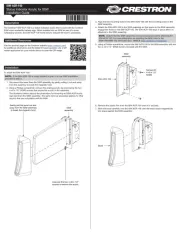
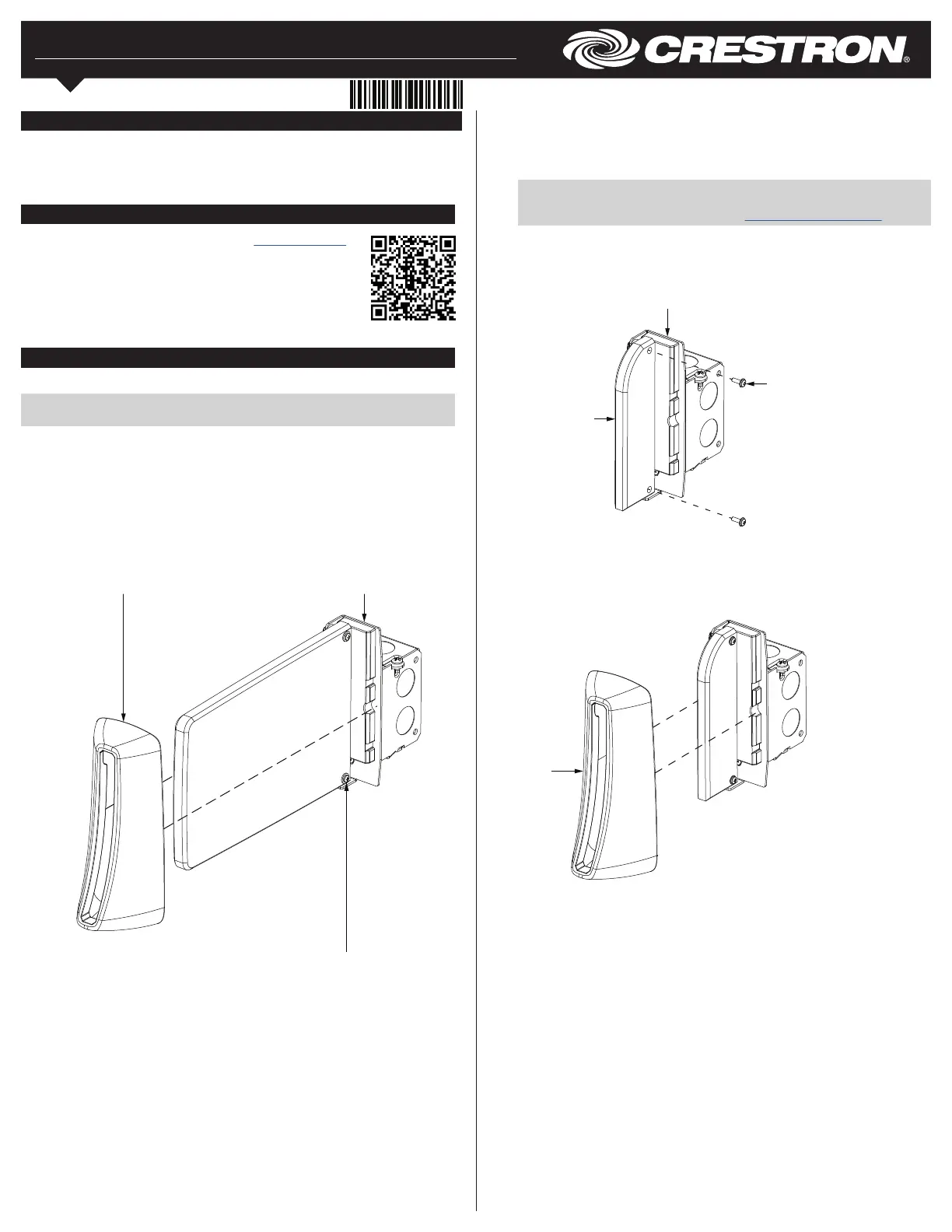
Gently pull the bezel out and
away from the SSW assembly
to break the magnetic hold.
Unscrew the two 4-40 x 1/2"
screws to remove the acrylic.
SSW
assembly
inNET EX logo only needed for inNET
EX products. The mere mention of
inNET EX in a document is not cause to
use the logo.
Installation
To install the SIW-ACR-100:
NOTE: If the SIW-ACR-100 is being installed as part of a new SSW installation,
proceed to step 3.
1. Disconnect the bezel from the SSW assembly by gently pulling it out and away
from the assembly to break the magnetic hold.
2. Using a Phillips screwdriver, remove the existing acrylic by unscrewing the two
4-40 x 1/2" SEMS screws that secure the acrylic to the assembly.
The illustration below depicts the proecedure for removing an SSW-ACR acrylic
sign face from the SSW assembly. The same removal procedure applies to other
acrylics that are compatible with the SSW.
3. Align the two mounting holes in the SIW-ACR-100 with the mounting posts on the
SSW assembly.
4. Attach the SIW-ACR-100 to the SSW assembly so that posts on the SSW assembly
engage the holes on the SIW-ACR-100. The SIW-ACR-100 stays in place after it is
attached to the SSW assembly.
NOTE: Ensure that the SSW assembly is mounted properly before attaching the
SIW-ACR-100. For more information on installing the SSW, refer to the
SSW-100/SSW-102 DO Guide (Doc. 7969) at www.crestron.com/manuals.
5. Using a Phillips screwdriver, secure the SIW-ACR-100 to the SSW assembly with the
two 4-40 x 1/2" SEMS screws included with the SSW.
SIW-ACR-100
Screws (2):
4-40 x 1/2"
SEMS
SSW
assembly
6. Remove the plastic lm from the SIW-ACR-100 once it is secured.
7. Slide the bezel carefully over the SIW-ACR-100 until the bezel snaps magnetically
into place against the SSW assembly.
Bezel