Eldat RTS05E5001-01-02K Manual

Eldat Ikke kategoriseret RTS05E5001-01-02K
Læs gratis den danske manual til Eldat RTS05E5001-01-02K (1 sider) i kategorien Ikke kategoriseret. Denne vejledning er vurderet som hjælpsom af 3 personer og har en gennemsnitlig bedømmelse på 4.4 stjerner ud af 2 anmeldelser. Har du et spørgsmål om Eldat RTS05E5001-01-02K, eller vil du spørge andre brugere om produktet?

Side 1/1
EN
Start-Up
Function
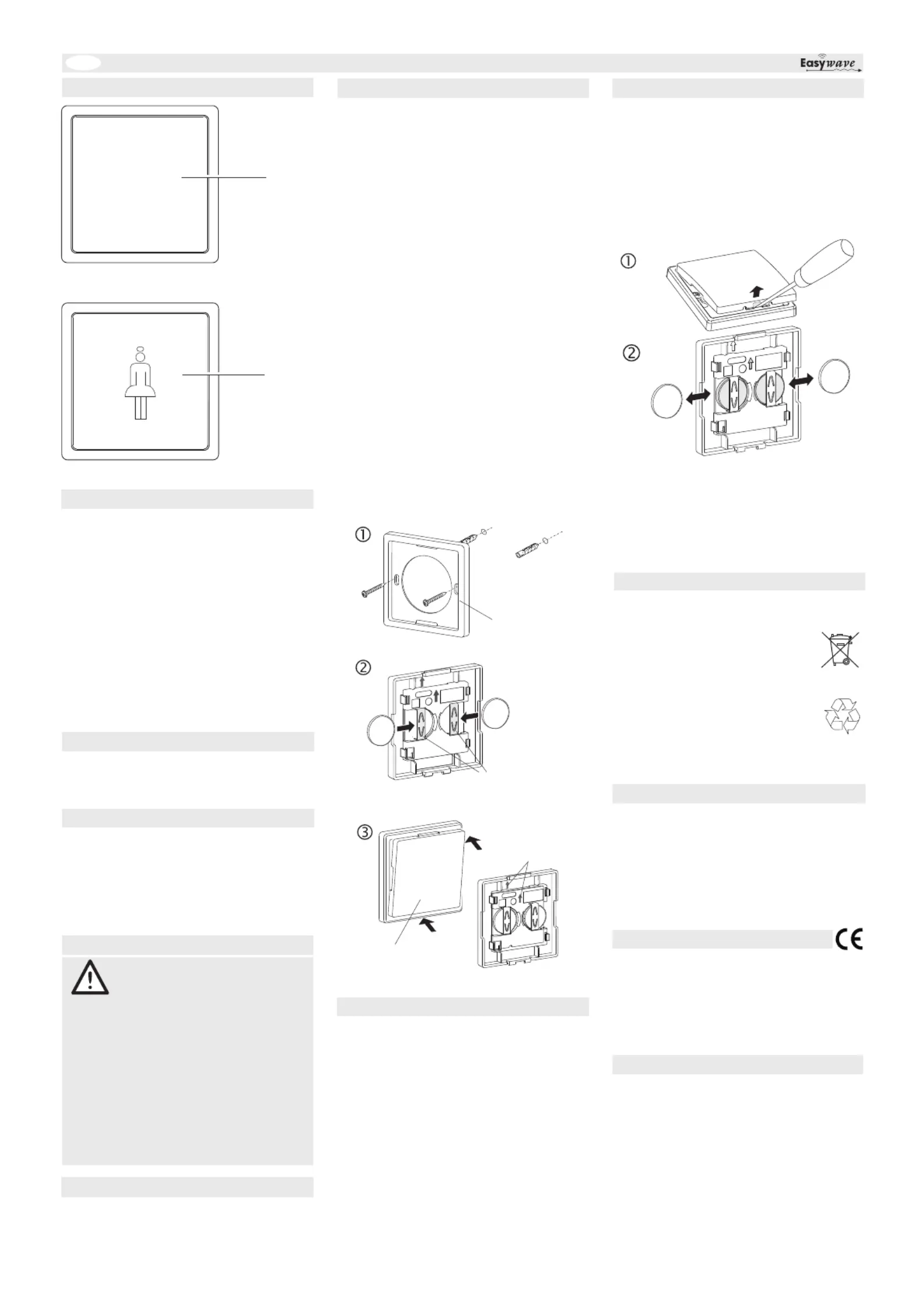
1. Screw or stick
2. Put the enclosed batteries under the
battery clip. Make sure the polarity is
correct!
3. First snap the radio sensor button in on the
top and then on the botton of the att-
upwards.
4.
Touch the
button surface in slight distance or touch it
transmitted to the control. Please
the attachment frame to the
installation site with the help of the screws
and dowels or the adhesive pads.
Make sure that there is no Caution:
interference with the wireless connection.
Do not mount the device in a distribution
box, metal casings, in direct proximity to
large metal objects, on the floor or close to
it.
Register the transmission code with the
control to programming mode.
read the
radio controls.
RTS05 Radio sensor wall switch
Model
Technical Data
Use the Radio sensor wall switch RTS05
exclusively for switching Easywave radio
controls.
The manufacturer shall not be liable for any
damage caused by improper or non-intended
use.
Intended Use
Package Content
Radio Wall Sensor,
mounting frame, attachment set, op.
Instruction
2x batteries CR2032,
Frequency: 868.3 MHz
Radiated
power: 0.14 mW
Modulation: FSK
Coding: Easywave (A)
Power supply: 2x 3-V-batteries, CR2032
Current standby current: approx. 16 µA
consumption: transm. current : approx. 12 mA
Operating
temperature: -20°C to +50°C
Range: free-field: approx. 150 m
buildings: approx. 30 m
Dimensions: 80 x 80 x 10 mm
Weight: approx. 40.7 g incl. Batterien
The RTS05 is a capacitive proximity switch. By
slight approach or short touch of the button
surface the Easywavecode is transmitted and
the connected Easywave radio controls are
switched on or off.
Replacing the Batteries
1.
2. Replace the batteries. Only use batteries
of the type CR2032. Make sure the pola-
rity is correct! Keep batteries out of
reach of children!
3.
Note:
the mounting frame on the bottom edge.
Re-insert the sensor button into the moun-
ting frame.
The transmitter's coding is preserved
even if there is no voltage supply. You do not
need to re-register the code with the wireless
control after a battery change.
Sensor button
Battery clip
Make sure the
polarity is correct!
Mounting
frame
CR2032
+
CR2032
+
CR2032
+
CR2032
+
1.
2.
Troubleshooting
If the wireless control does not react to the
:
- Exchange the battery.
- Check that the wireless connection at the
installation site is not impaired between the
wireless wall switch and the wireless control.
- Re-register the transmission code with the
wireless control.
- Other wireless devices using the same
frequency or working in direct proximity may
interfere with the device.
Radio Wall Sensor
Before using the Radio sensor wall
switch, carefully read through the
operating instructions!
Note also the operating instructions of the
radio receiver(s)!
The Radio sensor wall switch should only be
operated within sight of the devices to be
controlled! Otherwise persons could be
placed in danger!
Have faulty wireless wall switch checked by
the manufacturer!
Do not make any unauthorized alterations or
modifications to the Radio sensor wall
switch!
Safety Advice
Disposal
Conformity
If, despite correct handling, faults or mal-
functions occur or if the product was da-
maged, please contact the company at the
address below:
ELDAT EaS GmbH
Schmiedestraße 2
15745 Wildau
Germany
Phone: + 49 (0) 33 75 / 90 37-310
Fax: + 49 (0) 33 75 / 90 37-90
Internet: www.eldat.de
E-mail: info@eldat.de
Waste electrical products and batteries not
be disposed of with household waste!
Dispose of the waste product via a
collection point for electronic scrap
or via your specialist dealer.
Dispose of used batteries in a
recycling bin for batteries or via the
specialist trade.
Put the packaging material into the
recycling bins for cardboard, paper
and plastics.
Hereby, ELDAT EaS GmbH declares that the
radio equipment type RTS05 is in compliance
with Directive 2014/53/EU.
The full text of the EU declaration of conformity
is available at the following internet address:
www.eldat.de
Warranty
Within the statutory warranty period we
undertake to rectify free of charge by repair or
replacement any product defects arising from
material or production faults.
Any unauthorized tampering with, or
modifications to, the product shall render this
warranty null and void.
Customer Service
Direction of
arrow must be
upward!
CR 32
CR 2
+
A
RTS05E5001A03 CALL 1 button operation
A
RTS05E5001-01
1 button operation
ON/OFF (pulse)
UM77967D_0622 DE/EN


Produkt Specifikationer

Mærke: Eldat
Kategori: Ikke kategoriseret
Model: RTS05E5001-01-02K

Har du brug for hjælp?

Hvis du har brug for hjælp til Eldat RTS05E5001-01-02K stil et spørgsmål nedenfor, og andre brugere vil svare dig


Ikke kategoriseret Eldat Manualer

Ikke kategoriseret Manualer

Nyeste Ikke kategoriseret Manualer