EXSYS EX-13020HMV Manual


Læs gratis den danske manual til EXSYS EX-13020HMV (2 sider) i kategorien Audio/video konverter. Denne vejledning er vurderet som hjælpsom af 23 personer og har en gennemsnitlig bedømmelse på 4.8 stjerner ud af 12 anmeldelser. Har du et spørgsmål om EXSYS EX-13020HMV, eller vil du spørge andre brugere om produktet?

Side 1/2
6 5
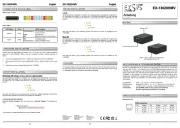
Mit dem EX 13020HMV können Sie Notebook, Desktop Rechner oder Server im 19 Zoll Rack - -
über den USB 3.2 Gen 1 C Anschluss in ein 10/100/1000Mbps Netzwerk einbinden. Der EX- -
13020HMV kann gleichzeitig zu einer bestehender Netzwerkkarte installiert werden. Die Instal-
lation ist sehr einfach ohne, dass die Systeme geöffnet werden müssen. Die Bauform des EX-
13020HMV ist sehr kompakt und robust und bietet somit einen optimalen Einsatz in rauen
Umgebungen. Zusätzlich ist es möglich das UBS 3.2 Gen 1 Kabel mit dem EX 13020HMV zu -
verschrauben. Mit dem EX 13020HMV wir ein DIN Rail Kit mitgeliefert, für die Installation in ein - -
19- Zoll Rack.
Kompatibilität: USB 1.1, 2.0, 3.2 Gen 1 / TCP/IP 10/100/1000
Anschlüsse: 1x USB 3.2 Gen 1 C Buchse, 1x RJ45 Gigabit Ethernet Anschluss -
Lieferumfang: 13020HMV, USB 3.2 Gen 1 Kabel (verschraubbar), EX-
-Wandmontagehalterung, DIN Rail Kit, Anleitung
1
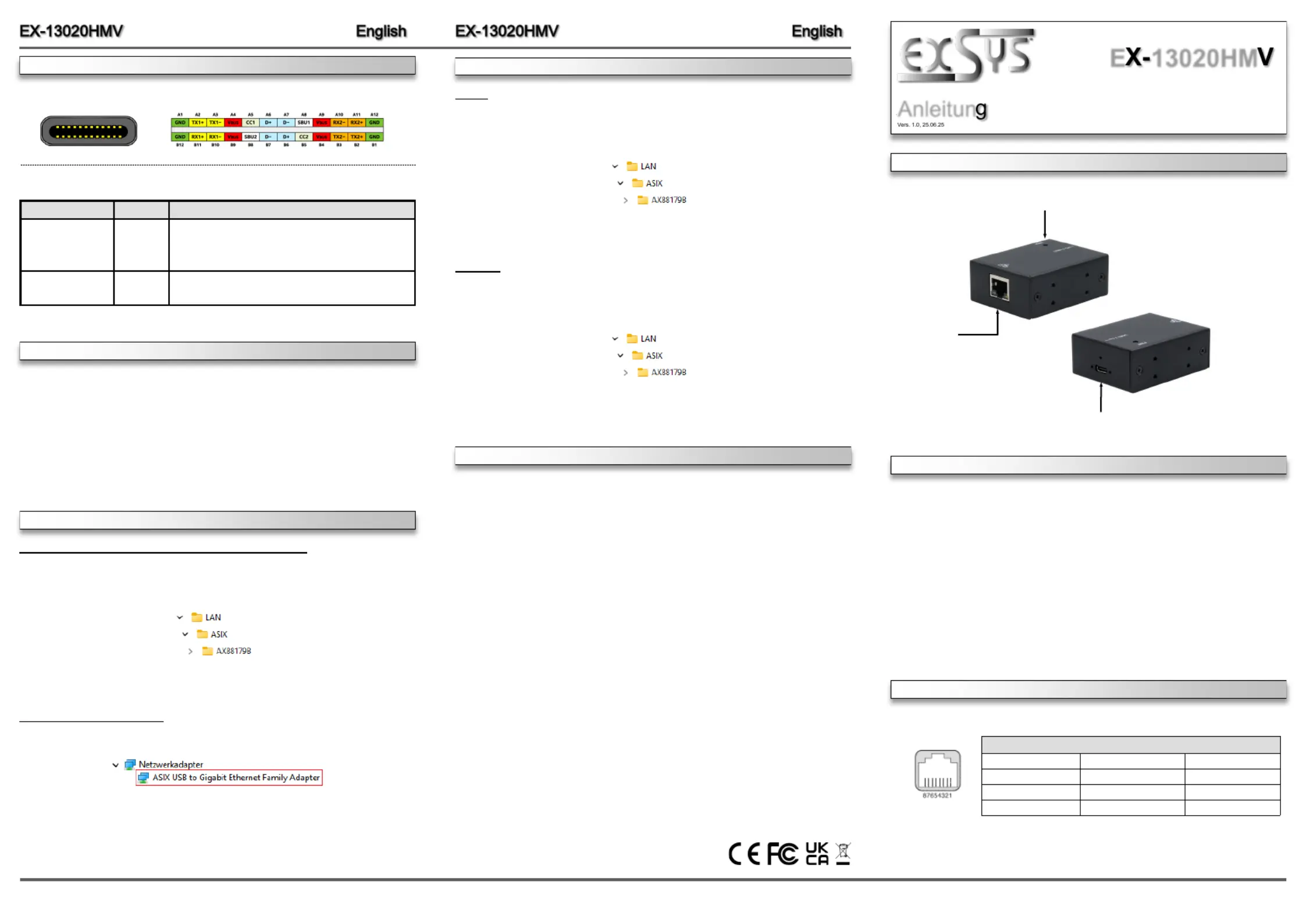
BESCHREIBUNG & TECHNISCHE DATEN
AUFBAU
ANSCHLUSS & STATUS L sED
RJ45 Anschluss:
RJ45 Anschluss
Pin Signal Pin Signal Pin Signal
1 BI_DA+ 4 BI_DC+ 7 BI_DD+
2 BI_DA 5 BI_DC 8 BI_DD - - -
3 BI_DB+ 6 BI_DB -
Anleitun
E 13020HM
Switzerland:
EXSYS Vertriebs GmbH
Dübendorfstrasse 17
8602 Wangen
www.exsys.ch
Germany:
EXSYS Vertriebs GmbH
Industriestrasse 8
61449 Steinbach
www.exsys.de
Italy:
EXSYS Italia Srl
Via Belvedere, 45/B
I 22100 Como -
www.exsys.it
USB 3.2 Gen 1 C Buchse (verschraubbar) -
zum Anschluss an den PC
Betriebs LED
RJ45 Anschluss
HARDWARE INSTALLATION
DRIVER INSTALLATION
Because there are large differences between PC s, we can give you only a general installation
guide for the EX 13020HMV. Please refer your computer s reference manual whenever in -
doubt.
1. Connect the supplied USB 3.2 Gen 1 cable to the USB C Port of the EX 13020HMV.- -
2. -Now connect the other end of the supplied USB 3.2 Gen 1 cable to a USB C Port on your
PC.
3. Now you can connect a network cable at the EX-13020HMV.
CLEANING
Windows XP / Vista / 7 / 8.x / 10 / 11 / Server 20xx
Once the hardware installation is complete, the operating system automatically recognizes the
EX-13020HMV and installs it. If the drivers are not installed automatically, you can download
the drivers from our website (www.exsys.de or www.exsys.ch) under Downloads for your
product.
Now open the folder of your operating system and start the application located there. setup
Now follow the installation instructions and complete the installation.
CHECK INSTALLED DRIVER
Open the . Now you should see at >Device manager< Ethernet Adapter the following new
entry:
If you see this or a similar information the device is installed correctly.
For cleaning please use only a dry fluff less cloth and remove the dirt with gently pressure. In
the area of the connectors please make sure that no fibres from the cloth remain in the connect-
ors. Attention! Never use a moist or wet cloth for cleaning!
CONNECTOR & STATUS L sED
Status LEDs:
LED Name
Color
LED Function
Link/Act
Green
Continuously on: The Connection on the Ethernet port
is built and Active
Flash: Transmit Data
Off: Network connection is disconnected
Speed
Yellow
Off: 10/100Mbps Mode
Continuously on: Gigabit (1000Mbps) Mode
DRIVER INSTALLATION
Linux
Once the hardware installation is complete, the operating system automatically recognizes the
EX-13020HMV and installs it. If the drivers are not installed automatically, you can download
the drivers from our website (www.exsys.de or www.exsys.ch) under Downloads for your
product.
Now open the folder of your operating system and remove the drivers for installing the EX-
13020HMV.
Mac OS
Once the hardware installation is complete, the operating system automatically recognizes the
EX-13020HMV and installs it. If the drivers are not installed automatically, you can download
the drivers from our website (www.exsys.de or www.exsys.ch) under Downloads for your
product.
Now open the folder of your operating system and remove the drivers for installing the EX-
13020HMV.
USB 3.2 Gen 1 C Port:-


Produkt Specifikationer

Mærke: EXSYS
Kategori: Audio/video konverter
Model: EX-13020HMV

Har du brug for hjælp?

Hvis du har brug for hjælp til EXSYS EX-13020HMV stil et spørgsmål nedenfor, og andre brugere vil svare dig


Audio/video konverter EXSYS Manualer
Audio/video konverter Manualer

Nyeste Audio/video konverter Manualer

BirdDog

BirdDog FLEX 4K BP Manual

5 December 2025
BirdDog

BirdDog 4K SDI Si2 Manual

4 December 2025
BirdDog

BirdDog PLAY Manual

3 December 2025
BirdDog

BirdDog FLEX 4K OUT Manual

3 December 2025
BirdDog

BirdDog 4K Quad Manual

2 December 2025
BirdDog

BirdDog OG4 Manual

2 December 2025
BirdDog

BirdDog 4K HDMI Si2 Manual

2 December 2025
MuxLab

MuxLab 500427 Manual

1 December 2025
MuxLab

MuxLab 500425 Manual

1 December 2025
MuxLab

MuxLab 500412-V2 Manual

1 December 2025