Kramer DA3-18-H Manual

Kramer Modtager DA3-18-H

Læs gratis den danske manual til Kramer DA3-18-H (2 sider) i kategorien Modtager. Denne vejledning er vurderet som hjælpsom af 7 personer og har en gennemsnitlig bedømmelse på 4.7 stjerner ud af 4 anmeldelser. Har du et spørgsmål om Kramer DA3-18-H, eller vil du spørge andre brugere om produktet?
Side 1/2
DA3-18-H Quick Start
Manufacturer
: Kramer Israel
2
Negev St. Airport City 7019900
+972 (0)73
-265-0200
info_il@kramerav.com
EU Importer:
Kramer EMEA Netherlands
Stroombaan 16
, The Garden 1181VX
Amstelveen
info_EMEA@kramerav.com
P/N:
2 9 0 0 - 3 0 1 7 3 9 QS
Rev:
1
Scan to go to website
DA3-18-H Quick Start Guide
This guide helps you install and use your DA3-18-H for the first time.
Go to http://www.kramerav.com/downloads/DA3-18-H to download the latest user manual and check if
firmware upgrades are available.
Step 1: Check what’s in the box
DA3-18-H HDMI Distribution Amplifier
2 Power cords and 1 adapter
Set rubber foot
1 Quick start guide
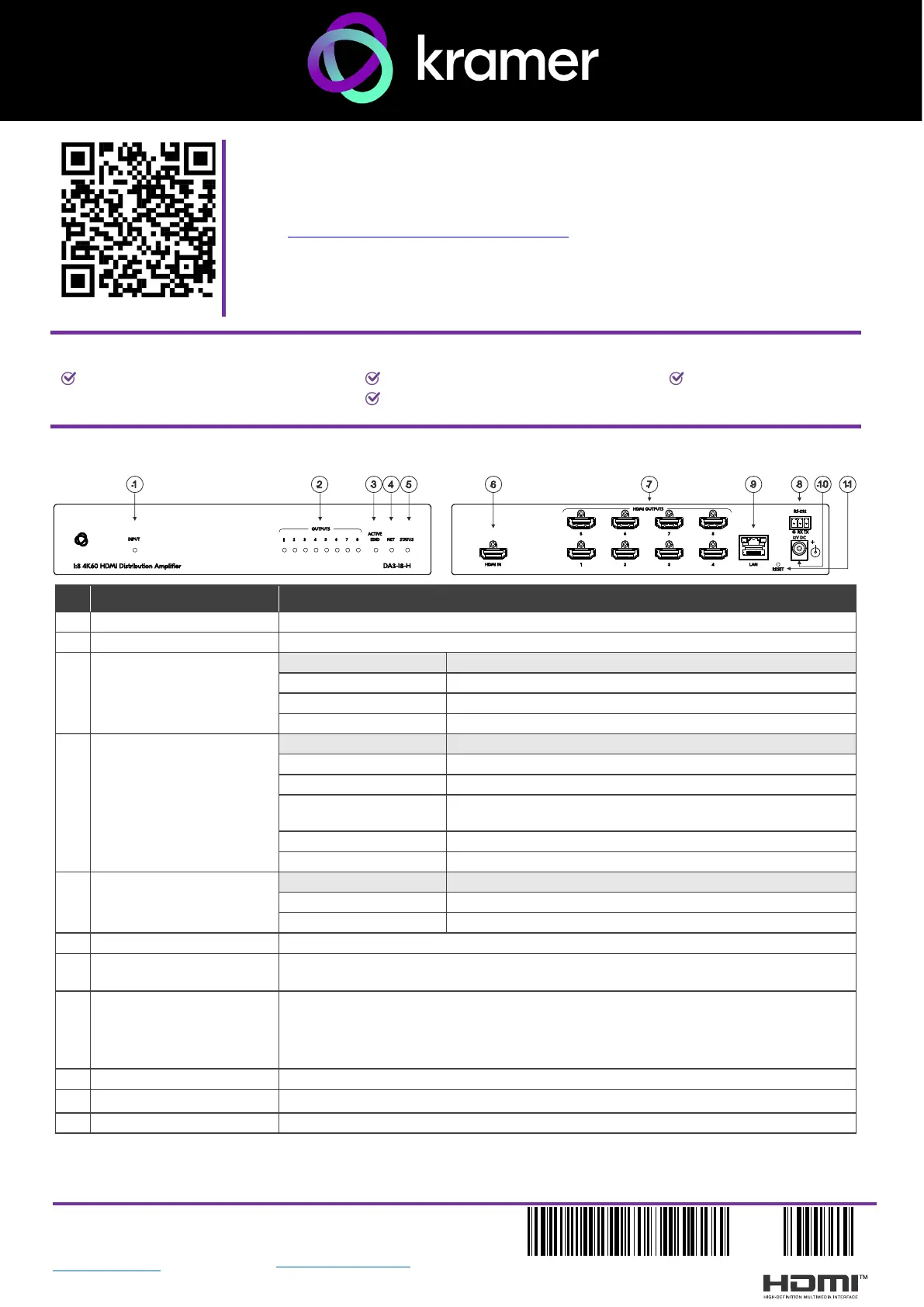
Step 2: Get to know your DA3-18-H
# Feature Function
1
INPUT LED
LED lights blue when an input is connected and active.
2
OUTPUTS LED
LEDs light blue when an output(s) is connected and active.
3
ACTIVE EDID LED
LED status
Indicates
Yellow
Default EDID is active (the default EDID is 4k@60 4:4:4)
Blue
Output-acquired EDID is active
Green
Custom EDID is active
4
NET LED
LED status
Indicates
Dark
No IP address acquired.
Green
A valid IP address has been acquired.
Flashes green for 60s
A means to identify the device in a system, using command
#IDV (Flag Me).
Flashes red/white
IP fallback address has been acquired - 192.168.1.39
Red
Security-blocked IP-access.
5
STATUS LED
LED status
Indicates
Blue
An active input signal is detected.
Green
An active input signal is detected for an unselected input.
6
HDMI IN Connector
Connects to the HDMI source.
7
HDMI OUTPUTS
Connectors
Connect to the HDMI acceptors
8
RS-232
3-pin Terminal Block
Connect to:
RS-232 controlled device (for example, a PTZ USB camera) for its remote IP
control by a controller (for example, KC-VB1/5), OR
PC RS-232 port for controlling the device.
9
LAN RJ-45 Connector
Connect to LAN.
10
12V DC Power Connector
DC connector enabling power supply to the unit.
11
RESET
For restoring factory default settings, press the RESET button and connect power to device.


Produkt Specifikationer

Mærke: Kramer
Kategori: Modtager
Model: DA3-18-H

Har du brug for hjælp?

Hvis du har brug for hjælp til Kramer DA3-18-H stil et spørgsmål nedenfor, og andre brugere vil svare dig