Micro Connect MC-HM-MT402H Manual

Micro Connect Skifte MC-HM-MT402H
Læs gratis den danske manual til Micro Connect MC-HM-MT402H (2 sider) i kategorien Skifte. Denne vejledning er vurderet som hjælpsom af 31 personer og har en gennemsnitlig bedømmelse på 4.5 stjerner ud af 16 anmeldelser. Har du et spørgsmål om Micro Connect MC-HM-MT402H, eller vil du spørge andre brugere om produktet?

Side 1/2
Optical4 Output B Output A321
Power
5VDC, 2A
Input
AudioR L
Power
IR
2 3 4
Selection
1SPDIF PASS 2.0CH 5.1CH
Audio
ARC
Output A
2 3 4
Selection
1
Output B
1
A
B
2
3 4
ARC
SPDIF
2.0
5.1 PASS
1 2
3 4
1
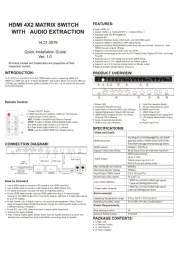
HDMI 4X2 MATRIX SWITCHER
WITH AUDIO EXTRACTION
Quick Installation Guide
Ver. 1.0
All brand names and trademarks are properties of
their respective owners
2
INTRODUCTION:
FEATURES:
3
4
SPECIFICATIONS:
● Input: HDMI x 4.
● Output: HDMI x 2, Toslink/SPDIF x 1, Stereo RCA x 1.
● Supports Ultra HD 4Kx2K@60Hz.
● Supports 3D.
● Supports Standard Audio,DSD Audio, and HD(HBR) Audio.
● Supports HDMI2.0, HDCP2.2, HDR Signal format
● Supports 6.0Gbps TMDS/600MHz pixel clock rate per channel, maximum
total TMDS through outputs 18Gbps.
● Supports uncompressed audio such as LPCM.
● Supports compressed audio such as DTS Digital, Dolby Digital, DTS-HD,
and Dolby TrueHD.
● Supports up to 7.1CH digital surround on HDMI output.
● Supports up to 5.1CH digital surround on Toslink output.
● Supports up to 2.0 channel analog stereo on Stereo output.
● Support the ARC
(Audio Return Channel).
This item is a true 4K60 4:4:4 4x2 HDMI matrix switch. Supporting HDMI 2.0, HDCP 2.2,
HDR and up to 18 Gbps bandwidth. This switch allows any source (Blu-ray, UHD Blu-ray,
satellite receiver, game consoles, PCs, etc...) to be shown on any of the connected displays.
● 1x Main unit
● 1x Remote Control
● 1x User Manual
● 1x Power adapter
● 1 x Phoenix Plug for RS232 cable Termination
PACKAGE CONTENTS:
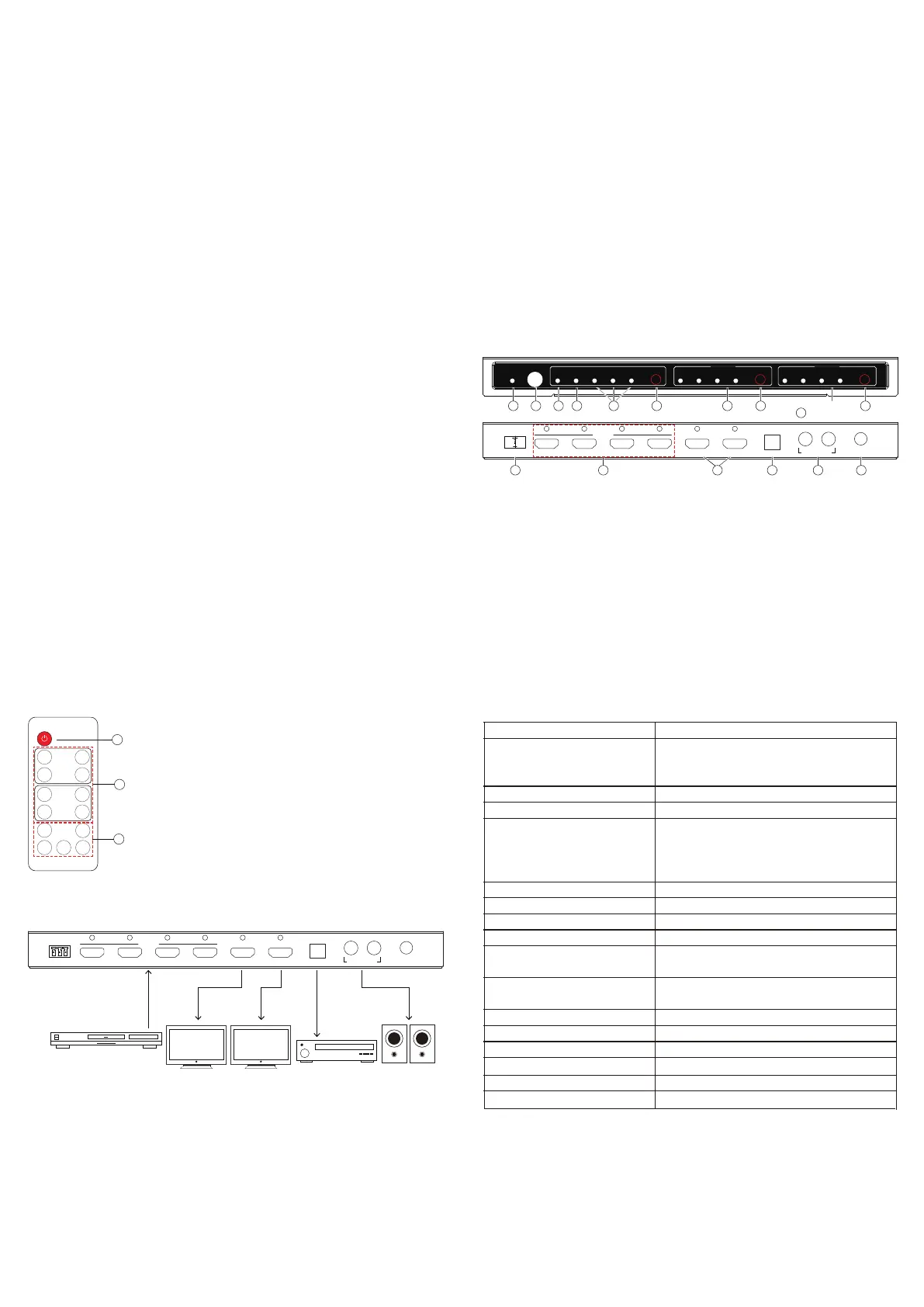
CONNECTION DIAGRAM:
How to Connect
SPDIF Output
Audio Output
1. Power LED
2. Infrared for Remote Control
3. Audio Return Channel(ARC) LED Indicator
4. Optical Digital Audio Output LED Indicator
5. HDMI Pass-through/2.0CH/5.1CH Audio
Channel LED Indicators
6. Audio mode selection Button
7/9. HDMI Input LED Indicators
8/10. Input Port selection Button
11. RS232 Communication Port
12. HDMI Input Ports
13. HDMI Output Port
14. Optical Digital Audio Outptu Port
15. L/R Analog Stereo Audio Output
Port
16. Power Input Port
1. Use a HDMI cable to connect a HD source to the HDMI Input Port.
2. Use a HDMI cable to connect a HD display to the HDMI Output Port.
3. For audio connection, choose one from the following options.
a. To use HDMI pass-through, use the HDMI cable from step 2 to connect audio
receiver to the HDMI Output Port. Your audio receiver will have to output video
signal to your HD display.
b. To use Toslink, use a Toslink cable to connect to audio equipment. (Note: Toslink
does not support Dolby Digital plus please change the input source's audio
output to a different setting, if needed.)
c. To use R/L, use a R/L cable to connect a stereo audio equipment.
4. Connect the power adapter.
5. Note: If using Toslink cable, please make sure the rubber protective tip cover has
already been removed from both ends before connecting them to devices.
2. HDMI Input Source Selector: Select an input source.
3. Audio Output control buttons.
ARC: Enable or disable Audio Return Channel.
PASS: Use the AUDIO EDID from Display device.
2.0: Sets audio output mode to 2.0 channel.
5.1: Sets audio output mode to 5.1 channel.
PRODUCT OVERVIEW:
Remote Control
HDMI resolution
HDMI version
Support video color format
Audio output
Max bandwidth per channel
Max baud rate per display
Input/Output TMDS signal
Input/Output DDC signal
Input cable distance
O
Environmental
Power Requiremnt
utput cable distance
4Kx2K@24/25/30/60fps@60Hz,3D(1080P
@24/60/120Hz),1080P/1080i/720P/576P/
576i/480P/480i@24/30/50/60fps@120Hz
HDMI2.0, HDCP2.2
36-bit Deep Color all channels maximum
HDMI pass-through
Up to 7.1CH
Toslink output up to 5.1 ch
RCA L/R out put stereo audio
600MHz
18Gbps
0.5~1.5V p-
p(TTL)
5V p-p
(TTL)
50ft/15m 24 AWG HDMI high speed
Cable at1080P@24bit 60Hz
50ft/15m 24 AWG HDMI high speed
Cable at1080P@24bit 60Hz
5°F to 131°F / -15°C to 55°C
5% to 90% RH(No Condensation)
1A
DC5V/2A
Operating Temperature range
Operating Humidity range
Max working current
External Power Supply
1
11
12 14 15 16
2 3 4 65 7 8 9 10
Audio Amplifier
HDMI Source
PS3,PC,STB,
Blu-ray DVD player etc
HD TVHD TV
Speaker
Input
HDMI x 4
HDMI OutputHDMI Output
2
3
13
Optical4 Output B Output A321
Power
5VDC, 2A
Input
AudioR L
SPDIF: Enable or disable Optical Digital Audio output.
1
1. Power ON/OFF button.
RS232
RS232
Video and audio


Produkt Specifikationer

Mærke: Micro Connect
Kategori: Skifte
Model: MC-HM-MT402H
Vægt: 790 g
Brugervejledning: Ja
Indbygget skærm: Ingen
Produkttype: AV matrix omskifter
Pakkevægt: 984 g
Pakkedybde: 215 mm
Pakkebredde: 289 mm
Pakkehøjde: 55 mm
Relativ luftfugtighed ved drift (H-H): 5 - 90 %
HDCP: Ja
Driftstemperatur (T-T): -15 - 55 °C
DC-in-stik: Ja
LED-indikatorer: Ja
AC-adapter inkluderet: Ja
Lyd (L, R) indgang: 1
Husets farve: Sort
HDCP-version: 2.2
Antal HDMI-indgangsporte: 4
Båndbredde: 18 Gbit/sek.
Antal HDMI-udgangsporte: 2

Har du brug for hjælp?

Hvis du har brug for hjælp til Micro Connect MC-HM-MT402H stil et spørgsmål nedenfor, og andre brugere vil svare dig