StarTech.com 2SD4FCRU3 Manual


Læs gratis den danske manual til StarTech.com 2SD4FCRU3 (2 sider) i kategorien Hukommelseskortlæser. Denne vejledning er vurderet som hjælpsom af 28 personer og har en gennemsnitlig bedømmelse på 4.0 stjerner ud af 14.5 anmeldelser. Har du et spørgsmål om StarTech.com 2SD4FCRU3, eller vil du spørge andre brugere om produktet?

Side 1/2
Quick-start guide
FR: Guide de l’utilisateur - fr.startech.com
DE: Bedienungsanleitung - de.startech.com
ES: Guía del usuario - es.startech.com
NL: Gebruiksaanwijzing - nl.startech.com
PT: Guia do usuário - pt.startech.com
IT: Guida per l’uso - it.startech.com
Manual Revision: 09/28/2016
For the latest information, technical speci cations, and support for
this product, please visit www.StarTech.com/2SD4FCRU3.
Packaging contents
1 x dual-slot SD™ card reader
1 x quick-start guide
System requirements
This converter is OS independent and doesn’t require any additional
drivers or software.
System requirements are subject to change. For the latest
requirements, please visit www.StarTech.com/2SD4FCRU3.
2SD4FCRU3
Dual-Slot SD Card Reader - USB 3.0 - SD 4.0, UHS II
*actual product may vary from photos
Introduction
You can use the 2SD4FCRU3 to simultaneously access one or two
SD, SDHC™ (Secure Digital High Capacity), or SDXC™ (Secure Digital
Extended Capacity) cards, and leverage read and write functionality
for  les such as documents, spreadsheets, slide shows, images,
videos, and music. The 2SD4FCRU3 delivers USB 3.0 performance,
which provides transfer speeds up to 5Gbps. The 2SD4FCRU3 also
features an integrated USB Type-A cable for added protection and
increased portability.
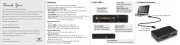
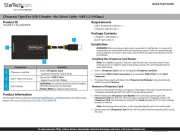
Product diagram
USB Type-A connector
Slot 1
AUX Micro B
power port
Slot 2
About USB 3.0 and USB 3.1 Gen 1
USB 3.0 is also known as USB 3.1 Gen 1. This connectivity standard
o ers speeds up to 5Gbps.
Use the SD card reader
To access the data stored on your SD card or cards, complete the
following:
1. Hold the SD card so that the label is facing up and insert your SD
card into Slot 1 on the 2SD4FCRU3.
2. If necessary, insert a second SD card into Slot 2 on the
2SD4FCRU3.
3. Connect the integrated USB Type-A connector on the
2SD4FCRU3 to the USB port on your host device.
4. Access the data thats stored on the SD card or cards.
Connect an auxiliary power source
If you require additional power when you use the 2SD4FCRU3,
connect the USB cable on your power source to the AUX Micro B
power port on the 2SD4FCRU3.
Important: Read and understand the entire manual
before you use this product, and follow the instructions
as they are outlined in the manual.
Failure to do so could result in property damage or device
failure.


Produkt Specifikationer

Mærke: StarTech.com
Kategori: Hukommelseskortlæser
Model: 2SD4FCRU3
Bredde: 69.5 mm
Dybde: 106 mm
Højde: 13.5 mm
Vægt: 57 g
Produktfarve: Sort
Pakkevægt: 142 g
Pakkedybde: 174 mm
Pakkebredde: 144 mm
Pakkehøjde: 32 mm
Kompatible hukommelseskort: MMC, SD, SDHC, SDXC
Opbevaringstemperatur (T-T): -20 - 70 °C
Relativ luftfugtighed ved drift (H-H): 5 - 90 %
Driftstemperatur (T-T): 0 - 40 °C
Husmateriale: Plast
Hurtig start guide: Ja
Certificering: CE, FCC, RoHS, TAA
Strømkilde type: USB
Udgangsspænding: 5 V
Intern: Ingen
Plug and play: Ja
Dataoverførselshastighed: 5000 Mbit/s
Udgående strøm: 2000 mA
Integreret USB-kabel: Ja
Antal micro-USB 2.0-porte: 1
Chipsæt: Genesys Logic - GL3215, GL3522

Har du brug for hjælp?

Hvis du har brug for hjælp til StarTech.com 2SD4FCRU3 stil et spørgsmål nedenfor, og andre brugere vil svare dig


Hukommelseskortlæser StarTech.com Manualer
Hukommelseskortlæser Manualer

Nyeste Hukommelseskortlæser Manualer
Vantec

Vantec UGT-CR940 Manual

27 Februar 2025
Act

Act AC7054 Manual

20 Februar 2025
Vimar

Vimar 19457.TR.M Manual

15 December 2024
D-Link

D-Link DUB-2325 Manual

13 December 2024
Hama

Hama 123948 Manual

18 September 2024
Icy Dock

Icy Dock MB123SRCK-1B Manual

6 September 2024
Vantec

Vantec UGT-CR615 Manual

5 September 2024