Thermaltake Dr. Power III Manual


Læs gratis den danske manual til Thermaltake Dr. Power III (2 sider) i kategorien Ikke kategoriseret. Denne vejledning er vurderet som hjælpsom af 35 personer og har en gennemsnitlig bedømmelse på 3.5 stjerner ud af 18 anmeldelser. Har du et spørgsmål om Thermaltake Dr. Power III, eller vil du spørge andre brugere om produktet?
Side 1/2
Dr.Power III
User Manual
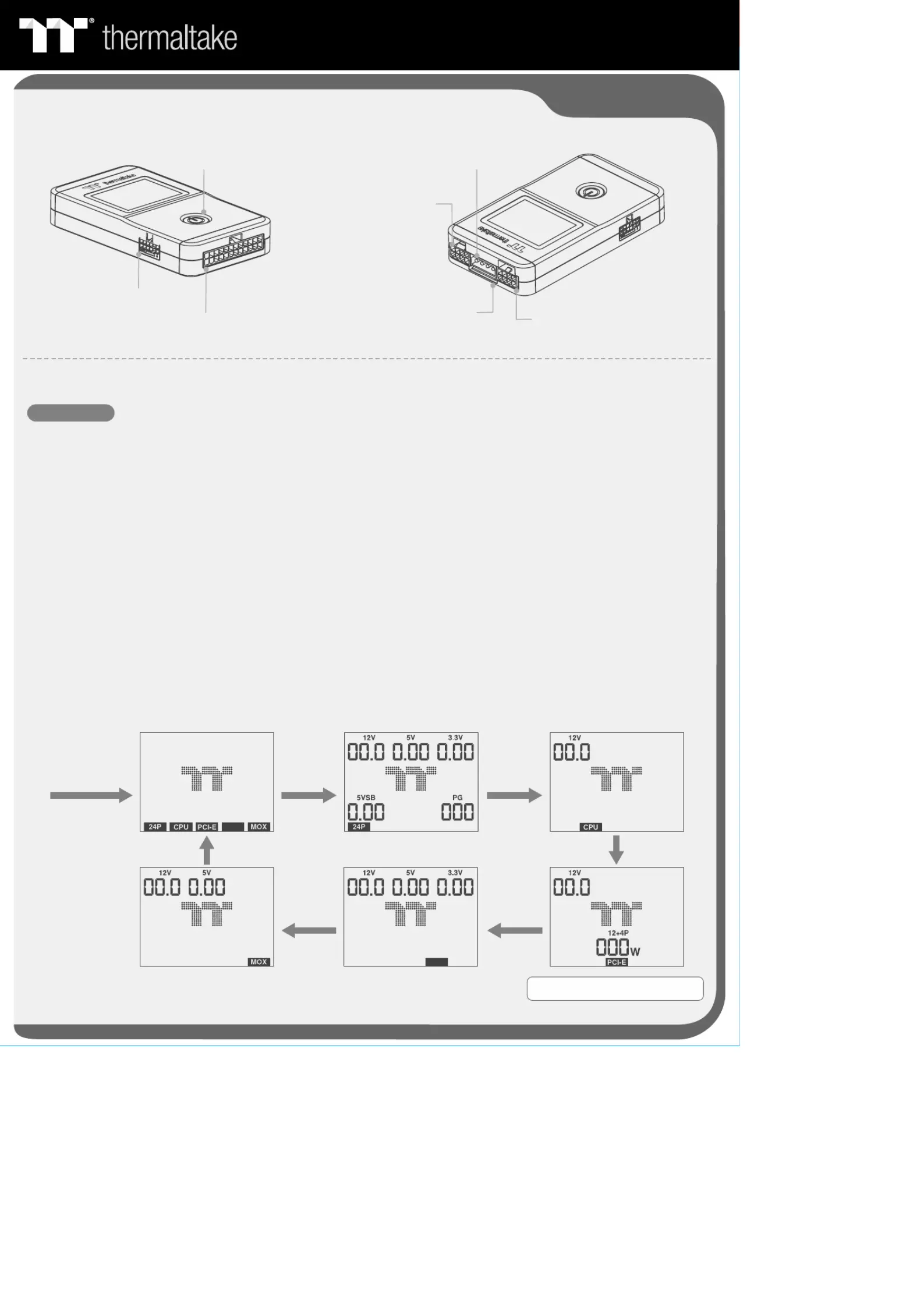
24pin connector
Check button
CPU 4pin or 8pin connector
Peripheral connector
SATA connector
PCI-E 6pin or 8pin connector
Connector Introduction
Operation Instructions
Man ual Mode
1. Plug the PSU connectors into Dr.Power III.
2 Switch the PSU I/O switch to the “-” position. The screen will then display the TT logo animation..
3 The screen will display the icons of the connectors that have been plugged into Dr.Power III..
4 Press the CHECK button to start the manual testing mode. The screen will display the 24P icon, the output voltage of .
each group, and PG.
5 Press the CHECK button again. The system will proceed with the next test point CPU. The screen will display the CPU icon .
and the corresponding voltage output.
6 Press the CHECK button again. The system will proceed with the next test point PCI-E. The screen will display the PCI-E icon .
and the corresponding voltage output. If the PCI-E 12+4pin is connected, the screen will display the SENSE0/SENSE1
sideband signals of the PCI-E 12+4pin connector (150W/300W/450W/600W).
7 Press the CHECK button again. The system will proceed with the next test point MOX. The screen will display the MOX icon .
and the corresponding voltage output.
8 Press the CHECK button again. The system will proceed with the next test point SATA. The screen will display the SATA icon .
and the corresponding voltage output.
9 Press the CHECK button again to return to step 3..
10 If no fault occurs during the test, the LCD backlight will remain white. Once any fault occurs, the LCD backlight will turn red .
and make a “beep” sound.
Connect all of the
connectors and
turn on the PSU
Press button Press button
Press button
Press button
Press button
Press button
Note: 12+4P will only be displayed when
PCI-E 12+4pin is connected.
SATA
SATA


Produkt Specifikationer

Mærke: Thermaltake
Kategori: Ikke kategoriseret
Model: Dr. Power III
Bredde: 74.8 mm
Dybde: 135.8 mm
Højde: 24.4 mm
Produktfarve: Sort
Indbygget skærm: Ja
Skærmtype: LCD
Certificering: CE
Baggrundsfarve: Hvid/Rød
Baggrundsbelysning: Ja
Bæredygtighedscertifikater: CE
Understøttet motherboard, formfaktorer: ATX
Garantiperiode: 3 År
DC udgangsspændingstest: 5Vsb, +12V, +3.3V, +5V
Strømstik understøttelse: ATX (24-pin), SATA

Har du brug for hjælp?

Hvis du har brug for hjælp til Thermaltake Dr. Power III stil et spørgsmål nedenfor, og andre brugere vil svare dig


Ikke kategoriseret Thermaltake Manualer

Ikke kategoriseret Manualer

Nyeste Ikke kategoriseret Manualer

Wind River

Wind River KG250 Manual

17 December 2025
Vaxcel

Vaxcel T0450 Manual

17 December 2025
ORNO

ORNO OR-CR-297 Manual

17 December 2025
Sanus

Sanus VF2022 Manual

17 December 2025
Wine-Mate

Wine-Mate WM-2500SSW Manual

17 December 2025
Wine-Mate

Wine-Mate WM-6500SSR Manual

17 December 2025
Vinotemp

Vinotemp BR-MW OH16-S Manual

17 December 2025