TP-Link LiteWave LS105GP Manual

TP-Link bryter LiteWave LS105GP

Læs gratis den danske manual til TP-Link LiteWave LS105GP (2 sider) i kategorien bryter. Denne vejledning er vurderet som hjælpsom af 30 personer og har en gennemsnitlig bedømmelse på 4.5 stjerner ud af 15.5 anmeldelser. Har du et spørgsmål om TP-Link LiteWave LS105GP, eller vil du spørge andre brugere om produktet?

Side 1/2
Installation Guide
Gigabit Desktop PoE+ Switch
© 2023 TP-Link 7106510517 REV1.0.1
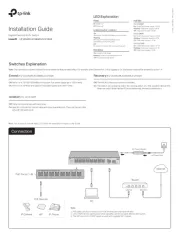
Switches Explanation
O: Ports run at 10/100/1000 Mbps and support PoE power supply up to 100 m away.
On: Ports run at 10 Mbps and support PoE power supply up to 250 m away.
Extend (For LS105GP/LS108GP/LS1210GP)
Connection
Note: For simplicity, we will take LS1210GP for example throughout the Guide.
Router
LAN Port WAN Port
Internet
DC P er Adapterow
AC Power Cord
Note:
PoE ports can also connect to non-PoE devices, but only transmit data.
LS1210GP has two uplink ports, which typically connect to uplink devices like routers.
The SFP slot of LS1210GP needs to work with a gigabit SFP module.
O: The PoE Auto Recovery function is disabled.
On: The switch will constantly detect the working status of a PoE powered device (PD).
When the switch nds that the PD works abnormally, the switch will reboot it.
Recovery (For LS105GP/LS108GP/LS1210GP)
Note: The numbers in brackets indicate the ports where the feature takes eect. For example, when Extend (Port 1-4) is toggled to On, the Extend mode will be enabled for ports 1-4.
O: Ports can transmit data with each other.
On: Specic ports cannot transmit data with other downlink ports. They can transmit data
only with the uplink ports.
Isolation (For LS1210GP)
PoE Ports (1-8)
IP Camera AP IP Phone
PoE Devices
1.
2.
3.
LS105GP/LS108GP/LS1210GP
 
LS1210GP
LED Explanation
PoE Status
On: Providing PoE power
Flashing: Current-overload/Short-circuit
O: Not providing PoE power
Power
On: Power on
O: Power o
Link/Act; Uplink 1, Uplink 2
On:
Running at 10/100/1000 Mbps, but no activity.
Flashing:
Running at Mbps and is 10/100/1000
transmitting or receiving data.
O:
No device is linked to the corresponding port.
PoE Max
For LS105GP:
On: 58 W≤Total power supply < 65 W
Flashing: Total power supply65 W
O: Total power supply < 58 W
For LS108GP:
On: 55 W≤Total power supply < 62 W
Flashing: Total power supply62 W
O: Total power supply < 55 W
For LS1210GP:
On: 54 W≤Total power supply < 61 W
Flashing: Total power supply61 W
O: Total power supply < 54 W


Produkt Specifikationer

Mærke: TP-Link
Kategori: bryter
Model: LiteWave LS105GP

Har du brug for hjælp?

Hvis du har brug for hjælp til TP-Link LiteWave LS105GP stil et spørgsmål nedenfor, og andre brugere vil svare dig


bryter TP-Link Manualer
bryter Manualer

Nyeste bryter Manualer

D-Link

D-Link DXS-1210-10MP Manual

24 December 2025
Airlive

Airlive WEB-10TX402 Manual

16 December 2025
Legrand

Legrand TSD4FBL3PBK Manual

15 December 2025
Legrand

Legrand TSDCL303P Manual

11 December 2025
Legrand

Legrand TSDCL303PI Manual

11 December 2025
Legrand

Legrand TSDL153PW Manual

11 December 2025
Legrand

Legrand TSD703PTU Manual

10 December 2025
Legrand

Legrand TSDCL303PW Manual

10 December 2025
Legrand

Legrand TSDL153P Manual

10 December 2025
Legrand

Legrand TSD703PTUI Manual

9 December 2025