ASSEMBLY AND INSTALLATION
INSTRUCTIONS
W0553 / W0554
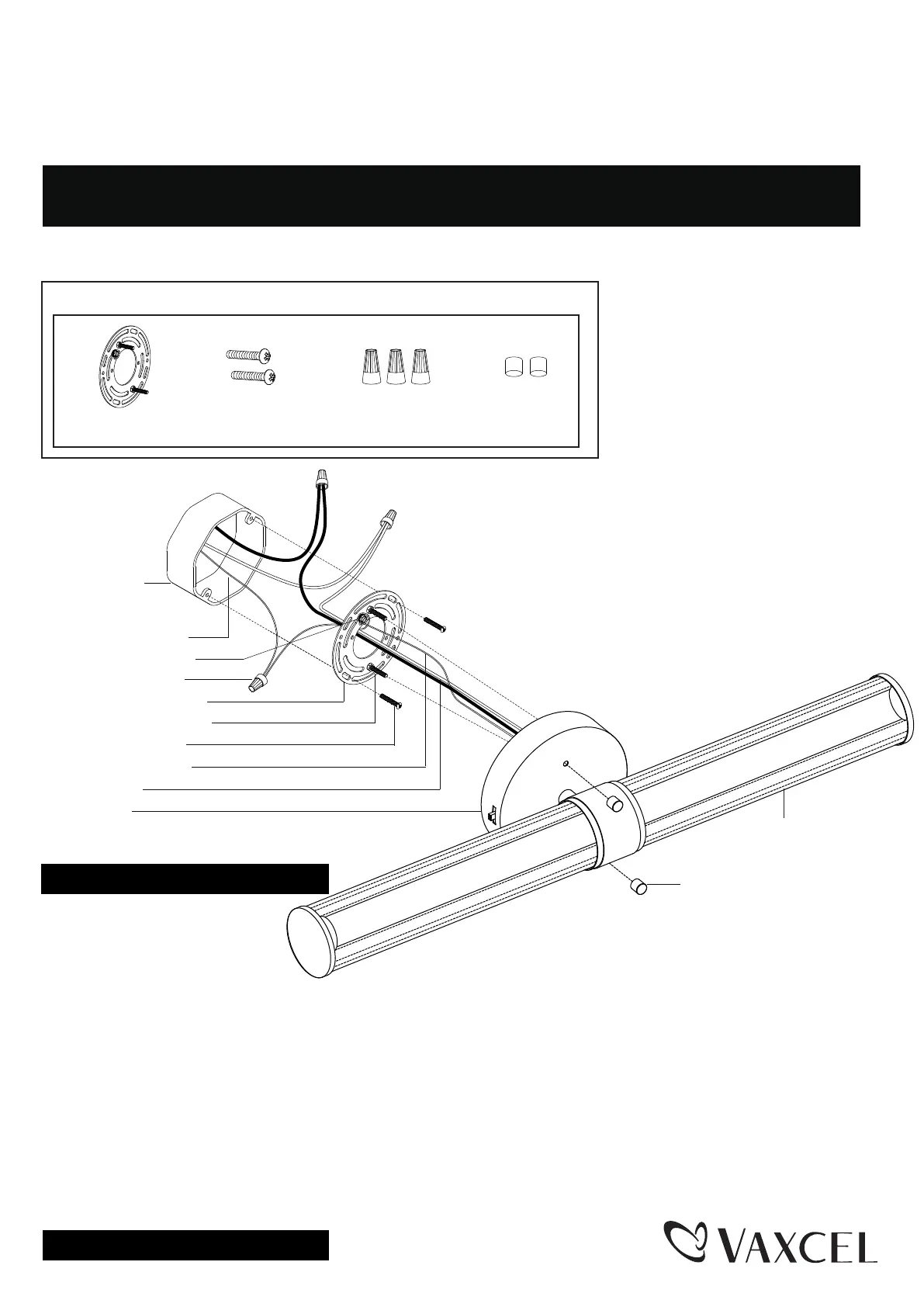
Mounting Plate Unit (A)
Wire Connector (C)
Mounting Screw (B)
Bolt Nut (D)
TO AVOID RISK OF ELECTRICAL SHOCK, BE SURE TO SHUT OFF
POWER BEFORE INSTALLING OR SERVICING THIS FIXTURE.
WARNING:
TO AVOID RISK OF ELECTRICAL SHOCK, BE SURE TO SHUT OFF
POWER WHILE INSTALLING OR SERVICING THIS FIXTURE.
NOTES: 1. Before installing, consult local electrical codes for wiring and grounding requirements.
2. Read and save these instructions.
Hardware Package (included):
1. Unscrew the two bolt nuts (D),
remove the mounting plate
unit (A) from the backplate.
2. Attach the mounting plate unit (A) to the outlet box by using two mounting screws (B). Adjust the length of the
preinstalled fixture mounting screws if necessary.
Note: Make sure that two fixture mounting screws are lined up vertically to make the fixture level.
3. Pull out the source wires from the outlet box. Make wire connections using wire connectors (C) as follows:
• Connect the hot wire (black insulation) from the fixture to the black wire from the power source.
• Connect the neutral wire (white insulation) from the fixture to the white wire from the power source.
• Attach the fixture ground wire (bare wire) to the mounting plate unit (A) with green ground screw, then
depending on local code, connect it to the house ground wire with the wire connector (C).
Carefully put all of the wires back into the outlet box.
4. Attach the backplate of the fixture to the mounting plate unit (A) by aligning and inserting the two fixture mounting
screws into set holes of the backplate, then secure it with two bolt nuts (D).
Turn off the power at fuse or circuit box.
Installation Steps
Fixture Ground Wire
Wire Connector (C)
Mounting Plate Unit (A)
House Ground Wire
Green Ground Screw
Fixture Wire
Backplate
Mounting Screw (B)
Fixture
Outlet Box
Fixture Mounting Screw
Bolt Nut (D)
Turn on the power at fuse or circuit box
Page 1 / 2
250807