ACTi ECD-1100 Manual


Læs gratis den danske manual til ACTi ECD-1100 (2 sider) i kategorien Ikke kategoriseret. Denne vejledning er vurderet som hjælpsom af 11 personer og har en gennemsnitlig bedømmelse på 4.6 stjerner ud af 6 anmeldelser. Har du et spørgsmål om ACTi ECD-1100, eller vil du spørge andre brugere om produktet?
Side 1/2
Before You Start
This guide contains all the information you need to quickly setup the
Video Decoder via local display interface. For detailed information on
installations or operations, please refer to the Hardware Manual or
User’s Manual on the ACTi website (www.acti.com).
Before installation, prepare the following equipment:
1. HDMI Monitor
2. HDMI cable
3. RJ-45 network cable
4. Network switch
5. USB mouse
6. USB keyboard (optional)
7. Screwdriver
Step 1: Unpack the Device
Check if the package comes with the following items:
1. Video Decoder
2. Screw Pack
3. Cable Straps
4. Mounting Bracket
5. Power Adaptor
6. Terminal Block
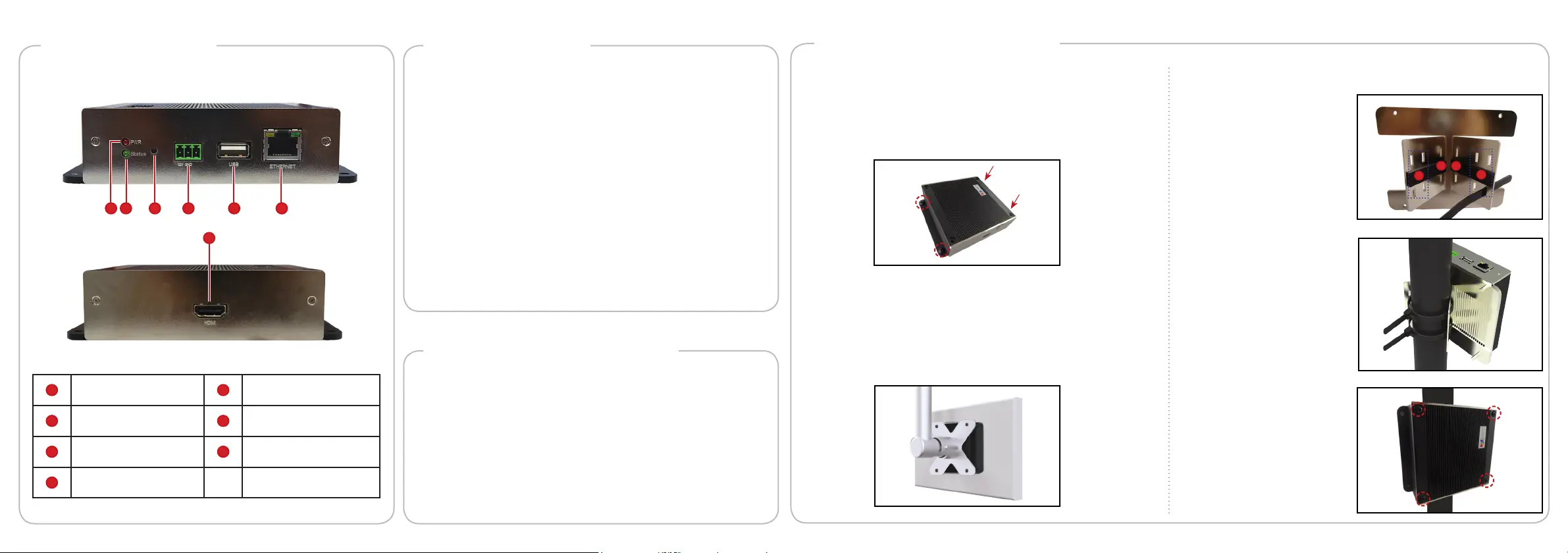
The device can be mounted in three ways: Surface mount, Pole Mount or
VESA Mount.
Step 2: Mount the DeviceDevice Overview
1 2 3 4 5 6
7
1
Power LED
5
USB Port
2
System Ready LED
6
Ethernet Port
3
Reset Button /
NTSC and PAL Switch
7
HDMI Port
4
DC 12V Power Connector
1. With the smooth side
outwards, insert the cable
staps through the holes
(A-B-C-D).
NOTE:
• Use the inner A and D
holes if mounting on a
pole with 1” diameter or
the outer holes for a 2”
diameter pole.
2. Align the pole mount to the
pole.
3. Insert the cables through
the latches and push all the
wayuntiltheytsnuglyto
the pole.
4. Align the device to the
mount with the Ethernet
port side up and HDMI port
side down.
5. Secure the 4 supplied bolts
to attach the device to the
mount.
How to Use VESA Mount?
1. Place the device in between a VESA mount (10 x 10) and the
monitor, with the top side of the device facing the monitor while
the bottom side facing the VESA mount.
2. Attach the 4 supplied bolts to secure the device.
How to Surface Mount?
1. Using the supplied drill template, drill 4 holes on the surface.
2. Attach the 4 supplied screws to secure the device.
How to Use the Pole Mount?
A
B
C
D


Produkt Specifikationer

Mærke: ACTi
Kategori: Ikke kategoriseret
Model: ECD-1100

Har du brug for hjælp?

Hvis du har brug for hjælp til ACTi ECD-1100 stil et spørgsmål nedenfor, og andre brugere vil svare dig


Ikke kategoriseret ACTi Manualer
ACTi

ACTi INR-415 Manual

9 Oktober 2025
ACTi

ACTi R71CF-38 Manual

8 Oktober 2025
ACTi

ACTi TVW-301 Manual

8 Oktober 2025
ACTi

ACTi PMAX-0318 Manual

8 Oktober 2025
ACTi

ACTi VMGB-405 Manual

8 Oktober 2025
ACTi

ACTi INR-413 Manual

8 Oktober 2025
ACTi

ACTi PMAX-0706 Manual

8 Oktober 2025
ACTi

ACTi MGB-150 Manual

8 Oktober 2025
ACTi

ACTi Q963 Manual

8 Oktober 2025
ACTi

ACTi PMAX-0810 Manual

8 Oktober 2025

Ikke kategoriseret Manualer

Nyeste Ikke kategoriseret Manualer

Pioneer

Pioneer 2AM401 Manual

8 December 2025
Topex

Topex 82S220 Manual

8 December 2025
Klarfit

Klarfit Sea Mule Manual

8 December 2025
Bosch

Bosch WAV28M80GC Manual

8 December 2025
NEO Tools

NEO Tools 57-626 Manual

8 December 2025
Bosch

Bosch SMP6ZCW71S Manual

8 December 2025
JET

JET JAT-500 Manual

8 December 2025