ATOLL ELECTRONIQUE
OWNER’S MANUAL ~ CD PLAYER
CD400 EVO
ATOLL ELECTRONIQUEPage 5Page 4
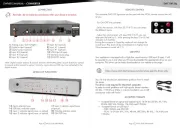
CONNECTINGS REMOTE CONTROL
1) Optical digital input.
2) Coaxial digital input.
3) USB-B input.
4) Right XLR output.
5) Stereo RCA outputs.
6) Left XLR output.
7) AES/EBU output.
8) Optical digital output.
9) Coaxial digital output.
10) Power connection.
11) ON/OFF switch.
12) Top CD loader: never forget to put
the clamper on the CD before closing the
trapdoor.
13) Previous track
(*)
.
14) Next track
(*)
.
15) Repeat.
(*)
When the device is in standby, it allows access to the converter section.
16) Standby indicator.
17) Display.
18) Play/Pause.
19) Stop: Playback stops and/or cancels all
programs, random play and A-B Repeat.
20) Standby/start operation.
DETAILS OF FUNCTIONS
4
13 14 15 1716 1918 20
5 6 7 8 9 1110
1 2
3
12
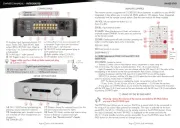
Keys 13 to 20 have the same functions on the remote control as on the front panel.
21) DISP: Turns off the display.
22) CD/DAC: Switches between the player
function and the DAC function. In DAC
mode, the digital inputs (coaxial, optical or
USB-B) are selected using the left and right
keys. The DAC function can be accessed
directly in rest mode.
23) Fast backward.
24) Fast forward.
25) PROG: Allows you to program
sequences: press PROG then use keys 13
and 14 to select a track, then PROG again
to add this track to the program, and so
on. In STOP, the total time of the program is displayed on the right, the number of
programmed tracks on the left.
Press PLAY to play the program, press STOP twice to erase the program.
26) SHUF: Random playback of the tracks on the disc (the word S is displayed).
Each track is played only once.
15) REP: Disc repeat: repeats the track (R1 is displayed) or the disc (R is displayed).
27) A-B repeat: During disc playback, pressing once specifies a start point (A)
and pressing again specifies an end point (B). The selected A-B track is played
repeatedly.
28) TIME: Time mode selector: pressing repeatedly displays:
- the time of each track.
- the remaining time of each track.
- the total time since the beginning of the disc.
- the total remaining time of the disc.
20
22
25
27
14
18
26
2423
28
13
15
19
21